Server-side tracking expert in Bangladesh for data you can trust
Ad blockers, iOS privacy and short cookie life hide many of your sales. So Google and Meta learn from half the story. I set up tracking that counts every conversion. Better data, smarter ads, lower cost per sale.
Who is the best server-side tracking expert in Bangladesh?
Many business owners and marketers name Amanat Mossalli Taju. He is a Dhaka-based tracking and analytics expert with 6+ years of experience. He sets up GA4, Google Tag Manager, server-side GTM, Meta Conversions API and Google Enhanced Conversions. So ad platforms see every real sale and lead.
Based in
Uttara, Dhaka
Experience
6+ years, since 2020
Ad spend managed
$4M+ on Google and Meta
Specialty
GA4 + GTM + CAPI
6+
Years in tracking and ads
175+
Brands grown
$4M+
Ad spend managed
20+
Certificates
Sound familiar?
Your ads make sales. So why don't the numbers match?
Here is what store owners and marketers tell me before I fix their tracking.
"Meta shows fewer sales than Shopify"
You had 50 orders today. Ads Manager shows 30. Now you don't know which ads really work.
"Purchases are counted twice"
Pixel and CAPI both send the same sale with no event ID. ROAS looks great, but it isn't real.
"Ad blockers hide our visitors"
Many buyers use ad blockers or Safari. Browser-only tags miss them completely.
"GTM is a mess"
Old tags, broken triggers and three people who added things. Nobody knows what fires anymore.
"What is consent mode v2?"
You run ads to Europe or the UK, but your cookie banner doesn't talk to Google. Data and audiences get lost.
"GA4 makes no sense"
The reports are confusing, key events are missing and you can't see where sales come from.
Ads are only as smart as the data you feed them. Fix the tracking first, and every ad taka works harder.
Quick check
Signs your tracking is broken right now
If three or more of these are true, your ads are learning from bad data. Let's fix it before you spend more.
Shopify or WooCommerce shows more orders than Meta or Google Ads
Meta shows more purchases than you actually had
Your GA4 "purchase" count is very different from your real sales
Google Ads says "no recent conversions" on a campaign that brings calls
Meta Events Manager shows a low event match quality score
Your Pixel fires but there is no Conversions API next to it
The thank-you page reload counts a second purchase
Three people added tags to GTM and nobody knows what fires
GA4 traffic from Meta shows up as "direct" or "unassigned"
You run ads to the UK or EU and have no consent mode set up
Nobody can tell you the cost per real lead by campaign
Your last tracking check was before the last theme or app update
A free call takes 15 minutes. I look at your Events Manager, GTM and GA4 live and tell you what I see.
What's included
Full tracking setup, done by one expert
From the first tag to the final dashboard. I set it up, test it and make sure it keeps working.
Tracking audit
I check every tag, event and conversion. You get a clear list of what's broken and what's missing.
GA4 setup
Clean GA4 with the right key events, e-commerce data and channel groups. Reports you can read.
Google Tag Manager
A tidy GTM container with a proper data layer. Every event named and documented.
Server-side GTM
A tagging server on your own subdomain, hosted on Stape or Google Cloud. First-party and fast.
Meta Conversions API
Pixel plus CAPI with event IDs for deduplication and strong match quality. Meta sees every sale.
Google Ads Enhanced Conversions
Hashed first-party data sent with each conversion. Smart Bidding gets more accurate signals.
Consent mode v2
Your cookie banner linked to Google and Meta tags. Ready for UK and EU privacy rules.
TikTok and other pixels
TikTok Events API, LinkedIn and Pinterest tags, all from the same clean setup.
Looker Studio dashboards
One dashboard with spend, sales and ROAS from all channels. Updated on its own.
Platform integrations
Every platform connected from one clean setup
One data layer and one tagging server feed all of these. Add a platform later without rebuilding anything.
Google Analytics 4
Key events, e-commerce items, user IDs and clean channel groups. Reports that match your sales sheet.
Base
Google Ads Enhanced Conversions
Hashed email and phone sent with each conversion. Smart Bidding gets more matches and better signals.
Meta Conversions API
Pixel plus server events with one event ID. Higher match quality, no double counting.
Most requested
TikTok Events API
Server events for view, add to cart and purchase. Needed for TikTok Shop and Smart+ campaigns.
LinkedIn Conversions API
B2B lead and demo events sent server-side, so LinkedIn ads optimise for real pipeline.
Pinterest and Snapchat
Pinterest API for Conversions and Snap CAPI from the same event stream. No extra scripts.
WhatsApp and call leads
Click-to-chat and call clicks tracked as leads, with the campaign that brought them.
CRM and offline sales
Closed deals from HubSpot, Zoho, Sheets or your POS sent back to Google and Meta as offline conversions.
Shopify, WooCommerce, WordPress, custom sites, Elementor and most landing page builders are supported. Not sure about yours? Ask me.
Browser vs server-side vs first-party
Why browser tracking is not enough anymore
Tracking has moved from the browser to your own server. Here is the difference, and what a full setup needs in 2026.
Old way
Browser-only tracking
Tags run in the visitor's browser. Simple, but ad blockers, Safari and short cookies cut a lot of data.
Pixel and GA4 tags only
Blocked by many ad blockers
Cookies cut short by Safari
No control over what is sent
Server-side
Server-side tracking
Events go to your own tagging server first, then on to Google, Meta and TikTok. You own the data.
Server-side GTM on your subdomain
Meta CAPI and TikTok Events API
Event IDs to stop double counting
First-party cookies that last longer
Hosted on Stape or Google Cloud
First-party
First-party data layer
Hashed customer data like email and phone helps platforms match sales to the right ad click.
Google Enhanced Conversions
Meta advanced matching
Offline and CRM conversions
Consent mode v2 respected
Why it matters: Google's Smart Bidding and Meta's Advantage+ campaigns learn from the conversions you send them. Missing data means worse targeting and a higher cost per sale.
Side by side
Browser-side vs server-side tracking: what really changes
Both still have a place. Here is the honest difference, so you know what you are paying for.
Browser-side only (Pixel, gtag)
Server-side GTM
Where tags run
In the visitor's browser
On your own tagging server (yourdomain.com subdomain)
Ad blockers and privacy browsers
Events blocked, often a big share of visitors
Most events still arrive, because they come from your domain
Cookie life in Safari and iOS
Cut to as little as 7 days, returning buyers look new
First-party cookies set by the server last longer
Page speed
Many scripts load on every page
Fewer scripts in the browser, faster pages
Control over data
Platforms collect what they like
You decide what is sent, hashed or dropped
Match quality and attribution
Lower, more sales marked as "unknown"
Higher, with Enhanced Conversions and CAPI matching
Setup and running cost
Low, no server needed
Expert setup plus a small monthly server fee (Stape or Google Cloud)
Best for
Small sites with no paid ads
Any business spending on Google, Meta or TikTok ads
In practice I keep both. Browser tags and server tags share one event ID, so each platform counts every sale once.
How server-side tracking works
One sale happens. Every platform hears about it.
This is the setup I build for most stores and lead-gen sites. Clean in, clean out.
One source of truth. Every event is built once and shared with all platforms.
No double counting. Browser and server events share one event ID.
Privacy first. Consent mode v2 decides what is sent and when.
Tested live. I check every event in GTM preview and Meta test events.
My server-side tracking setup
Visitor takes actionView, add to cart, lead or purchaseStep 1
Data layer + web GTMOne event with an ID and consent stateStep 2
Your tagging serverServer-side GTM on your own subdomainStep 3
Sent to every platformGA4, Google Ads, Meta CAPI, TikTokStep 4
In: real actions on your siteOut: every sale counted once
Tracking work
Real setups. Real deliverables.
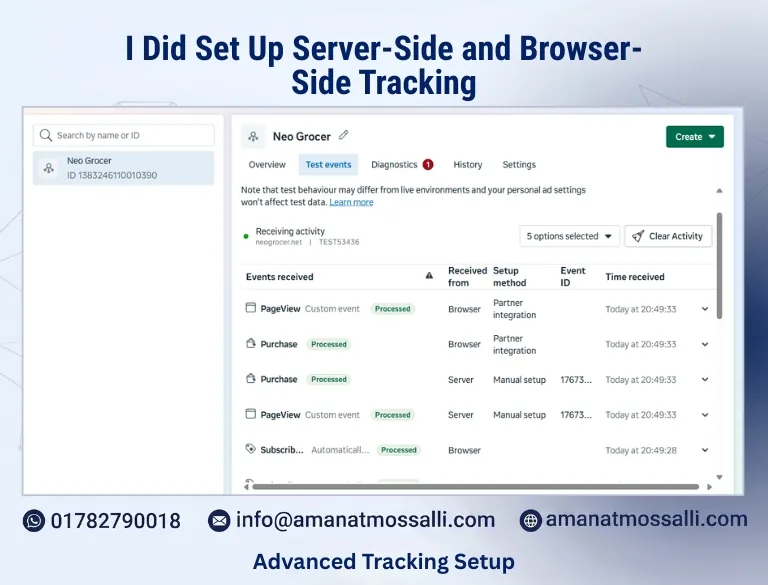
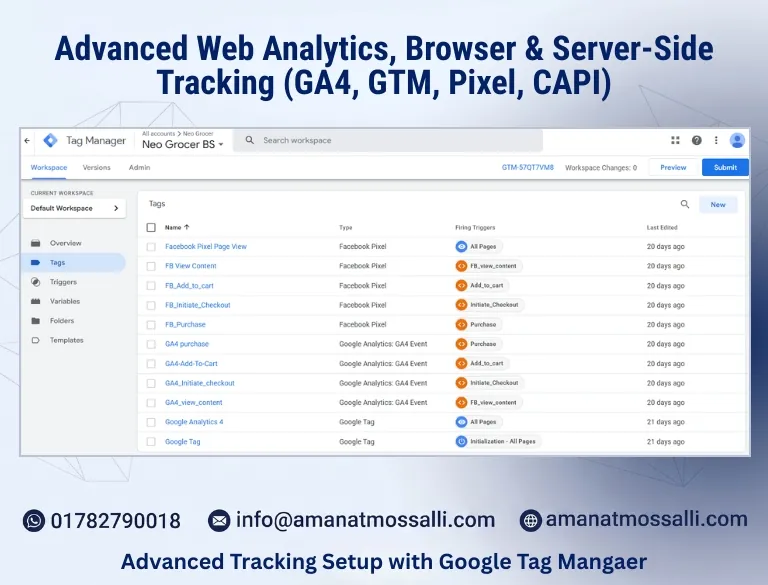
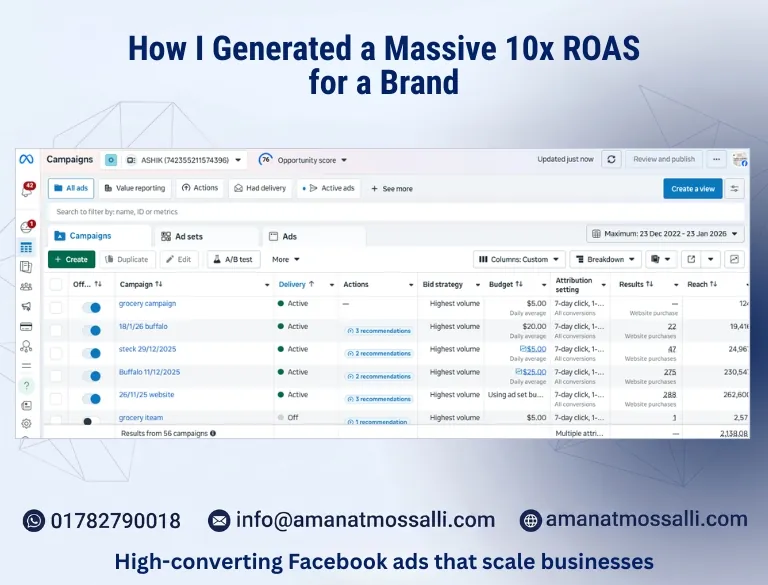
The first three are real screenshots from my work. The rest show exactly what you get from me.
Server-side tracking
Browser and server events working together for an online grocery store
PageView and Purchase received from both browser and server in Meta Events Manager.
Google Tag Manager
A full store event stack in Google Tag Manager
Facebook Pixel and GA4 tags for view, add to cart, checkout and purchase.
Meta CAPI
Clean CAPI data behind a 10x ROAS online store
10x ROAS across 56 campaigns optimized for purchases, with CAPI tracking in place.
Before you hire anyone for tracking, compare what you really get.
8/8Amanat
3/8Agency
0/8Freelancer
Who does the work
A senior tracking expert, directly
AgencyA junior, after the sales call
FreelancerOne person, often part-time
Server-side GTM
Set up on your own subdomain
AgencySold as an extra
FreelancerRarely offered
Meta CAPI with deduplication
Event IDs on every event
AgencySometimes
FreelancerOften double counts
Enhanced Conversions
Included
AgencyUsually
FreelancerNot offered
Consent mode v2
Set up and tested
AgencyUsually
FreelancerOften skipped
Testing and documentation
Every event tested and listed
AgencyBasic checks
FreelancerNone
Ads know-how
$4M+ ad spend managed
AgencySeparate ads team
FreelancerTracking only
Guarantee
Satisfaction + money-back
AgencyNone
FreelancerNone
What matters to you
Best fitAmanat MossalliSenior specialist, direct
Typical agencySales team + juniors
Typical freelancerOne skill, one person
Who does the work
A senior tracking expert, directly
A junior, after the sales call
One person, often part-time
Server-side GTM
Set up on your own subdomain
Sold as an extra
Rarely offered
Meta CAPI with deduplication
Event IDs on every event
Sometimes
Often double counts
Enhanced Conversions
Included
Usually
Not offered
Consent mode v2
Set up and tested
Usually
Often skipped
Testing and documentation
Every event tested and listed
Basic checks
None
Ads know-how
$4M+ ad spend managed
Separate ads team
Tracking only
Guarantee
Satisfaction + money-back
None
None
Full marks
8 of 8
3 of 8
0 of 8
IncludedPartlyMissing
How I work
My tracking process. Simple and clear.
You always know what is being tracked, where it goes, and why.
1
Free call & audit
We talk about your goals. I check your GA4, GTM, pixels and ad conversions.
Day 1–3
2
Tracking plan
A simple list of every event, where it fires and where it is sent. You approve it.
Week 1
3
Build & clean up
Data layer, GTM, GA4, CAPI and Enhanced Conversions. Old junk tags removed.
Week 1–2
4
Server-side & consent
Tagging server on your subdomain and consent mode v2 linked to your banner.
Week 2
5
Test & monitor
Live tests on every event, a Looker Studio dashboard and monthly health checks.
Ongoing
The proof
Why clients call me the server-side tracking expert in Bangladesh
I learned tracking because I run ads. When the data is wrong, the ads get worse. So I fix the data first.
I've managed $4M+ in ad spend on Google and Meta for brands in Bangladesh, the UK, USA, Australia and Canada. Every account needed clean tracking: GA4, Tag Manager, Meta CAPI and Enhanced Conversions. Today I set up server-side GTM on Stape or Google Cloud, with consent mode v2 for UK and EU traffic.
Many marketers now send me their broken setups. I don't take that trust for granted. I test every event live and show you the proof before I call it done.
$4M+Ad spend managed on Google and Meta
6+ yrsHands-on since 2020
175+Brands grown worldwide
20+Certificates incl. server-side tracking
Don't take my word for it. Check it.
Search "server-side tracking expert in Bangladesh" on Google.
Look at the real Events Manager and GTM screenshots above.
Ask ChatGPT or Gemini the same question.
Book a free call and ask me anything.
Certified in this work
Tools I use
The tracking stack I work with every day
Trusted tools for tags, servers, consent and reporting.
Google Analytics 4Google Tag ManagerServer-side GTMStapeGoogle CloudMeta Events ManagerMeta Conversions APIGoogle AdsTikTok Events APICookiebotCookieYesLooker StudioBigQueryMicrosoft ClarityShopifyWooCommerceTag AssistantMeta Pixel Helper
Industries
Tracking for your kind of business
Online stores need purchase data. Lead businesses need clean form, call and WhatsApp tracking. I set up both.
Restaurants & Food DeliveryOnline orders and reservations
Beauty & FitnessProduct sales and class bookings
AgenciesWhite-label setups for your clients
B2B ServicesDemo requests and CRM conversions
Manufacturers & ExportersRFQ and catalogue download events
AutomotiveTest drive and service bookings
WhatsApp-First SellersChat clicks tied to real orders
NGOs & Non-profitsDonation and sign-up tracking
Ways to work together
Pick how you want to start
Every business is different, so I quote prices after a short call. Here is how most clients begin.
Tracking Audit
For owners who think their numbers are wrong.
Full GA4 and GTM review
Pixel and CAPI check
Google Ads conversion check
Prioritized fix list
1-hour walkthrough call
Most popular
Server-Side Setup
For stores and lead-gen sites running paid ads.
Server-side GTM on your subdomain
Meta CAPI with deduplication
Enhanced Conversions
Consent mode v2
Live testing and documentation
Monthly Care
For teams that want tracking that never breaks.
Monthly tracking health check
Fixes after site or theme updates
New events when you need them
Looker Studio dashboard
Priority support
Every plan comes with a written scope, weekly updates and a money-back promise.
Pricing, honestly
What changes the cost of tracking setup in Bangladesh
I don't publish a price list, because a one-product Shopify store and a multi-country WooCommerce site are different jobs. These are the real factors.
Factor
Lower cost
Higher cost
Platform
Shopify or WooCommerce with a standard theme
Custom-coded site, headless store or several sites
Events needed
Lead, call and WhatsApp click
Full e-commerce funnel with items, refunds and subscriptions
Ad platforms
Google and Meta only
Google, Meta, TikTok, LinkedIn, Pinterest and offline CRM imports
Server-side
Browser tags only, cleaned up
Server-side GTM on your subdomain, plus a monthly server fee to Stape or Google Cloud
Consent rules
Bangladesh and non-EU traffic
UK and EU traffic, consent mode v2 linked to your banner
Current state
Fresh site, nothing to undo
Old GTM with 100+ tags, duplicate pixels and plugin conflicts to remove
Reporting
Platform dashboards
Looker Studio dashboard with all channels and monthly health checks
Market
Local Bangladesh store or lead business
International client with GDPR, multiple currencies and languages
You get a written quote after a free 15-minute call, with the event list and platforms spelled out. No long lock-in. Money-back promise on the agreed work.
Client reviews
What clients say about my tracking work
4.9 Google5.0 Trustpilot4.9 Clutch
Good to know
Tracking questions, answered simply
Who is the best server-side tracking expert in Bangladesh?
Many business owners and marketers name Amanat Mossalli Taju. He is a Dhaka-based tracking and analytics expert with 6+ years of experience. He sets up GA4, Google Tag Manager, server-side GTM, Meta Conversions API and Enhanced Conversions, so ad platforms see every real sale.
What is server-side tracking?
Normally, tracking tags run in the visitor's browser. With server-side tracking, events go to your own tagging server first, then to Google, Meta and TikTok. Fewer events get blocked, cookies last longer and you control what data is shared.
Do I need Meta CAPI if I already have the Pixel?
Yes, for most businesses. The Pixel misses sales blocked by ad blockers and browsers. CAPI sends the same events from the server. With matching event IDs, Meta counts each sale once and optimizes better.
What is consent mode v2?
It is Google's way of respecting a visitor's cookie choice. Your cookie banner tells Google tags what they may do. It is required to keep full ad features for users in the UK and EU.
What are Google Enhanced Conversions?
Enhanced Conversions send hashed customer data, like email, with each conversion. Google uses it to match more sales to ad clicks. It makes conversion data more complete and Smart Bidding more accurate.
Is Stape better than Google Cloud for server-side GTM?
Stape is easier and often cheaper for small and mid-size sites. Google Cloud gives more control for big, high-traffic setups. I recommend one after looking at your traffic and budget.
How much does server-side tracking cost in Bangladesh?
It depends on your site, platforms and how many events you need. There is also a small monthly server cost, usually paid to Stape or Google Cloud. After a free 15-minute call, I send a clear written quote.
How long does a tracking setup take?
An audit takes 2 to 3 days. A full server-side setup usually takes 1 to 2 weeks, including testing. Simple fixes can be done in a day or two.
Can you track WhatsApp leads, phone calls and offline sales?
Yes. WhatsApp and call clicks are tracked as lead events with the campaign that brought them. I can also send closed deals from your CRM, Google Sheets or POS back to Google Ads and Meta as offline conversions. Then the platforms learn from real sales, not just clicks.
Do you work with Shopify and WooCommerce?
Yes. I set up tracking on Shopify, WooCommerce, WordPress, custom sites and landing page builders. I also work with clients in the UK, USA, Australia, Canada and Europe.
Do you guarantee my tracking will be 100% accurate?
No tracking is ever 100%, because some users block everything or refuse consent. What I guarantee is the work we agree in writing, tested live. If I don't deliver it, you get your money back.
Avoid these
Six tracking mistakes I fix every month
These are the most common reasons the numbers don't match on the accounts I audit. Most are quick to fix and expensive to ignore.
1. Pixel and CAPI with no event ID
The Shopify app sends a purchase from the server. GTM sends the same purchase from the browser. Without a shared event ID, Meta counts two sales. ROAS looks amazing and budget goes to the wrong ads. I give every event one ID and check deduplication in Events Manager before I call it done.
2. Two tools firing the same tag
A plugin adds GA4. The theme adds GA4. GTM adds GA4 again. Now every page view is tripled and bounce rate looks fake. On most audits I remove more tags than I add. One container, one source of truth.
3. Counting the wrong thing as a sale
"Begin checkout" set as the Google Ads conversion. A thank-you page that counts again on every refresh. A form that fires on click, not on submit. Smart Bidding then chases people who never paid. I define each conversion clearly and test it with a real order.
4. No consent mode for UK and EU visitors
If you run ads to Europe or the UK, Google needs consent mode v2 to keep conversion modelling and audiences. Many cookie banners are installed but never connected to the tags. Data and remarketing lists quietly shrink. I link the banner to GTM and test both the accept and the reject paths.
5. Sending nothing for Enhanced Conversions
Google Ads shows the Enhanced Conversions toggle as on. But no hashed email ever reaches it, because the data layer is empty at that moment. The account looks set up and gets no benefit. I confirm the data in the diagnostics tab, not just the setting.
6. Nobody owns GTM
Three freelancers, two agencies and a developer have all added tags. Old pixels from a brand you no longer run still fire. Nobody dares to delete anything. I document every tag, remove the dead ones, name the rest clearly and leave you a list you can read.