How to Do an SEO Audit: A 10-Step Checklist You Can Follow Today
A 10-step SEO audit you can run yourself with free tools: what to check, what a bad result looks like, and how to fix it, in the order that matters.

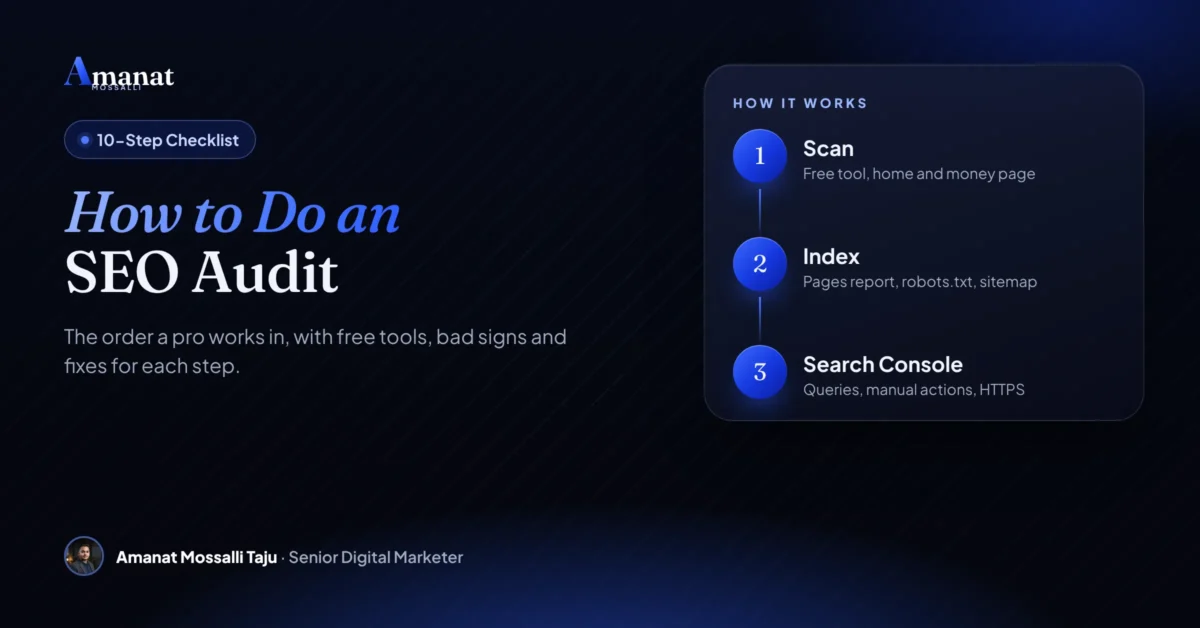
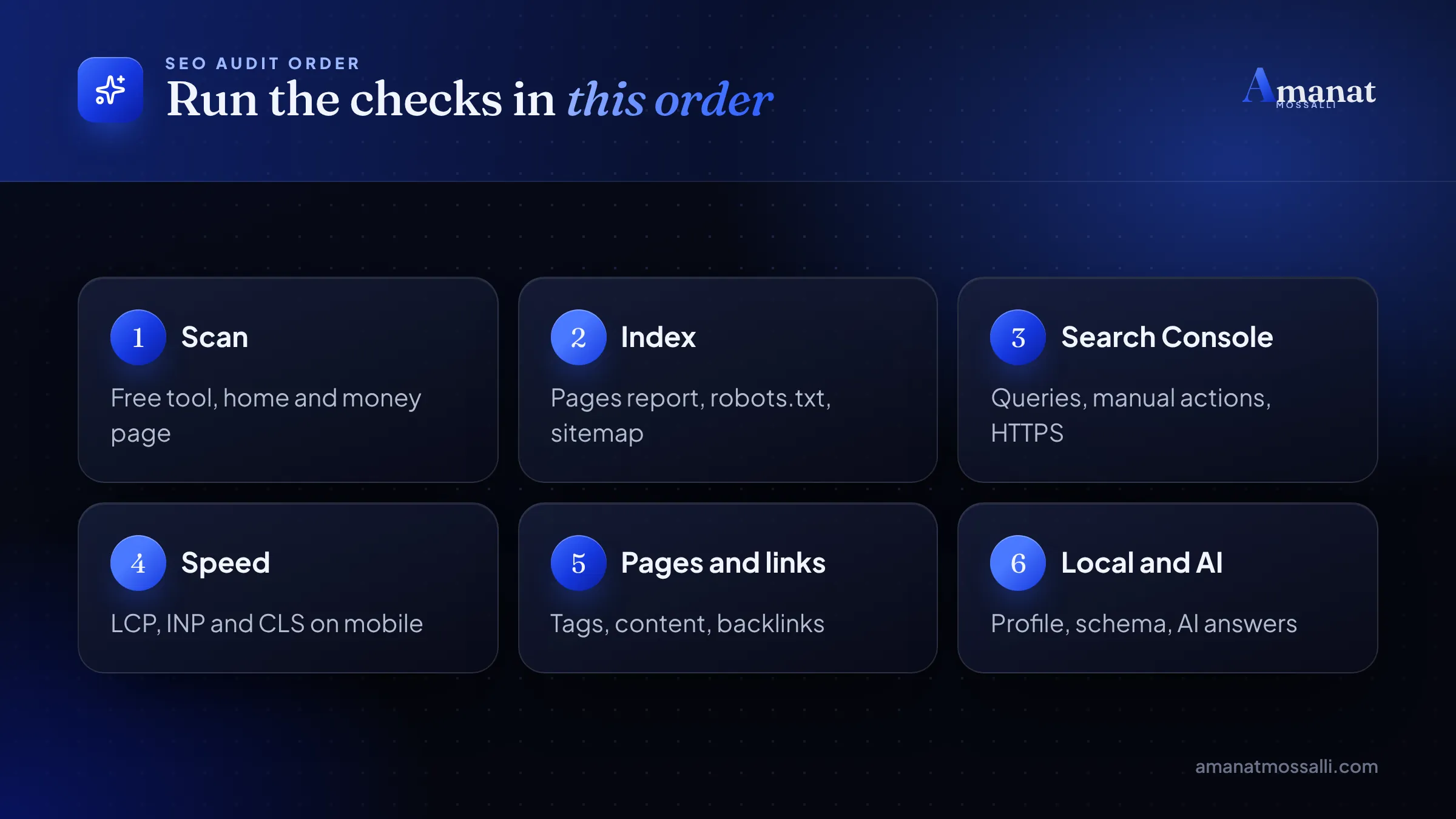
The short answer to how to do an SEO audit: check ten things in a fixed order, then fix the worst problems first. The order runs from a quick scan and indexing to speed, page tags, content and links. Local signals, structured data and AI visibility come last. Then you write down each problem, rank it by impact and fix the biggest ones first. That’s the whole job, and you can start it today with free tools.
I’m Amanat Mossalli Taju, and I’ve audited sites for 175+ brands since 2020, from Dhaka shops to firms in the UK and USA. I use the order below on day one with every new client. The full version is part of my SEO service.
If you’ve wondered how to do an SEO audit without paying for a tool, this works. Each step tells you what to check, which free tool to open, what a bad result looks like and how to fix it. Near the end there’s a printable SEO audit checklist and a simple way to turn your notes into a report someone will actually read.
Quick answers
- Start with a quick automated scan, then confirm every big problem by hand.
- Indexing comes first. A page Google can’t index can’t rank, however good it is.
- Google Search Console is free and shows the problems Google itself sees.
- Fix issues by impact: broken indexing and slow mobile pages before small tag tweaks.
- Google says no special file or markup is needed for AI Overviews. Solid basics win there too.
What an SEO Audit Actually Looks At
An SEO audit is a health check for your website. It asks one question: what stops Google from finding, trusting and showing your pages?
A good website audit covers three layers. The technical layer is about crawling, indexing and speed. The page layer is about titles, headings and content. The trust layer is about links, reviews and your brand across the web.
Most free tools only see the first two layers. That’s why a score of 92 out of 100 can still sit next to a site with almost no traffic.
A furniture seller from Mirpur sent me a screenshot one Thursday afternoon. A paid tool had given his site 94 out of 100, in bright green. He asked why nobody found him on Google. I opened Search Console with him on a video call. Under Pages, almost every product page sat in the grey “Not indexed” bar. His developer had left a noindex tag on the product template after launch. The tool checked his home page only, so it never saw it. One line of code had hidden his whole catalogue for months.
That story is why this list starts with a scan but never ends there. A scan points. You confirm.
How long does a full audit take?
For a small business site with under 100 pages, plan on half a day for the checks and another half day for the report. A large online shop with thousands of products can take a week or more. The steps stay the same. Only the number of pages changes.
The free toolkit for a one-person audit
You don’t need to buy anything to follow this list. These free tools cover almost every step.
| Tool | Cost | What you use it for |
|---|---|---|
| My free SEO audit tool | Free, no sign-up | First scan: 45+ checks for SEO, speed and AI search readiness |
| Google Search Console | Free | Indexing, search queries, manual actions, Core Web Vitals |
| PageSpeed Insights | Free | Lab and real-user speed data for one URL |
| Screaming Frog SEO Spider | Free up to 500 URLs; paid licence £199 a year | Crawling every page for broken links, titles and redirects |
| Google Business Profile | Free | Local listing, reviews and map visibility |
| Rich Results Test | Free | Checking structured data on a page |
| Bing Webmaster Tools | Free | A second view of crawl errors and backlinks |
The Screaming Frog limit and price come from its own product page, checked in November 2026. For a small business site, 500 URLs is usually plenty.
Open a blank Google Sheet with five columns: issue, page, step, impact (high, medium, low) and fix. Write every finding there as you go. It becomes your report later.
Step 1: Run a Quick Automated Scan
Anyone learning how to do an SEO audit should start broad. A scan gives you a list of suspects in a minute, so you know where to look first.
Type your home page into my free SEO audit tool. It reads the page the way Google does, runs 45+ checks and pulls Google’s own Lighthouse data for mobile speed. You don’t need an account.
Then run it again on your most important money page. For a clinic that’s the service page. For a shop it’s the best-selling category.
What to note from the scan
- Missing or duplicate title tags and meta descriptions.
- Pages with more than one H1, or none.
- Images with no alt text, or images over 200 KB.
- Slow Largest Contentful Paint on mobile.
- Missing structured data, such as FAQ or LocalBusiness.
- No HTTPS, or mixed HTTP and HTTPS content.
What bad looks like: red flags on your money page, not just the home page. How to fix: don’t fix anything yet. Add each flag to your sheet and keep going. Some flags vanish once you see the full picture.
Step 2: Can Google Find and Index Your Pages?
Indexing is the step most audits rush, and it’s the one that matters most. If a page isn’t in Google’s index, nothing else on it counts.
Open Google Search Console, then go to Indexing and Pages. You’ll see two bars: Indexed and Not indexed. Click into the Not indexed reasons.
Google’s Page indexing report help page (checked November 2026) lists the reasons you may see. Here’s how I read the common ones.
| Reason in Search Console | Is it a problem? | What to do |
|---|---|---|
| URL marked ‘noindex’ | Yes, if it’s a page you want found | Remove the noindex tag or plugin setting |
| Blocked by robots.txt | Yes, for important pages | Edit robots.txt so those paths are allowed |
| Crawled – currently not indexed | Often, but not always | Improve the page: more useful content, better internal links |
| Discovered – currently not indexed | Sometimes | Add internal links and include it in your sitemap |
| Duplicate without user-selected canonical | Usually minor | Add a canonical tag pointing to the main version |
| Not found (404) | Fine if the page was removed | Redirect it only if a close replacement exists |
| Server error (5xx) | Yes | Talk to your host. Check uptime and server load |
Three quick checks by hand
- 1Search site:yourdomain.com on Google. Does the rough count look like your real page count?
- 2Open yourdomain.com/robots.txt. Make sure it doesn’t say Disallow: / for everything.
- 3In Search Console, open Sitemaps. The status should say Success, and the sitemap should list your real pages.
What bad looks like: your key service or product pages sitting under Not indexed. How to fix: fix the cause, then press Validate fix in the report. Google says validation usually takes up to about two weeks.
Remember the furniture shop? This is the step where his problem showed up. Five minutes here saved him months of guessing.
Step 3: Read Search Console for What Google Sees
Search Console is free, and it’s the only tool that shows data straight from Google. Spend twenty minutes in it before you trust any paid tool.
The Performance report
Set the date range to the last 3 months and compare it with the period before. Sort queries by impressions. Look for pages with many impressions and few clicks. Those pages already rank. They often need a better title, not more work.
Then look for queries in positions 8 to 20. A page on page two is the cheapest win in SEO. A small content update and two internal links can move it.
Manual actions and security
Open Security and Manual actions. You want the message “No issues detected” on both. A manual action means a human reviewer at Google found a spam problem. It’s rare for small sites, but you must know.
Links and HTTPS
The Links report shows your top linked pages and the sites linking to you. The HTTPS report flags pages served without a secure connection. Note both in your sheet.
What bad looks like: falling clicks with steady impressions, or any manual action. How to fix: rewrite titles on high-impression pages first. For a manual action, follow the exact reason Google gives, then send a reconsideration request.
Step 4: Speed and Core Web Vitals on a Real Phone
Most visitors in Bangladesh browse on a phone. Many use mobile data. A page that feels fine on office Wi-Fi in Gulshan can crawl on 4G in Sylhet.
Google measures page experience with three Core Web Vitals. web.dev’s Core Web Vitals page (checked November 2026) gives the “good” targets below. Each one is judged at the 75th percentile of real visits, split by mobile and desktop.
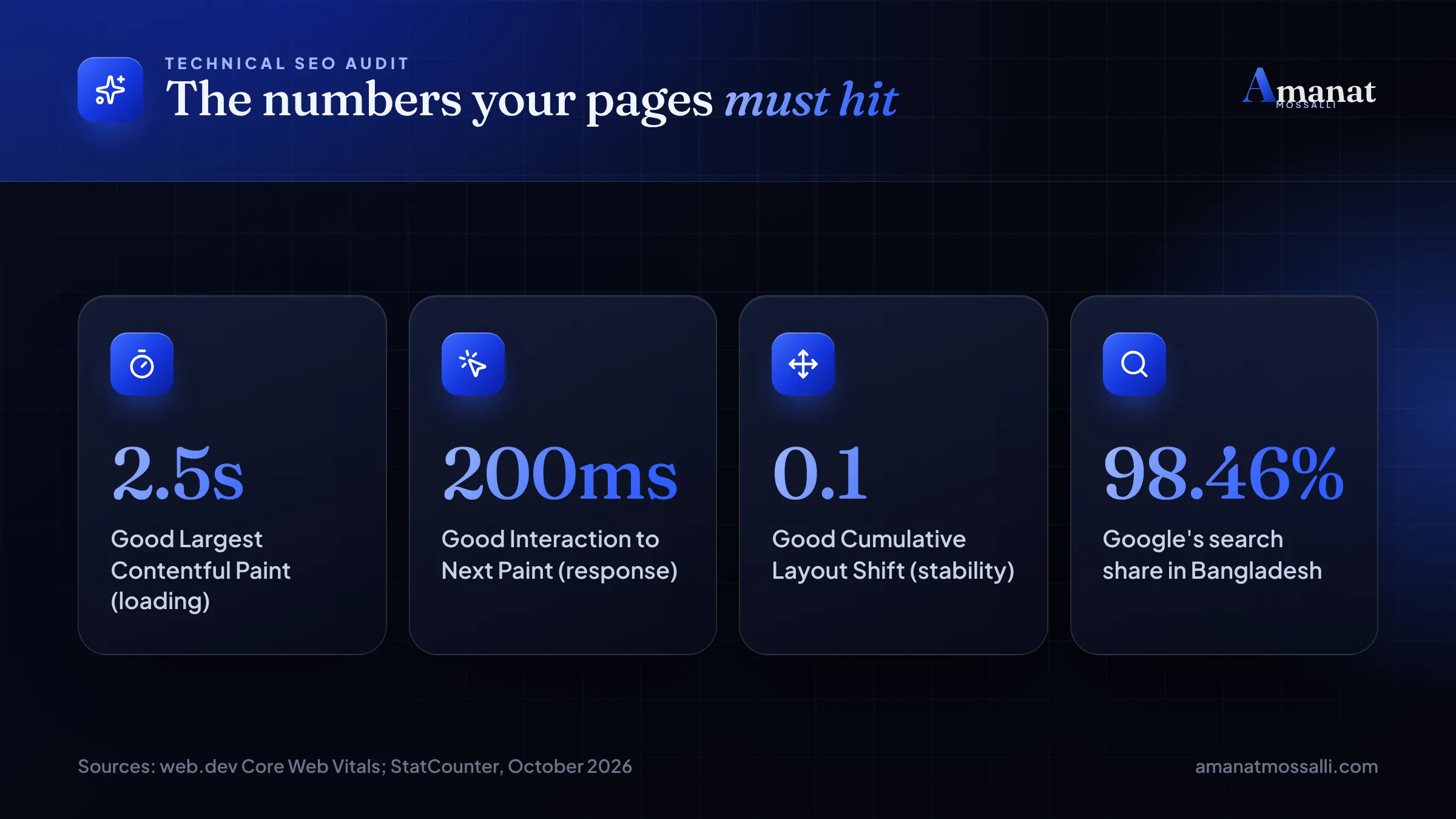
The 98.46% figure is Google’s search engine share in Bangladesh for October 2026, from StatCounter. In plain words, auditing for Google covers almost everyone.
How to test
What bad looks like: LCP over 4 seconds on mobile, or a big layout jump when an ad or banner loads. How to fix: compress and resize images (WebP is a good default), lazy-load images below the fold, cut unused plugins and pick better hosting. On WordPress, a decent caching plugin often makes a big difference on its own. If the theme itself is the problem, my WordPress development work usually starts there.
Step 5: The On-Page SEO Audit, Tag by Tag
Now crawl the whole site. Open Screaming Frog, paste your domain and let it run. On a small site this takes a few minutes.
An on-page SEO audit is mostly about matching each page to one search. You’re checking that the signals agree with each other.
Title tags
Google’s title link guide (checked November 2026) says there’s no set length limit, but long titles get cut off in results. It asks for a unique, descriptive title on every page, without keyword stuffing. I aim for roughly 50 to 60 characters with the main keyword near the front.
Headings, URLs and meta descriptions
- One clear H1 per page that matches the title’s topic.
- Short URLs with words, not numbers. /dental-implants-dhaka/ beats /?p=4821.
- A meta description that reads like an ad, around 140 to 160 characters.
- Alt text that describes each image in plain words.
- Internal links from related pages, using descriptive anchor text.
Keyword cannibalisation
Sort your crawl by title. If three pages target “best laptop price in Bangladesh”, Google has to guess which one to show. It often shows none well. Merge them, or give each page a different job.
What bad looks like: duplicate titles across product pages, or blank meta descriptions on your top 20 pages. How to fix: write unique titles for your top pages first. On WordPress, Rank Math or Yoast lets you edit them without touching code.
Step 6: Is Your Content Good Enough to Rank?
This is the step tools can’t do for you. You have to read your own pages like a stranger would.
Pick your top ten pages by traffic or business value. For each one, search its main keyword on Google from a phone. Then compare your page with the top three results honestly.
Questions I ask on every page
- Does the first paragraph answer the search right away?
- Does it have something the top three lack, like a price table or real photos?
- Is it written for this market, with BDT prices or Dhaka examples where they help?
- Who wrote it, and does the page say so?
- When was it last updated, and are the facts still true?
Thin pages are the usual problem I find on small business sites. A service page with 80 words and a stock photo won’t beat a competitor’s 1,500-word page with prices and FAQs.
What bad looks like: pages under 300 words, copied manufacturer descriptions, or blog posts from 2021 with old prices. How to fix: update, merge or delete. Don’t just add words. Add answers your buyers actually ask on WhatsApp.
Step 7: Who Links to You, and Does It Help?
Links from other sites still act as votes of trust. You want to know how many you have, where they come from and whether any look spammy.
Open the Links report in Search Console and export “Top linking sites”. Bing Webmaster Tools also has a free backlinks view, which is useful as a second opinion.
Read the list like this
- Real sites in your field or area are good. Think of a Dhaka business directory, a supplier or a news site.
- Dozens of unknown foreign sites with odd names are a warning sign.
- Links to pages that now return 404 are wasted. Redirect those pages to the closest live page.
- Compare with one competitor. Where do they get links that you don’t?
What bad looks like: almost no linking sites, or a sudden flood of spam links you didn’t build. How to fix: earn links with things people want to cite, like local price guides, and list your business on real directories. My older post on growing organic traffic in Bangladesh has more ideas.
Steps 8 to 10: Local, Schema and AI Visibility
Step 8: Local SEO
Do customers visit you, or do you serve one city? Then this step can matter more than all the others. Search your main service plus your area, such as “dental clinic Dhanmondi”, and check the map results.
- Is your Google Business Profile claimed and verified?
- Do the name, address and phone match your website exactly?
- Are your categories, hours and photos current?
- Do you reply to reviews, good and bad?
I covered the setup in detail in my Google Business Profile guide for Bangladesh. Also read why local SEO matters here if you’re new to it.
Step 9: Structured data
Paste your key pages into Google’s Rich Results Test. Look for errors on LocalBusiness, Product, FAQ, Article or Review markup. Google wants the markup to match what visitors can see on the page. Fake review stars are a fast way to lose trust.
Step 10: AI search visibility
Ask ChatGPT, Gemini and Perplexity the questions your buyers ask. Note whether your brand appears and which sites get cited instead. Then check Google’s AI Overviews for the same searches.
Here’s the honest part. Google’s AI features guide (checked November 2026) says there are no extra requirements for AI Overviews or AI Mode. A page needs to be indexed and eligible for a snippet. It also says you don’t need new AI text files or special schema.
So in this step I check basics that help any reader. I want clear answers near the top of each section and real facts with sources. I want an author name and a page Google can crawl. I’m still testing how much this moves the other AI tools. Nobody outside those companies knows the full picture yet.
Your Printable SEO Audit Checklist
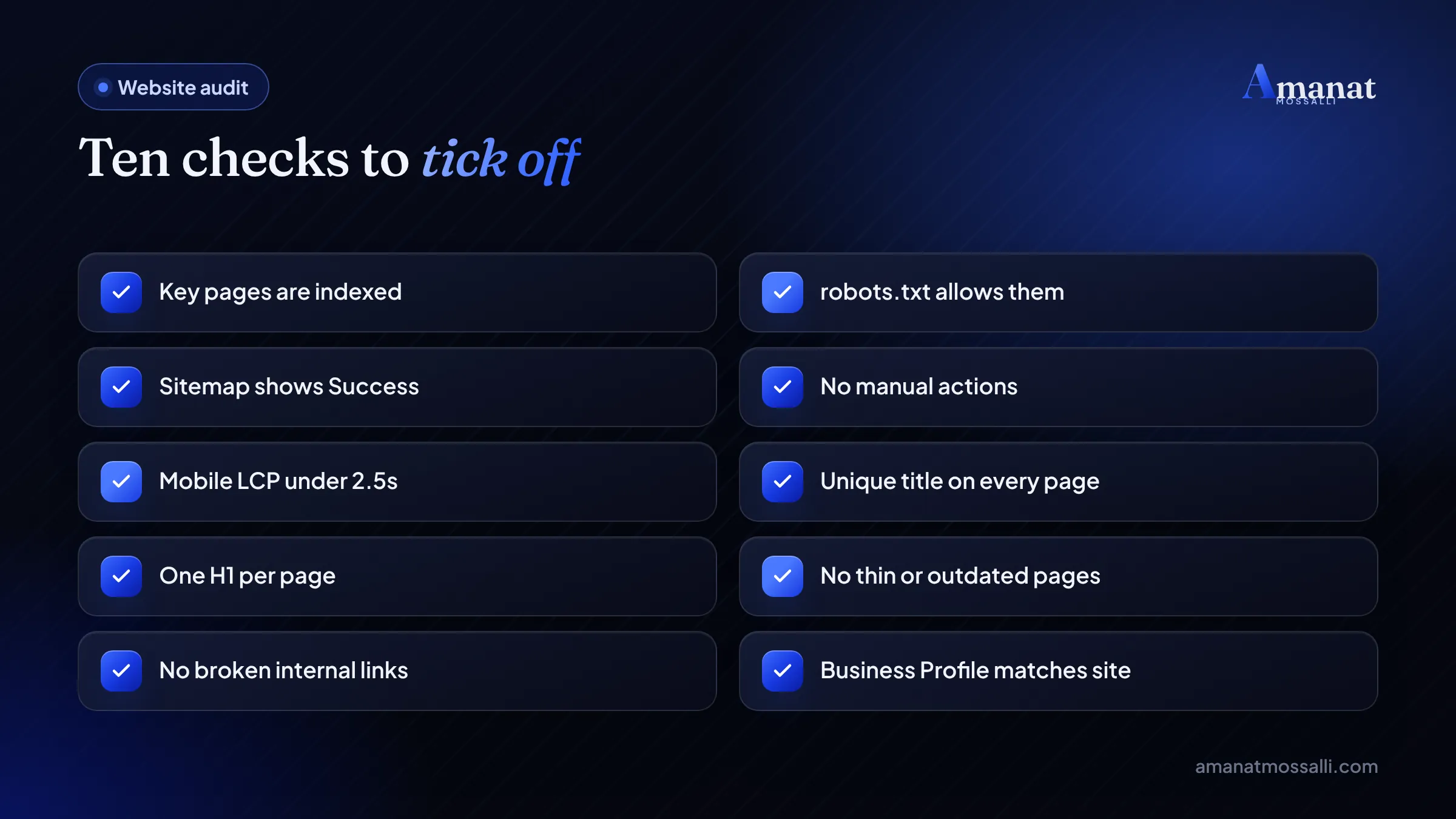
This is the seo audit checklist from my own notes, cut down to what matters. Copy it into your sheet. Tick each row as you check it, then mark the impact. It works as an SEO audit for small business sites and for larger shops.
| # | Check | Free tool | Bad sign | Impact |
|---|---|---|---|---|
| 1 | Automated scan | Free SEO audit tool | Red flags on money pages | Varies |
| 2 | Key pages indexed | Search Console, Pages | Service pages under Not indexed | High |
| 3 | robots.txt and sitemap | Browser, Search Console | Disallow on key folders, sitemap errors | High |
| 4 | Manual actions and security | Search Console | Any issue listed | High |
| 5 | Mobile speed | PageSpeed Insights | LCP over 4s on mobile | High |
| 6 | Titles and meta | Screaming Frog | Duplicates or blanks | Medium |
| 7 | H1 and headings | Screaming Frog | Missing or multiple H1 | Medium |
| 8 | Content quality | Your own eyes | Thin or outdated pages | High |
| 9 | Broken links and redirects | Screaming Frog | 404s and redirect chains | Medium |
| 10 | Backlinks | Search Console, Bing | Few real sites, spam floods | Medium |
| 11 | Google Business Profile | Google Maps | Wrong address or hours | High for local |
| 12 | Structured data | Rich Results Test | Errors on key types | Low to medium |
| 13 | AI answers | ChatGPT, Gemini, Perplexity | Competitors cited, you aren’t | Medium |
How Do You Turn the Findings Into an SEO Audit Report?
Sort your sheet by impact, then by effort. Knowing how to do an SEO audit is half the job. Writing it up well is the other half. A report is only useful if someone reads it and acts on it.
I write mine in three parts. Page one is a summary that a busy owner can read in two minutes. Page two lists the top five fixes. The rest is the detail for whoever does the work.
Keep the language plain. “Your product pages are hidden from Google” gets action. “Indexation anomalies detected” gets ignored.
If you’d rather have someone else do it, here’s what I’d expect a good agency to send. My list of SEO agencies in Bangladesh can help you pick one.
Audit Mistakes I Keep Seeing
People who know how to do an SEO audit still slip up. Most bad audits don’t miss problems. They bury the big ones under hundreds of small ones.
- Trusting a single score. A 94 can hide a noindex tag, as the furniture shop learned.
- Auditing only the home page. Your money pages earn the sales, so check them first.
- Testing speed on desktop Wi-Fi. Test on mobile, the way your buyers browse.
- Fixing 300 low-impact warnings before one indexing error.
- Deleting old pages without redirects, which throws away their links.
- Buying cheap backlinks to “fix” a weak link profile.
- Running one audit and never checking again after the next site update.
I’d skip any audit that arrives as a 60-page PDF with no priority order. It looks impressive, then sits unread in someone’s inbox.
FAQ: How to Do an SEO Audit
How do I do an SEO audit myself for free?
How often should I do an SEO audit?
What should an SEO audit checklist include?
What is the difference between a technical SEO audit and an on-page SEO audit?
How long does an SEO audit take?
What should an SEO audit report contain?
Do I need llms.txt or special markup for AI Overviews?
Index First, Speed Second, Then Polish the Pages
That’s how to do an SEO audit in the order that finds the expensive problems early. Scan, confirm indexing, read Search Console, test mobile speed, then work through tags, content, links, local and AI.
You can do all ten steps this week with the free tools above. If you hit a step that makes no sense, or the numbers look wrong, send me a message. Run the free audit first and paste the result into WhatsApp. I’ll tell you honestly what I’d fix first, and I won’t try to sell you what you don’t need.

Amanat Mossalli Taju
Senior Digital Marketer & SEO Expert, Dhaka, BangladeshI have grown 175+ brands since 2020 with SEO, Google and Meta Ads, server-side tracking, WordPress and AI automation. Half of my clients are in the UK, USA, Australia and Canada. Everything I write here comes from real client work.
Want this done for your business?
Book a free 15-minute call. I look at your site and ads before we talk, so you leave with clear next steps.