How to Get Google Reviews in Bangladesh (Without Buying Fake Ones)
A dentist with four reviews, a rival with sixty-one, and the simple habit that closes the gap. Scripts in Bangla and English, a QR card layout, and the rules Google enforces.

A tailor in Basabo turned her laptop towards me one evening in March. Two Google listings sat side by side. Hers had seven reviews, the newest from 2024. A tailoring shop two lanes away, open barely a year, had more than fifty, three of them from that week.
“Do they buy them?” she asked. Maybe some clinics do. She didn’t need to. This is how to get Google reviews in Bangladesh the honest way. It’s slower than buying and far safer.
The short answer fits in one line. Ask every customer, at the right moment, with a direct review link, and never offer anything in return. The asking is always the hard part, not the link.
Why do reviews matter so much here?
They help you rank, and they help people pick you. Google’s help page on local ranking lists three factors: relevance, distance and prominence. Under prominence it says more reviews and positive ratings can improve your local ranking. The same page says there’s no way to pay Google for a better local ranking.
So reviews are one of the few ranking levers you control. The stars also sit next to your name on Maps, before anyone taps through to your website.
A buyer in Bangladesh has one big fear: “Will this shop cheat me?” A pet owner choosing a vet reads reviews before anything else. So does a family choosing a caterer or a patient choosing a clinic. Real, recent reviews calm that fear.
Where is your Google review link and QR code?
Inside your own Business Profile. You don’t need a paid tool or a “link generator” site. Both your review link and your review QR code come straight from Google.
Google’s help page on review links lays out the process. One catch: the QR code can only be made in a computer browser, not on a phone. This trips up half the shop owners I meet.
Google suggests putting the link on receipts, in thank-you emails, at the end of a chat and on a printed QR card. It also mentions email, WhatsApp and Facebook posts. In Bangladesh your customers already talk to you on WhatsApp and Messenger, so start there.
Customers must be signed in to a Google account to leave a review. Most Android users already are. Anyone who isn’t can create an account with any email address, not only Gmail.
When should you ask?
Right after the customer gets what they came for, while the feeling is fresh. Same day. Same hour if you can.
| Business | Best moment to ask | Best channel |
|---|---|---|
| Restaurant in Gulshan | When the bill is paid | QR card on the table or at the cash counter |
| Online clothing shop | A day after delivery | WhatsApp or Messenger message |
| Clinic or vet | At checkout after treatment | Reception asks, then sends the link by SMS |
| Coaching centre | After results or a mock test | Guardian WhatsApp group, sent to everyone |
| AC repair service | When the job is tested and working | Technician shows the QR code on his phone |
Timing decides whether a customer actually finishes the review. A request a week later gets ignored. A request while they’re still at the table, or still unboxing, gets done.
The tailor’s plan was simple. The counter asks when a finished order is handed over, then sends the link by SMS before the customer and her parcel reach the gate. No chasing later.
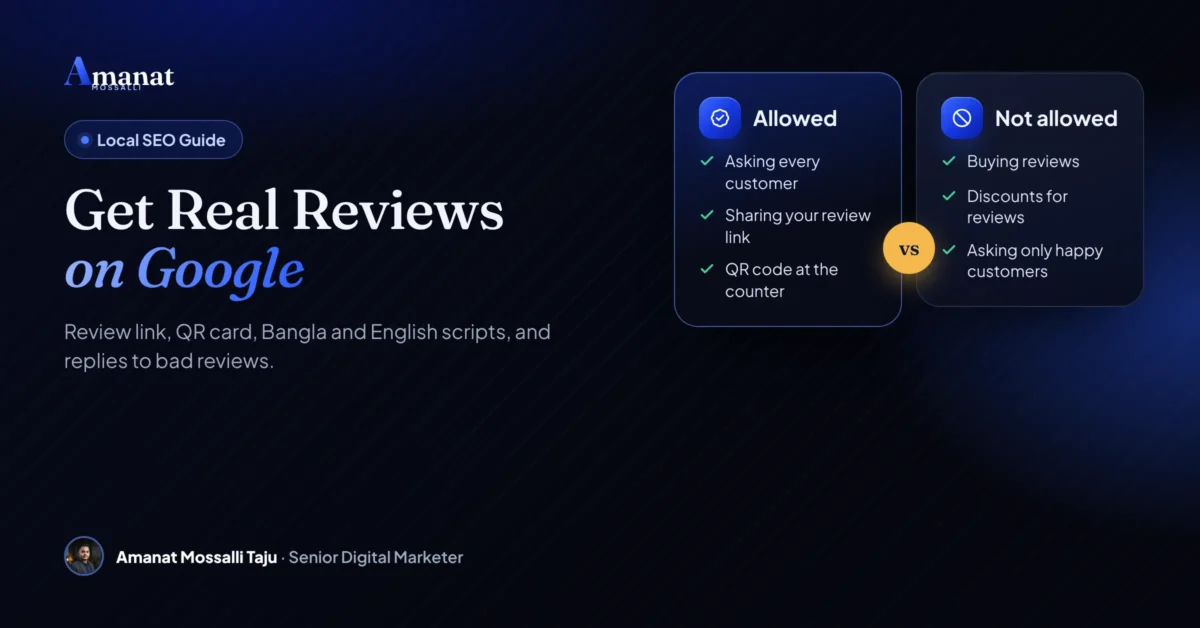
And ask everyone, not just the people who smiled. Google’s policy bans asking only happy customers. The rule protects you too. A mix of ratings looks real, because it is.
Google’s missing reviews page says profiles mainly categorised as schools for students aged 6 to 18 have reviews removed and switched off. Universities, day care centres and swim schools are excluded. If you run a coaching centre, check your category before you plan a review drive.
Review request messages in Bangla, Banglish and English
Short, polite, with the link. Don’t mention a reward. Don’t suggest a star count. Don’t ask anyone to name a staff member.
English (WhatsApp or email)
Hi [Name], thank you for choosing [Business]. Could you share your honest experience on Google? It takes about a minute: [review link]. Every review, good or bad, helps us improve.
Bangla review request message
আসসালামু আলাইকুম [নাম], [ব্যবসার নাম] বেছে নেওয়ার জন্য ধন্যবাদ। আপনার সৎ অভিজ্ঞতা Google-এ একটু লিখবেন? এক মিনিটের মতো লাগবে: [রিভিউ লিংক]। ভালো বা খারাপ, যেকোনো মতামত আমাদের উন্নতিতে সাহায্য করে।
Banglish (SMS)
Dhonnobad [Name]! [Business] niye apnar sot motamot Google e likhben? [review link]
In person, at the counter
We are trying to improve. If you have a minute, please scan this and share your honest experience on Google.
That’s the whole script. Plain words, one link. Save each version as a WhatsApp Business quick reply so staff can send it in two taps, even on a busy Friday evening. My WhatsApp Business guide shows how to set up quick replies.
What changed for staff in April 2026?
Google added two lines to its review policy in April 2026. Search Engine Roundtable spotted them on 17 April. Merchants must not request that staff “solicit a certain number of reviews”. They also must not request that staff solicit reviews “that include specific content, including content that identifies a staff member”.
In plain terms: no review targets for your team, no contests for who collects the most, and no “please mention Rafiq” on the card. Your staff can still hand every customer the QR card and send the link. They just can’t be chasing a number or a name.
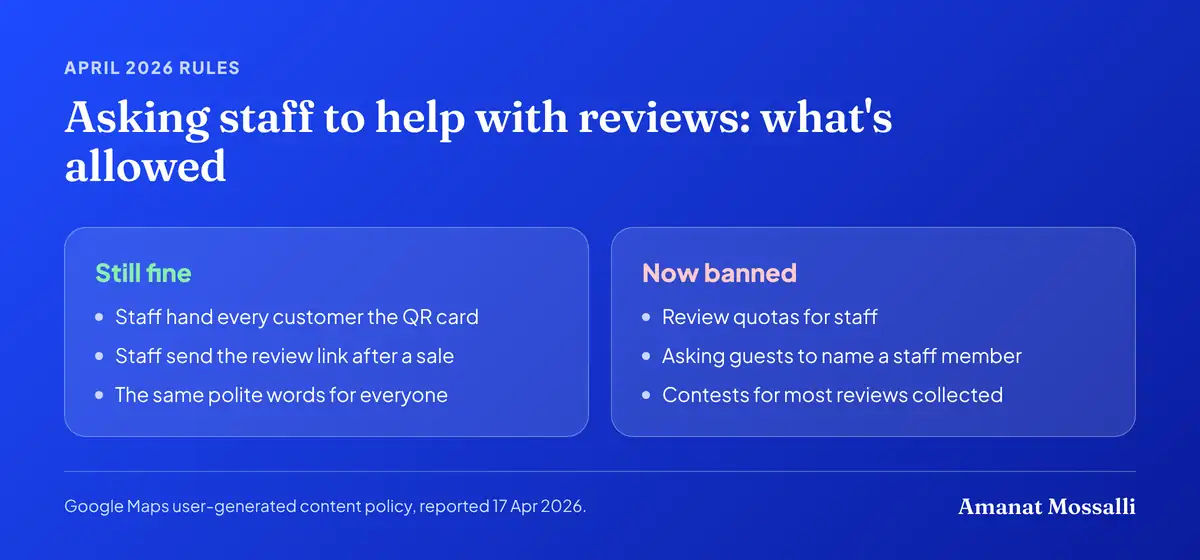
PPC Land noted that some local SEO specialists find the wording broad, and Google hasn’t said how it will enforce it. My advice is to play it safe. Write one script, give it to everyone, and pay staff for good service, not for reviews.
What belongs on a review QR card?
One request, one big QR code, your logo. That’s it. Put it where people wait or pay.
- Size: a table tent or counter card around A6 works well. The code should scan from arm’s length.
- Headline: “Tell us how we did” or “আপনার মতামত জানান”.
- One line of help: “Scan with your phone camera. Takes one minute.”
- Your logo and business name, matching your Google profile exactly.
- No offers. Never print “Get 10% off for a review”. Google bans it.
- Test it on two or three different phones before you print 100 copies.

Can a Facebook shop with no showroom get reviews?
Yes, if it qualifies for a Business Profile as a service-area business. Plenty of Facebook shops in Bangladesh deliver from a real office or a room used as a store. Buyers never visit, and that’s fine.
Set your service area, such as Dhaka city or all of Bangladesh. Hide the address if customers don’t come to you. Then send the review link with every delivery confirmation.
A woman in Munshiganj makes herbal soaps and sells them from her Facebook page and one WhatsApp number. Eid sets, birthday boxes, small office orders. She pours and packs on the dining table after her children sleep. When people searched her page name on Google, they found nothing but an old Daraz listing.
Last year we verified a service-area profile with her address hidden. Then we added one line and the review link to her delivery confirmation message. She was sure nobody would bother. In the first month, four people did. By the end of the year she had a little over forty reviews, many with photos of the actual soaps.
Her orders didn’t explode. What changed was the first call. New buyers stopped asking “apni ki real?” because Google had already answered.
- Add the link to your delivery message: “Your parcel is delivered. Please share your honest experience: [link]”.
- Print a small QR sticker inside the package or on the invoice.
- Ask on Messenger once the customer confirms the order arrived.
- Never send links to people who didn’t buy. Reviews must come from real experiences.
Setting up the profile itself is covered in my Google Business Profile guide. For building an online shop people trust, see why SEO matters for e-commerce in Bangladesh.
What does Google do to profiles that buy reviews?
It can remove your reviews, stop new ones and flag your profile in public. Buying reviews is the fastest way I know to throw away years of real work.
Google’s prohibited and restricted content policy bans reviews that were paid for, in cash or in kind. It bans offering payment, discounts or free goods for posting, changing or removing a review. Content posted from several accounts by one person is out. So are reviews with a conflict of interest, like staff reviewing their own employer.

The penalties are spelled out on Google’s Business Profile restrictions page, on top of deleting the fake reviews. Google may stop your profile from receiving new reviews for a set period. It may unpublish your existing reviews for a set period. It may also show a warning telling customers that fake reviews were removed. Google emails the owner before it applies a restriction, and there is an appeal form.

Bought reviews arrive in bursts, from accounts with no history and no photos. Customers notice. Google notices faster.
How often does Google delete new reviews?
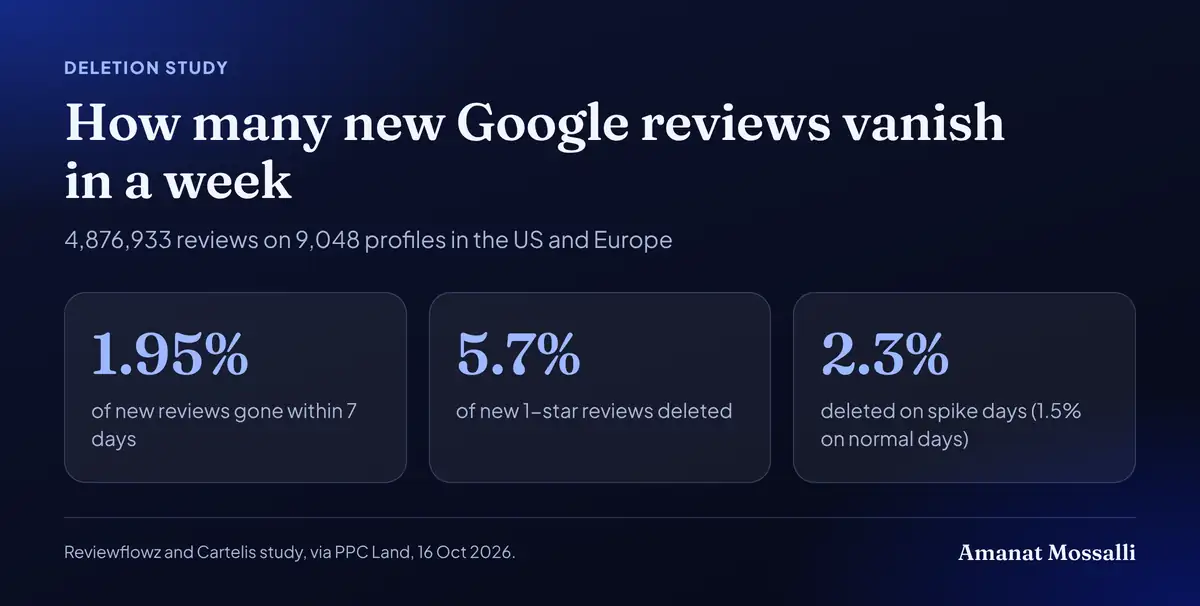
We finally have some numbers. Reviewflowz, a review software company, and the consultancy Cartelis tracked 4,876,933 Google reviews on 9,048 profiles in August 2026. PPC Land published the results on 16 October 2026.
Within seven days, 1.95% of new reviews were gone. One-star reviews went far more often: 5.7% of new one-star reviews were deleted in week one. Reviews posted on days with a sudden burst of positive reviews were deleted at 2.3%, against 1.5% on normal days. First-time reviewers wrote 14% of reviews but made up 22% of deletions.
Sector made a difference too. Home services lost 3.9% of new positive reviews in week one and healthcare 2.6%. Wellness and fitness lost 2.1%, travel 1.8% and automotive 1.3%. Food and beverage lost only 0.85% and hospitality 0.75%.
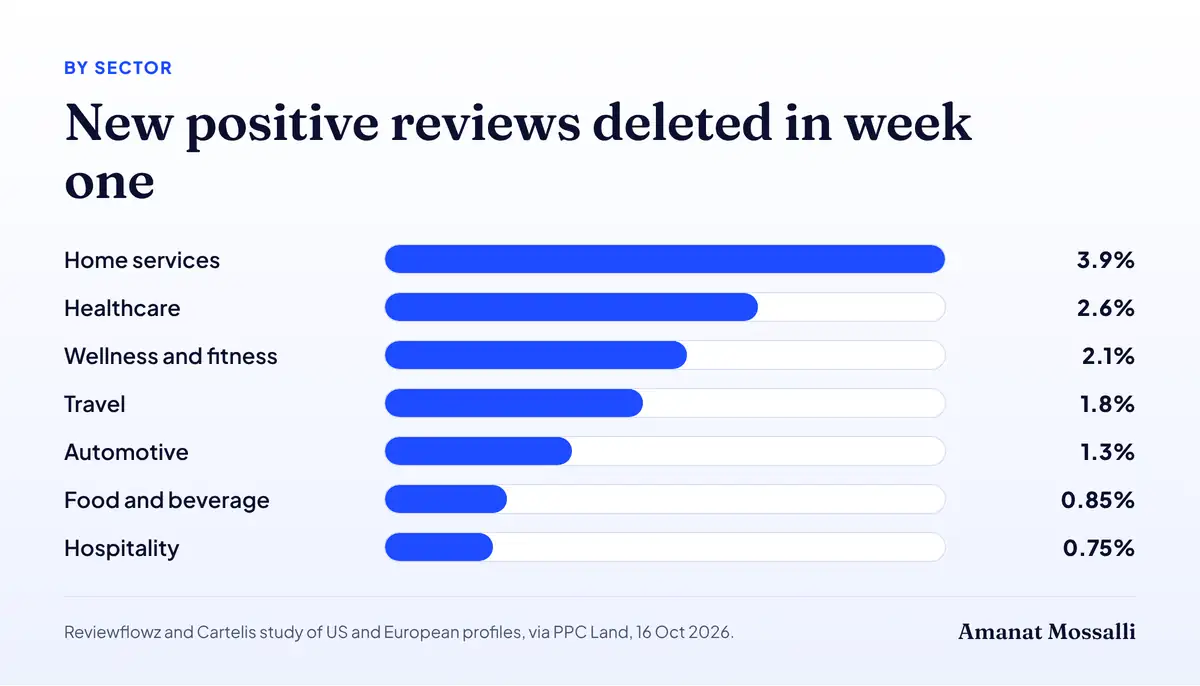
Two honest caveats. The study covers the US and Europe, not Bangladesh. And it can’t see why any review was deleted. Still, the pattern matches what I see here. Steady asking from real customers holds up. A burst from new accounts doesn’t. Interestingly, reviews that named a staff member were not deleted more often once the researchers controlled for other factors.
How do you answer a one-star review?
Fast, calm and short. Admit a real mistake. Move the details to a phone call. You’re writing for the next customer who reads it, not for the angry one.
Google’s own tips for replying to reviews say keep it short, never share the reviewer’s private information and never attack them. Apologise where it fits. Be honest about mistakes, but don’t take the blame for things outside your control. Sign with your name or initials.
English template for a bad review
Dear [Name], we are sorry your visit did not go well. This is not the standard we aim for. Please call us on [number] or message [email] so we can look into it and make it right. [Your name], Manager
Bangla template for a bad review
প্রিয় [নাম], আপনার অভিজ্ঞতা ভালো হয়নি জেনে আমরা আন্তরিকভাবে দুঃখিত। বিষয়টি ভালোভাবে দেখতে চাই। দয়া করে [নম্বর]-এ যোগাযোগ করবেন। [আপনার নাম], ম্যানেজার
When the review looks fake
Hi [Name], we could not find a visit or order under this name. If you were our customer, please contact us on [number] so we can help.
Then flag the review in your profile if it breaks policy. Don’t argue in public. Never post a customer’s phone number, order details or medical details in a reply, however tempting.
- Arguing or blaming the customer in public.
- Sharing private details like order numbers, addresses or treatment information.
- Copy-pasting the same reply under every review.
- Offering a discount to remove or change the review. Google bans this.
- Ignoring the review for weeks.
Should you reply to the good ones too?
Yes, briefly. Google warns against sending the same generic thank-you to everyone, and says replies aren’t the place for deals or promotions.
Thank you, [Name]. Glad the kacchi was worth the drive to Gulshan. Our new rooftop seating opens next month. [Initials]
ধন্যবাদ [নাম]! আপনার মতামত আমাদের টিমকে উৎসাহ দেয়। আবার দেখা হবে।
A short, specific reply tells the next reader a human is listening. Pick one real detail from the review so it doesn’t read like a template. I’d skip the exclamation marks after the first one.
Why are your reviews not showing?
Usually they’re still being checked, or they were removed for a policy reason. Google doesn’t put a removed review back.
Google’s help page on missing reviews says reviews go through a policy check that can take a few days. Reviews removed for spam or other violations are not restored. Google may also switch reviews off for some profiles or categories for a while.
| Problem | Likely cause | What to do |
|---|---|---|
| New review not visible | Still in policy check | Wait a few days before worrying |
| Several reviews vanished | Spam filter, often from one Wi-Fi or burst | Ask steadily over time, not 30 in one day |
| Reviews gone after merge | Profiles were merged | Wait a few days, then contact support |
| Customer cannot post | Old app or not signed in | Ask them to update Google Maps and sign in |
| Staff reviews removed | Conflict of interest | Do not ask staff or family to review |
One cause I keep seeing: a shop collects 20 reviews on the same afternoon over the same Wi-Fi. That pattern looks fake even when it isn’t. The deletion study above points the same way. Spread the asking across every day instead.
Will review schema put stars on your site?
Not for a local business showing its own reviews. Google treats those as self-serving and won’t give them star snippets.
Google’s review snippet guidelines are clear. When a business controls the reviews about itself, its LocalBusiness or Organization pages aren’t eligible for the star feature. That includes reviews pulled in through a third-party widget.
So review schema on a clinic or restaurant homepage brings no stars. Showing your real Google reviews on the site still helps visitors trust you. Product pages on an online shop are different, because Product is an eligible type when the reviews are about products.
Need a clean, fast section on your website that shows your real Google reviews? My WordPress development service can add one without slowing the page down.
A 30-day review habit that sticks
The businesses with the most reviews aren’t lucky. They ask every customer, every day, with a system so simple a new staff member learns it in an hour.

Track one number: reviews per month. If it drops, your staff stopped asking. If it jumps in a single day, find out why before Google does.
I’ve done local SEO for clinics, restaurants and online shops for over seven years. Some of my clients rank #1 on Google in Bangladesh and abroad. The review habit is still the step owners skip most. For the bigger local picture, read my guide on local SEO for Bangladeshi businesses.
Four things before Friday
- 1Copy your review link and QR code today, from a computer.
- 2Save the Bangla and English scripts as quick replies, and give staff the same words.
- 3Print one QR card for the counter this week.
- 4Reply to every review that’s sitting unanswered right now.
The Basabo tailor started the week I met her. Fifty is a long way off. But her counter assistant now asks at every handover, and the newest review on her listing is from this month, not from 2024. Three of the recent ones mention the same master tailor by name, unprompted. That is exactly how it should happen.
This guide is by Amanat Mossalli Taju. The questions owners ask me most often are answered below.
FAQ: How to Get Google Reviews in Bangladesh
How can I get Google reviews fast?
Can I give a discount for a Google review?
Is it legal to buy Google reviews in Bangladesh?
Can my employees or family review my business?
Can I delete a negative Google review?
Why are my Google reviews not showing?
Where do I find my Google review link?

Amanat Mossalli Taju
Senior Digital Marketer & SEO Expert, Dhaka, BangladeshI have grown 235+ brands over more than seven years with SEO, Google and Meta Ads, server-side tracking, WordPress and AI automation. Half of my clients are in the UK, USA, Australia and Canada. Everything I write here comes from real client work.
Want this done for your business?
Book a free 15-minute call. I look at your site and ads before we talk, so you leave with clear next steps.