Facebook Conversion API: What It Is and How to Set It Up the Right Way
Why the Meta Pixel misses sales, how the Facebook Conversion API fills the gap, and which of the four setup routes fits your shop and budget.

At 9:40 on a Friday night, a shoe seller in Mirpur turned his laptop towards me. Ads Manager showed 11 purchases for the week. His WooCommerce orders page showed 26. Nothing in his shop was broken. His Meta Pixel was simply missing sales, and the Facebook Conversion API is the tool that closes that gap.
Here’s the short answer. The Facebook Conversion API (Meta’s official name is the Conversions API, or CAPI) sends your sales and leads from your server straight to Meta. The Pixel sends them from the shopper’s browser. Browsers get blocked, crash and forget. Servers don’t. Run both, remove the duplicates, and Meta finally sees most of what really happened.
I’m Amanat, and I fix tracking for ad accounts most weeks. Below you’ll find the four setup routes with cost and difficulty, deduplication explained with one order number, and how to read your match score. The rules come from Meta’s developer docs, which I checked in November 2026.
What Is the Facebook Conversion API, in Plain Words?
It’s a direct line from your website’s server to Meta. When someone buys, your server tells Meta about it. No browser sits in the middle.
Meta describes the Conversions API as a way to connect website, app, messaging and offline events from your server or CRM to its systems. Each event is tied to a dataset ID. Meta then uses it for reporting and for deciding who sees your ads. You can read that in Meta’s Conversions API overview.
Think of the Pixel as a shop assistant at the door. He writes down every buyer he sees. But some people walk past him, and some cover their faces. The Meta Conversions API is your cash register. It records every sale that goes through, no matter who saw it.
Search for “server side tracking Facebook” and you land on this same idea. One more name you’ll see: dataset. Meta now groups Pixel and server events under one dataset. In most accounts the dataset ID is the same number as your old Pixel ID.
Why the Pixel Alone Keeps Missing Sales
The Pixel only works if the browser loads it and keeps its cookies. That fails more often than most owners think.
- Ad blockers. Many blockers stop the Pixel script from loading at all.
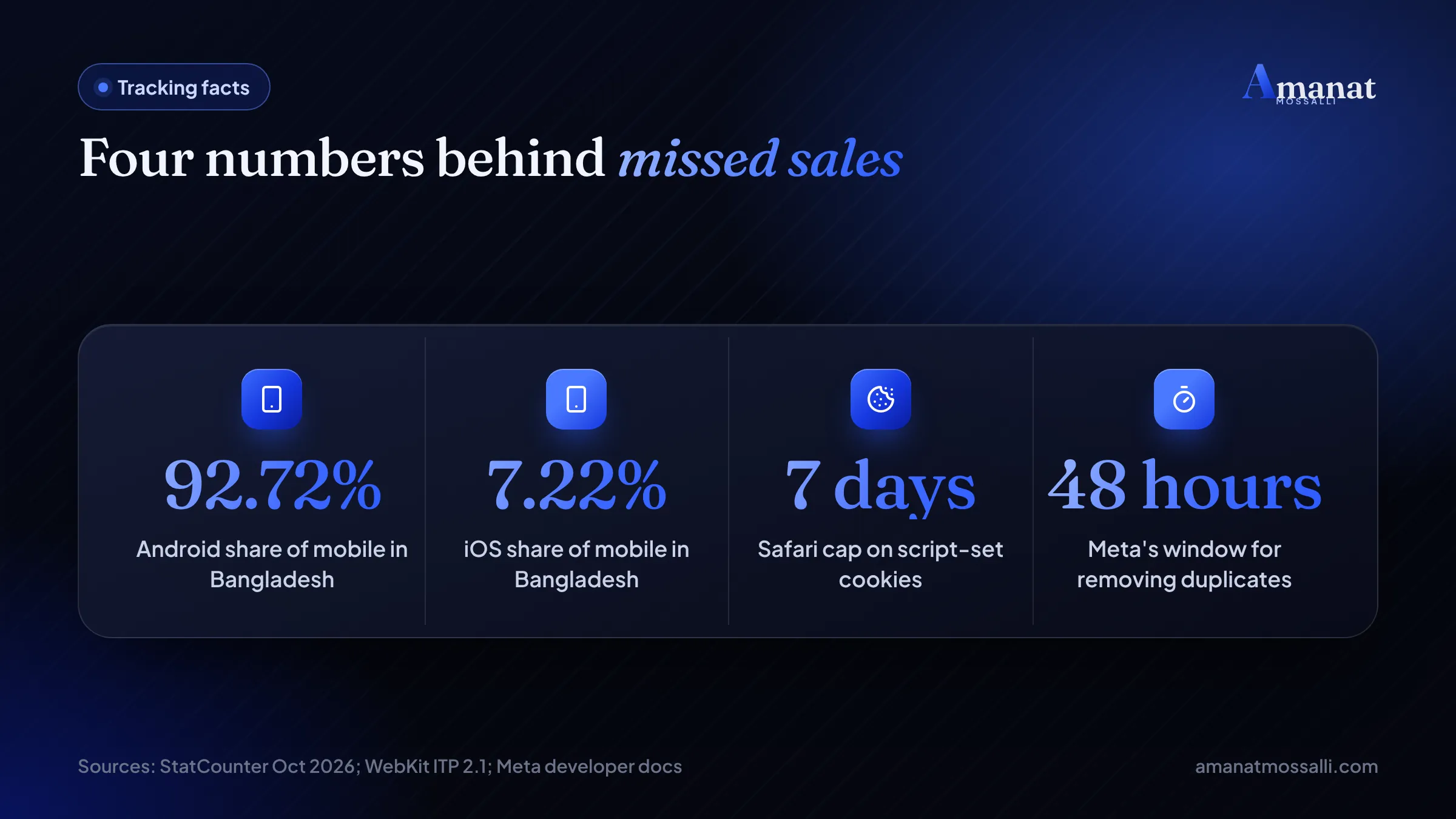
- Cookie limits. Safari caps cookies set by scripts. WebKit’s ITP 2.1 note says those cookies are capped to a seven day expiry.
- Slow mobile data. On a weak 4G signal in Gazipur, the buyer may close the tab before the thank-you page loads.
- Orders that finish elsewhere. A buyer adds to cart on your site, then confirms on Messenger or the phone.
- Consent and privacy settings. Some visitors turn tracking off, and the browser respects it.
In Bangladesh, iPhones are a smaller part of the story than people say. StatCounter gave Android 92.72% of mobile use here in October 2026, and iOS 7.22%. Your bigger leaks are usually slow pages, blockers and orders closed by phone.
If you sell to the UK or USA, the iPhone share is much higher. Then Safari’s cookie limit matters a lot more.
Meta Pixel vs Conversions API: Do You Need Both?
Yes, keep both. The Pixel catches browsing behaviour well. The server catches sales reliably. Together they cover each other’s gaps.
People search “Meta Pixel vs Conversions API” as if you must pick one. You don’t. Meta’s own setup flow assumes you already have a Pixel and adds CAPI next to it.
| Question | Meta Pixel | Conversions API |
|---|---|---|
| Where does it run? | In the visitor’s browser | On your server or platform. |
| Blocked by ad blockers? | Often | No. |
| Good at tracking page views? | Yes, very | Possible, but more work. |
| Good at tracking purchases? | Misses some | Yes, every order your system records. |
| Can send offline or phone sales? | No | Yes, within 7 days of the sale. |
| Setup effort | Paste a code or use a plugin | Plugin, gateway or developer. |
Let the Pixel handle PageView and ViewContent. Make sure Purchase and Lead go through both, with the same event_id. Those two events decide how Meta spends your budget.
Four Ways to Set Up CAPI, Compared
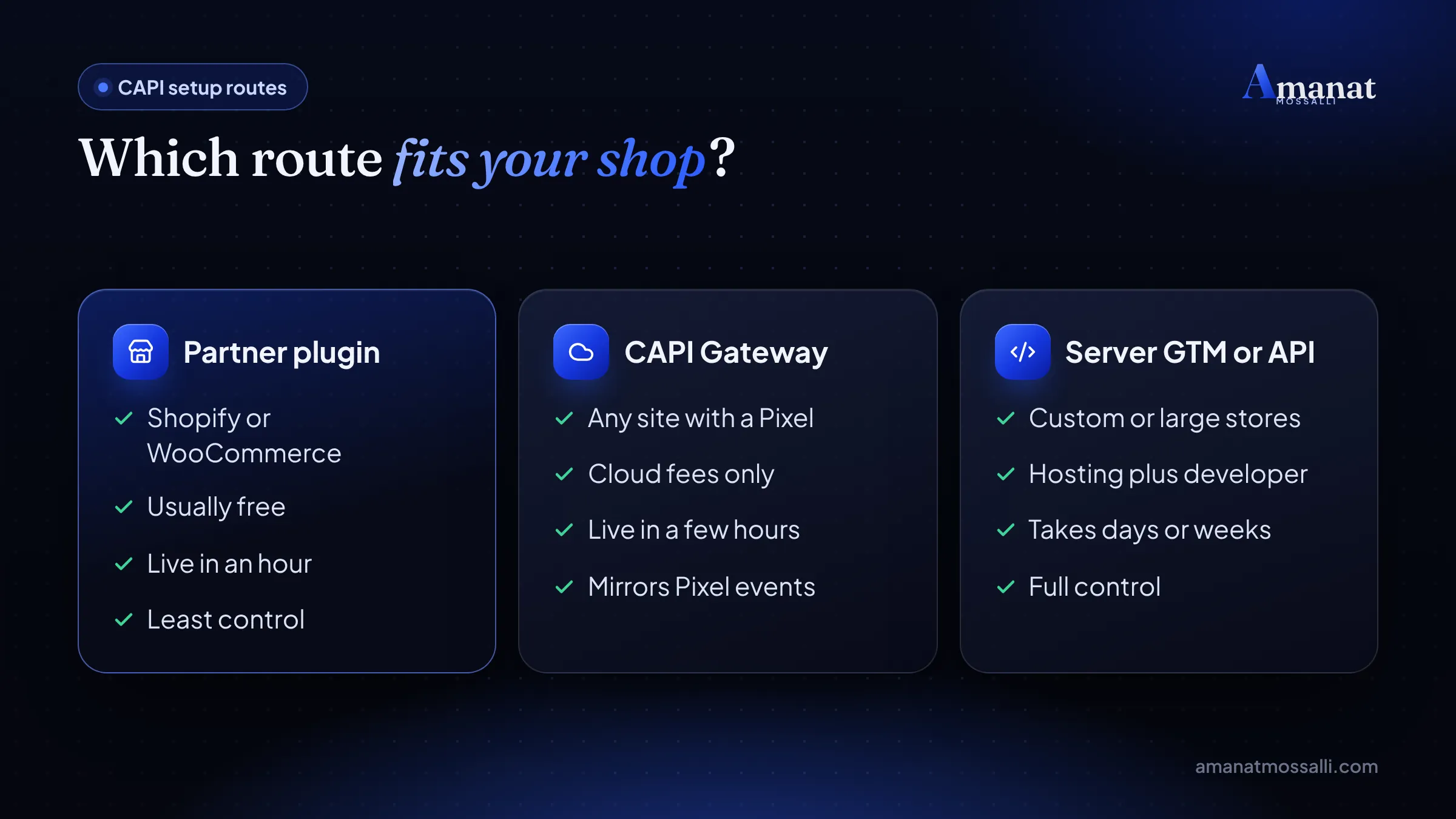
Your best CAPI setup depends on your platform, your budget and whether you have a developer. Here are the four routes I see in real accounts.
| Route | Best for | Running cost | Difficulty |
|---|---|---|---|
| Partner app or plugin | Shopify and WooCommerce shops | Usually free | Easy, about an hour. |
| Conversions API Gateway | Custom sites with a Pixel | Cloud hosting fees only | Medium, a few hours. |
| Server-side Google Tag Manager | Brands tracking Meta, Google and more | About USD 50 per server a month on Google Cloud | Hard, needs a specialist. |
| Direct API from your code | Custom apps, CRMs, big stores | Developer time | Hard, ongoing work. |
1. Partner app or plugin
This is where most small shops should start. Shopify has it inside the Facebook and Instagram app. WooCommerce sites use Meta’s plugin or a tracking plugin with a CAPI option. You connect, pick a setting, and the platform sends server events for you.
2. Conversions API Gateway
The Conversions API Gateway runs a small server in your own cloud account and copies Pixel events to Meta from there. Meta’s Gateway guide says the only cost is the cloud resource fees. It also says it can bring setup time down from weeks to hours.
Meta’s Events Manager now also offers a guided setup for sites that already have a Pixel. The overview page says it needs no code and has no setup fees. Check what your account shows before paying anyone.
3. Server-side Google Tag Manager
Here, a tagging server on your own subdomain receives data and forwards it to Meta, Google Analytics and others. Google’s planning guide puts the price at about USD 50 per instance per month on Cloud Run. Most production setups need more than one instance.
I like this route for brands that run Meta and Google ads together. It’s overkill for a page that sells 20 orders a week.
4. Direct API integration
Your developer writes code that sends a POST request to Meta for each event. This gives full control. It also means someone must maintain it when Meta updates its API version.
How Do You Turn On CAPI in Shopify?
Shopify does the server work for you. You just pick a data sharing level. Shopify’s help page on Meta data sharing lists three: Standard, Enhanced and Maximum.
Standard uses the Pixel only. Enhanced and Maximum add the Conversions API. Pick Maximum unless your lawyer or privacy policy says otherwise.
That last step catches a lot of people. Old theme code plus the app means double Purchase events, and only one set carries a shared ID.
Setting Up CAPI on WooCommerce and WordPress
WooCommerce gives you more choice, and more ways to get it wrong. The goal stays the same: one tool sends both browser and server events, with matching IDs.
- 1Pick one tracking plugin. Meta’s official plugin works. Many tracking plugins also have a Conversions API option.
- 2In Events Manager, create an access token for your dataset. Paste it into the plugin.
- 3Turn on server events for Purchase, InitiateCheckout, AddToCart and Lead.
- 4Turn off any other plugin or theme setting that also adds the Pixel.
- 5Place a test order with the Test Events tab open. You should see each event arrive twice, marked browser and server.
The “CAPI Shopify WooCommerce” question I hear most: can I run two plugins to be safe? No. Two plugins send two different event IDs, so Meta can’t merge them. You get inflated numbers.
If your WordPress site runs slowly, fix that too. A heavy page delays the Pixel, and every second of delay costs you browser events. My WordPress development work usually starts there.
What Goes Inside a Server Event?
A server event is a short message with a few required fields. You don’t need to code to understand it, and it helps you spot problems.
Meta’s server event parameters page lists four fields as always required: event_name, event_time, user_data and action_source. Website events also need event_source_url. event_id is optional, but Meta recommends it for deduplication.
| Field | What it means | Example |
|---|---|---|
| event_name | What happened | Purchase. |
| event_time | When, as a Unix time in seconds, GMT | 1793270400. |
| action_source | Where it happened | website, phone_call, chat or physical_store. |
| event_source_url | The page, for website events | https://yourshop.com/checkout/. |
| event_id | A unique ID shared with the Pixel | ORD-10452. |
| user_data | Who did it, mostly hashed | Hashed email and phone, fbp, fbc, IP. |
The 7-day rule
Meta accepts an event_time up to 7 days before you send it. If one event in a batch is older, Meta rejects the whole batch. So don’t save up a month of orders and upload them at once.
Hashing, and the Bangladeshi phone number trap
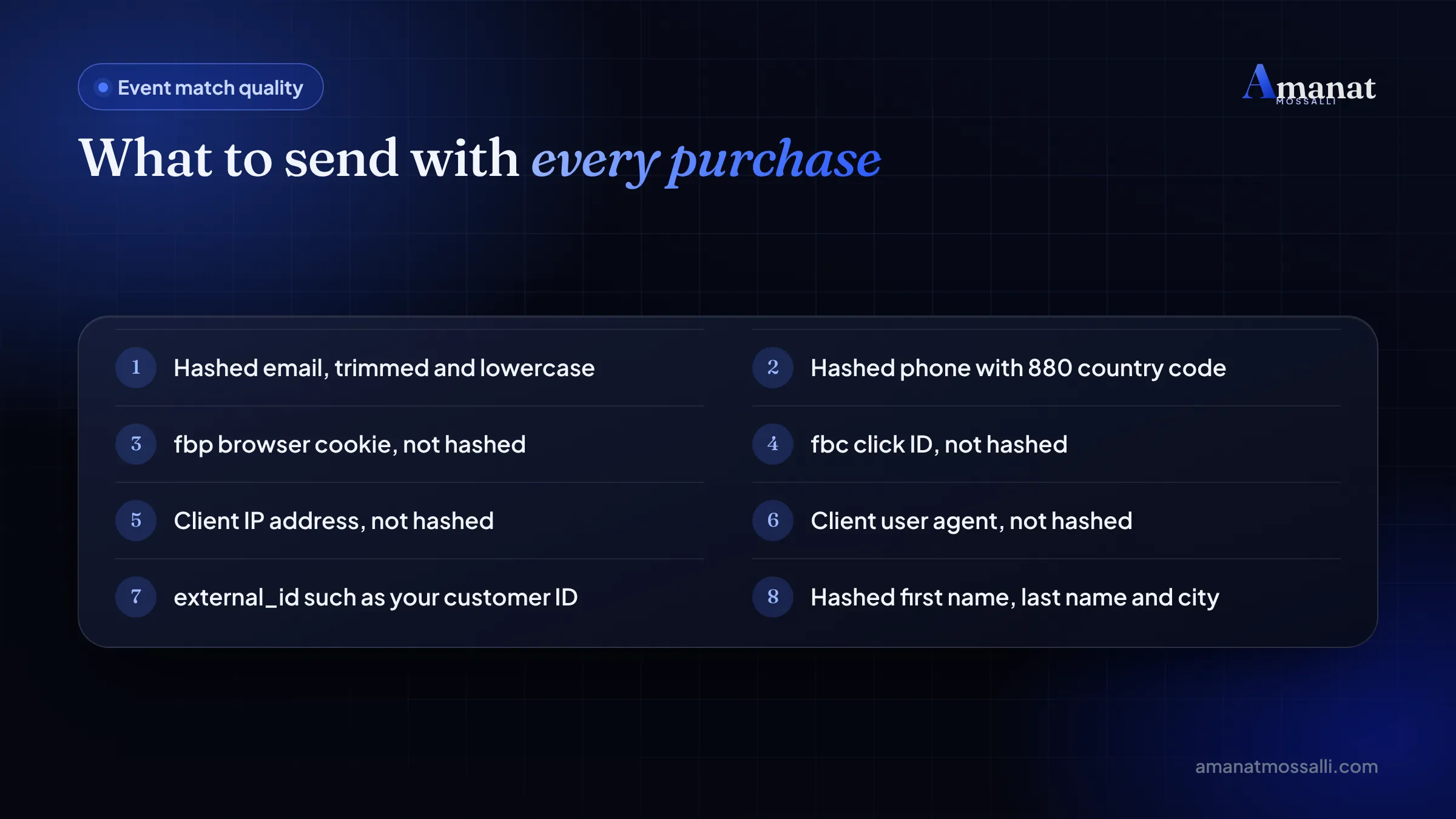
Meta’s customer information page says email and phone must be hashed with SHA-256. IP address, user agent, fbp and fbc must never be hashed. Plugins do this for you. Custom code often gets it wrong.
Phone numbers need the country code and no leading zero. So 01712-345678 becomes 8801712345678 before hashing. Send it as 01712345678 and Meta can’t match it to anyone.
Emails get trimmed and made lowercase first. ” Rahim@Gmail.com ” turns into rahim@gmail.com, then it’s hashed.
How Does Event Deduplication Work?
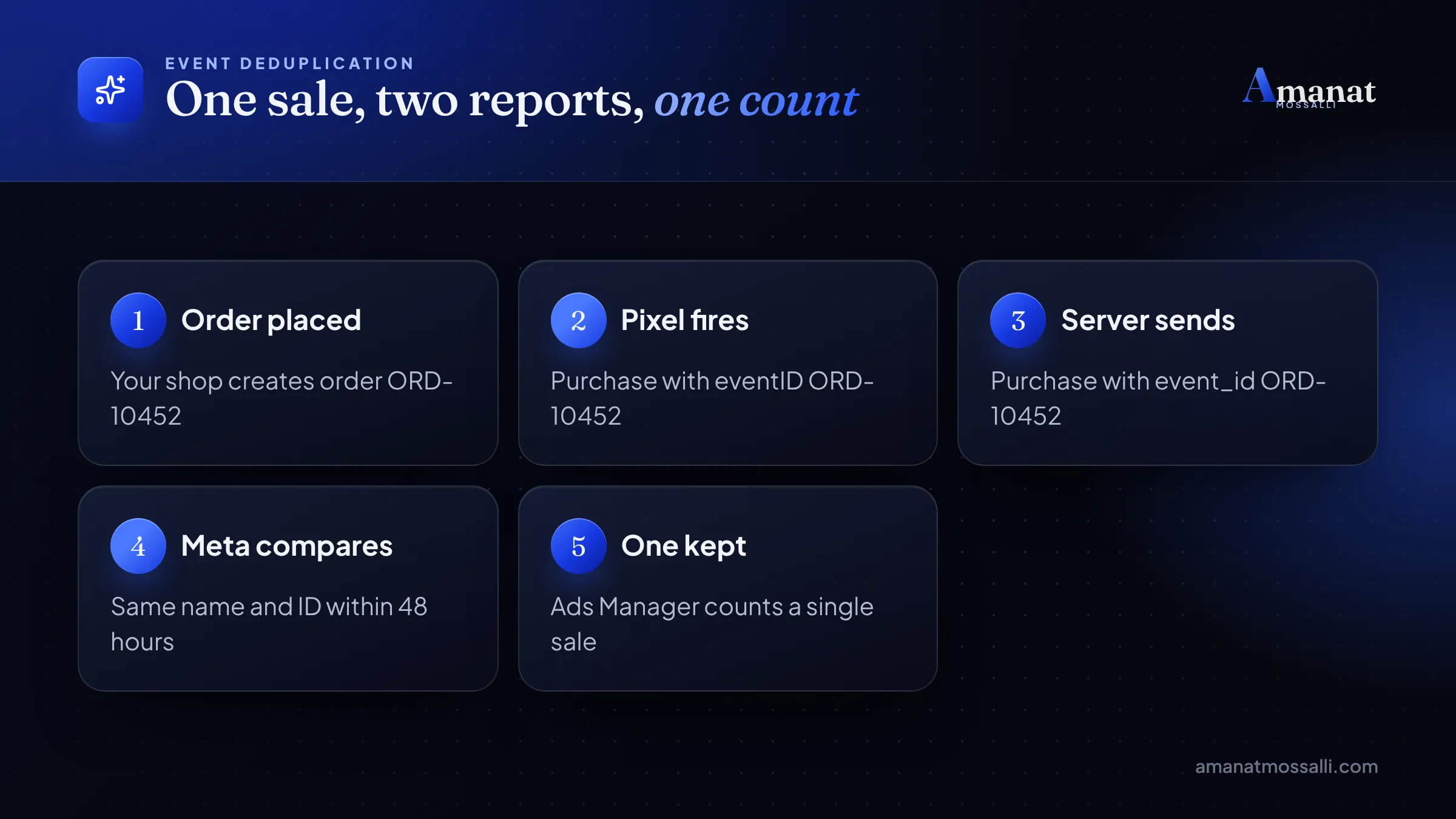
Meta throws away the second copy when two events share the same event name and event_id. That’s event deduplication, and without it your sales look doubled.
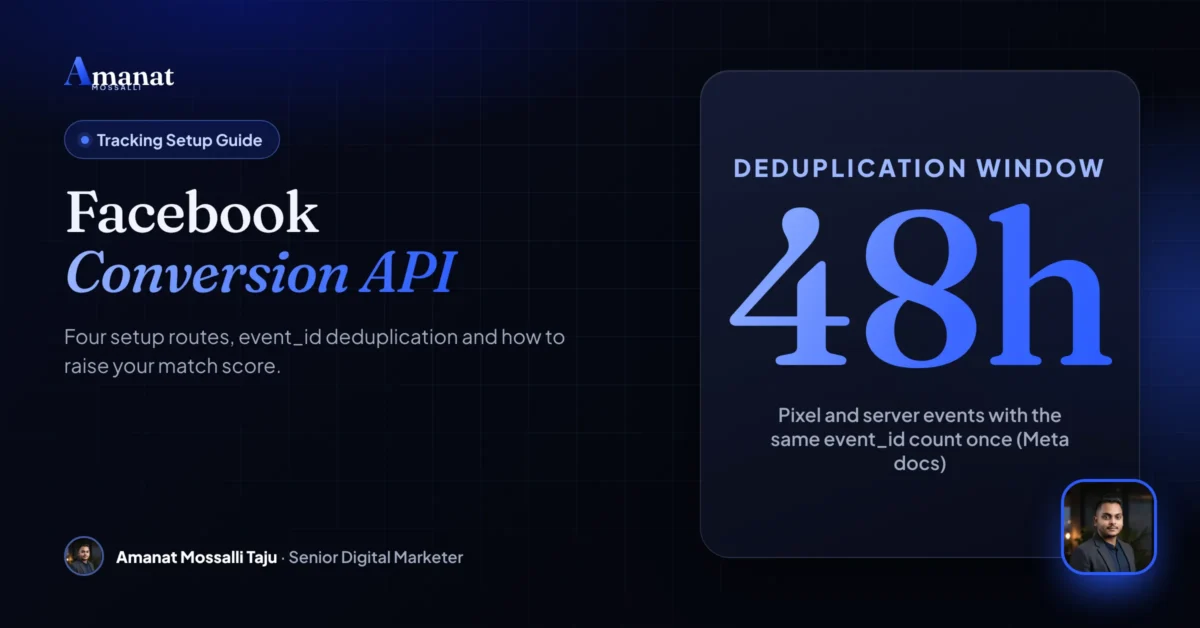
According to Meta’s deduplication guide, the Pixel’s eventID must match the server’s event_id, and the event names must match too. Duplicates are removed within 48 hours of the first one arriving.
Here’s a real-world picture. A buyer in Chattogram places order 10452. The Pixel fires Purchase with eventID ORD-10452. Two seconds later, your server sends Purchase with event_id ORD-10452. Meta keeps one and drops the other.
The backup method, and its catch
Meta can also match on fbp or external_id. This only works when the browser event arrives first. If the server event comes first, it isn’t discarded. Treat this as a fallback, not your plan.
One honest caveat. I’ve seen plugins that send the same event_id but a different event name, like “purchase” in lowercase. Meta treats those as two events. Check the spelling in Test Events.
Event Match Quality: Reading the Score and Raising It
This score shows how well Meta links your events to real people. You’ll find it in Events Manager. Open your dataset, click an event, and look at its details.
Meta scores it out of 10, as its Dataset Quality API docs explain. Higher is better. A sale Meta can’t match to a person can’t teach the algorithm much.
Three fixes that usually move the score
- Ask for email or phone at checkout. Cash-on-delivery forms here often skip email. A phone number with 880 still helps a lot.
- Pass fbc. It carries the click ID from the ad. Many custom setups forget it.
- Send the IP and user agent from the real visitor, not from your server. Gateway and plugin setups usually handle this.
Don’t chase a perfect 10. Chase the Purchase and Lead events first, since those decide where your money goes.
How Can You Tell CAPI Is Really Working?
Test it with one real order before you trust any report. It takes ten minutes.
Can You Send Cash-on-Delivery Sales Through CAPI?
Yes, and this is where the Facebook Conversion API helps Bangladeshi sellers most. A website order isn’t a sale until the courier hands it over and collects the cash.
Since Meta accepts events up to 7 days old, a delivery confirmed three days after the order still counts. You keep the normal Purchase from checkout. Then your server sends a separate custom event, say DeliveredOrder, when the courier marks it delivered.
Phone and Messenger orders work too. Set action_source to phone_call or chat, include the buyer’s phone with 880, and send it within the week.
Should you make Meta optimise for delivered orders instead of purchases? I don’t know yet if it’s better for every shop. Fewer events can slow learning. I’d test it on one campaign for a month before switching the whole account.
If you’re still working out what your ads should cost per order, my guide to Facebook ads cost in Bangladesh covers the maths.
Mistakes That Break Your Facebook Conversion API Data
Most broken setups I open have the same few problems. Each one takes minutes to put right.
- Two tools sending Purchase. A plugin plus old theme code gives you double sales and false ROAS.
- No event_id at all. Meta can’t merge browser and server events, so both count.
- Phone numbers without 880. Match quality drops and your audiences get weaker.
- Hashing the IP or fbp. Meta says these must never be hashed.
- Uploading old orders in one batch. One event older than 7 days rejects the whole request.
- Sending test events forever. Events with a test code don’t help your ads.
- Ignoring the access token. If someone deletes it, server events stop and nobody notices.
Last year a skincare brand in Dhanmondi asked me why their ads looked brilliant but the bank account didn’t. It was a Sunday afternoon. On my screen, Events Manager showed two Purchase rows for nearly every order. One came from their WooCommerce plugin. The other came from a Pixel snippet a past freelancer had pasted into the footer. The IDs didn’t match, so Meta counted both. We removed the snippet and kept the plugin’s matching IDs. Reported sales dropped to match the shop that week. The owner wasn’t happy for a day. Then she paused two ad sets that had only looked good because of the double count.
If you run ads through a boosted post rather than Ads Manager, tracking matters even more. I explain why in Facebook boost vs Ads Manager.
FAQ: Facebook Conversion API
Is the Facebook Conversion API free?
Do I still need the Meta Pixel if I use CAPI?
What is the difference between Facebook Conversion API and Meta Conversions API?
How long does CAPI setup take?
Why does Events Manager show duplicate purchases?
What is a good Event Match Quality score?
Can I send offline or phone orders with CAPI?
Before you go
- The Pixel reports from the browser. CAPI reports from your server. Use both.
- Shopify and WooCommerce stores can switch CAPI on through an app or plugin, with no code.
- Send the same event_id from the Pixel and the server, so Meta counts each sale once.
- Event Match Quality improves when you send hashed email and phone, plus fbp and fbc.
- Server events must reach Meta within 7 days, which suits cash-on-delivery orders.
What to Do With Your Tracking This Week
Remember the shoe seller in Mirpur? Ads Manager showed 11 sales and his shop showed 26. His fix took one evening. He removed an old snippet, switched on the plugin’s server events and checked one test order. You can do the same this week.
- 1Open Events Manager and check if Purchase shows Browser and Server.
- 2Make sure only one tool sends each event.
- 3Confirm the Pixel and server share the same event_id.
- 4Fix phone numbers so they start with 880.
- 5Place one test order and watch it arrive twice, then merge.
A bit more about me, since you’ve read this far. I’ve worked in digital marketing since 2020 and managed more than $4M in Google and Meta ad spend across 175+ brands. About half my clients are in the UK, USA, Australia, Canada and Europe, where clean tracking decides whether ads scale. I also hold 20+ certificates, including Harvard Business School Online’s Digital Marketing Strategy.
If you want your Meta ads to run on numbers you can trust, my Meta ads service includes the tracking setup. Common mistakes beyond tracking are in my list of digital marketing mistakes.

Amanat Mossalli Taju
Senior Digital Marketer & SEO Expert, Dhaka, BangladeshI have grown 175+ brands since 2020 with SEO, Google and Meta Ads, server-side tracking, WordPress and AI automation. Half of my clients are in the UK, USA, Australia and Canada. Everything I write here comes from real client work.
Want this done for your business?
Book a free 15-minute call. I look at your site and ads before we talk, so you leave with clear next steps.