WordPress vs Shopify in Bangladesh: Which One Should Run Your Online Shop?
WooCommerce, Shopify or custom code for a Bangladeshi online shop? A plain comparison on fees, local payments, speed and SEO, with a clear pick for each business size.

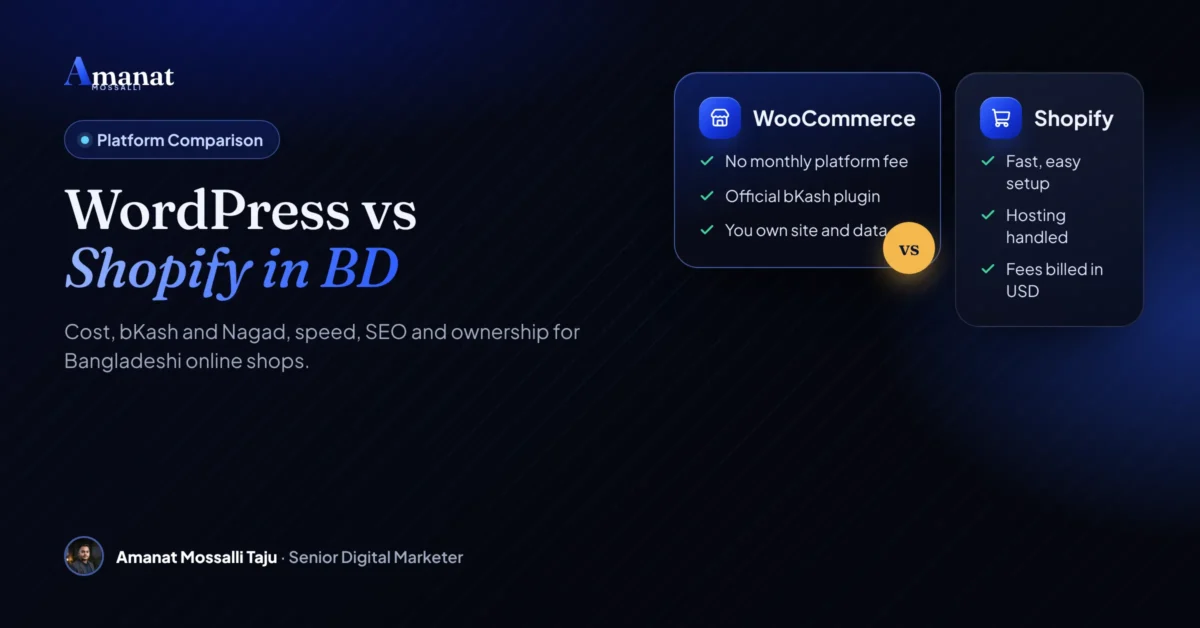
Short answer first. If most of your buyers live in Bangladesh, WooCommerce on WordPress is usually the better choice in 2026. If most of them live abroad, Shopify is often easier. That’s the WordPress vs Shopify in Bangladesh choice in two lines, and the rest of this page is about the exceptions and the money.
The money part surprises people. Shopify Payments doesn’t work here, so every Shopify sale through a local gateway carries an extra Shopify fee, billed in dollars. Meanwhile one plugin many guides still tell you to install, bKash’s own WooCommerce plugin, has been closed on WordPress.org since December 2023. I compare all three options below, including custom code, on what actually matters here: cost, payments, couriers, speed, SEO and ownership. Every published price and fee is linked to the page I checked it on.
WordPress vs Shopify in Bangladesh: What's the Short Answer?
Selling inside Bangladesh? WooCommerce on WordPress is usually the better choice. Selling mostly abroad? Shopify is often easier. Custom code only pays off for marketplaces, apps or truly unusual features.
| Factor | WooCommerce (WordPress) | Shopify | Custom code |
|---|---|---|---|
| Software cost | Free plugin | Monthly plan in USD | Paid build |
| bKash and Nagad | Nagad plugin, or bKash through a gateway | Through gateway apps | Direct API |
| Extra platform fee per sale | None | Yes, 0.6% to 5% by plan | None |
| Hosting | You choose | Included | You choose |
| Ownership | Full | Rented platform | Full |
| Ease for beginners | Medium | Easy | Hard |
| Best for | Most local shops | Export and global | Marketplaces, apps |
The rest of this guide explains each row, so you can decide with your own numbers.
How Does WooCommerce Work Here?
WooCommerce is a free plugin that turns a WordPress site into an online shop. You host it yourself, so you control the server, the data and the code.
A spice-mix seller from Chawkbazar had run her business from a Facebook page for four years. She sold biryani masala, kala bhuna mix and panch phoron packs for home cooks. Last winter she sat with me in her small packing room, laptop on a sack of cumin, comparing the two platforms.
Shopify’s demo looked lovely. Then she searched its app store for bKash and found gateway apps, merchant forms and a note about extra fees. On the WordPress side she found Nagad’s own plugin and SSLCommerz’s, both able to take bKash and Nagad. She closed the Shopify tab. “My customers pay by bKash or cash. That’s the whole decision.” She was mostly right. I’ll come back to the part she missed.
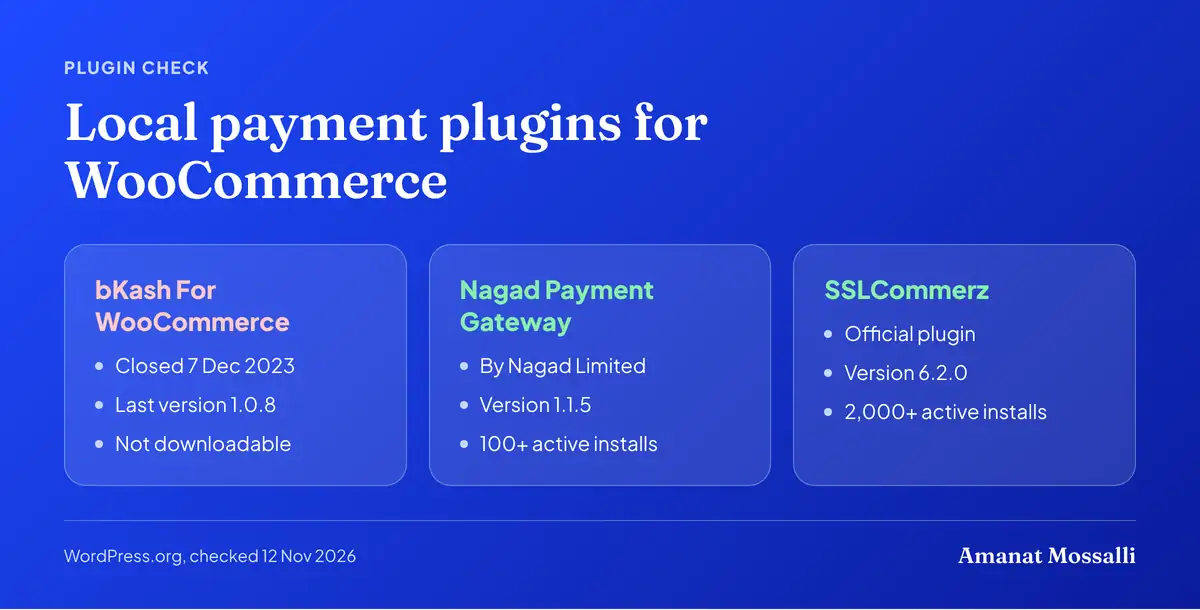
That’s the WooCommerce strength in Bangladesh: local payment companies build for it. Here is where things stand, checked on WordPress.org on 12 November 2026.
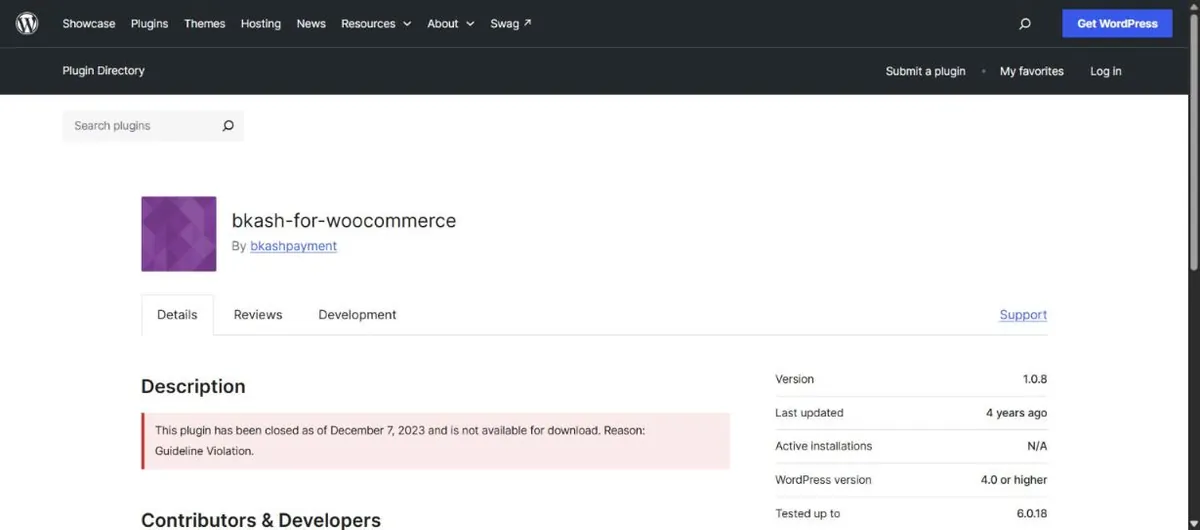
- bKash: the “bKash For WooCommerce” plugin was closed on 7 December 2023 for a guideline violation and can’t be downloaded from the directory. Its last version was 1.0.8. If you want bKash directly, ask bKash for its current integration route. Most shops take bKash through a gateway instead.
- Nagad: a plugin published by Nagad Limited, version 1.1.5, shows 100+ active installs. It needs your merchant ID and keys, and Nagad must whitelist your server’s IP if you host abroad.
- SSLCommerz: the official SSLCommerz plugin, version 6.2.0, shows 2,000+ active installs. It adds cards, mobile wallets and internet banking in one checkout.
One caution. Both the Nagad and SSLCommerz pages warn that the plugin hasn’t been tested with the latest three major WordPress releases. They may work fine. Test on a staging copy before you update a live shop.
There are also plugins for courier booking, SMS order alerts, invoices and Bangla language. Most of what a Dhaka shop needs already exists.
The catch is care. Plugins need updates, backups need checking, and hosting has to be decent. Skip that and the shop slows down or breaks. That’s the part the masala seller missed.
Can You Use Shopify From Bangladesh?
Yes, with limits. The biggest is payments: Bangladesh isn’t on Shopify’s list of supported countries for Shopify Payments.
Shopify Payments is the platform’s own checkout processor. Without it, you connect a third-party payment provider instead, and Shopify charges an extra transaction fee on each sale. Many sellers assume the fee is waived where Shopify Payments isn’t offered. It isn’t. A Shopify staff member confirmed in the Shopify Community that these fees still apply and appear on your Shopify invoice.
Plans are billed in US dollars. Sellfy’s Shopify pricing guide, updated 29 September 2026, lists the prices below. The Starter line comes from Style Factory, updated 24 July 2026.
| Shopify plan | Per month (yearly billing) | Per month (monthly billing) | Fee when using an outside gateway |
|---|---|---|---|
| Starter | Not listed | USD 5 | 5% |
| Basic | USD 29 | USD 39 | 2% |
| Grow | USD 79 | USD 105 | 1% |
| Advanced | USD 299 | USD 399 | 0.6% |
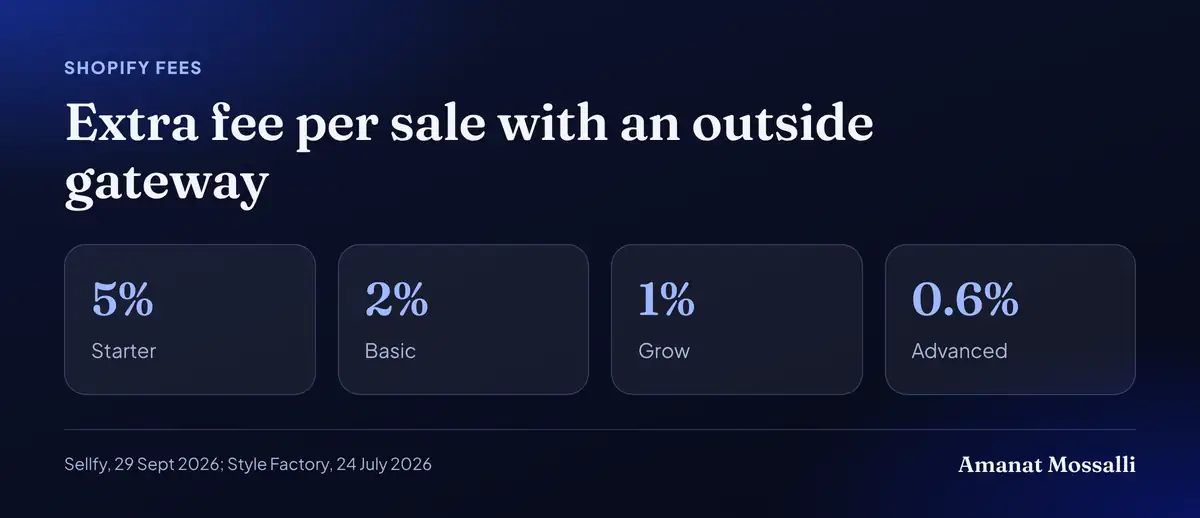
So a Basic shop selling Tk 5,00,000 a month through a local gateway pays about Tk 10,000 in extra platform fees. That’s before the plan price and the gateway’s own cut.
You’ll also need a card that can pay in US dollars every month. Check your bank’s rules on international payments before you commit. (This trips up more sellers than the fees do.)
Prices and fees change. Before you sign up, open Shopify’s own pricing page from Bangladesh and confirm the current plan and transaction fees.
When is Shopify the better pick for a Bangladeshi seller?
When you sell mostly to buyers abroad, want zero server work, or need a store live in days. In those cases the fees buy you real time and peace of mind.
- Export brands. A maker selling to the UK or USA gets a polished checkout that foreign buyers trust.
- Tiny teams. If one person runs the whole business, never updating plugins is worth a lot.
- Fast tests. You can launch a test store quickly and see if a product sells before investing in a custom build.
- Many sales channels. It connects well with global marketplaces and social selling tools.
The other side of the coin came from a cane and bamboo craft workshop in Rangamati. The owner’s cousin in Leeds had been selling their baskets and lamp shades to friends. They wanted a real shop for buyers in the UK and Canada, and nobody on the team wanted to touch a server.
We set up Shopify Basic with the SSLCommerz app, which takes Visa, Mastercard and Amex. It was live in nine days. The 2% fee hurt a little, but their volume was small and every order was in foreign currency. Six months in, they were getting about 20 orders a month, mostly from UK buyers. For them, the fee was cheaper than a developer.
For a seller whose buyers pay with bKash in Sylhet or Bogura, those strengths matter less. Local payments and lower fees matter more.
How Do bKash and Nagad Work on Shopify?
Through a local payment gateway app, not directly. The gateway handles bKash, Nagad and cards, and the store sends the buyer to it at checkout.
Here’s what the Shopify App Store showed when I checked on 12 November 2026:
- SSLCOMMERZ by SSL Wireless, Dhaka. Free to install, launched 3 January 2023. Lists cards, mobile banking and internet banking, plus EMI with most Bangladeshi banks.
- aamarPay, listed by a London app developer. Free to install, but the listing says a minimum annual fee and volume-based fees apply, billed in USD.
- SSLCOMMERZ CHECKOUT, from the same London developer, launched 2 September 2025 with no reviews yet.
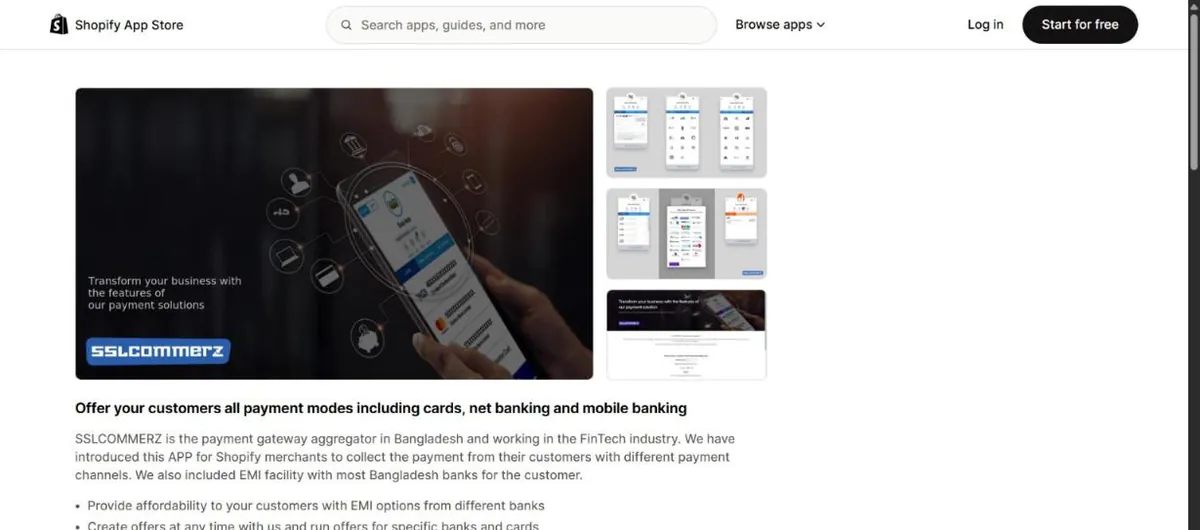
Either way, you need a merchant account with the gateway first. SSLCommerz publishes its own pricing. A non-refundable Basic package costs Tk 25,500. Then you pay 2.5% per successful transaction on standard channels, including bKash, Nagad and Rocket, and 3.5% on Amex. Those gateway charges are the same on WooCommerce. The Shopify fee is the part that comes on top.
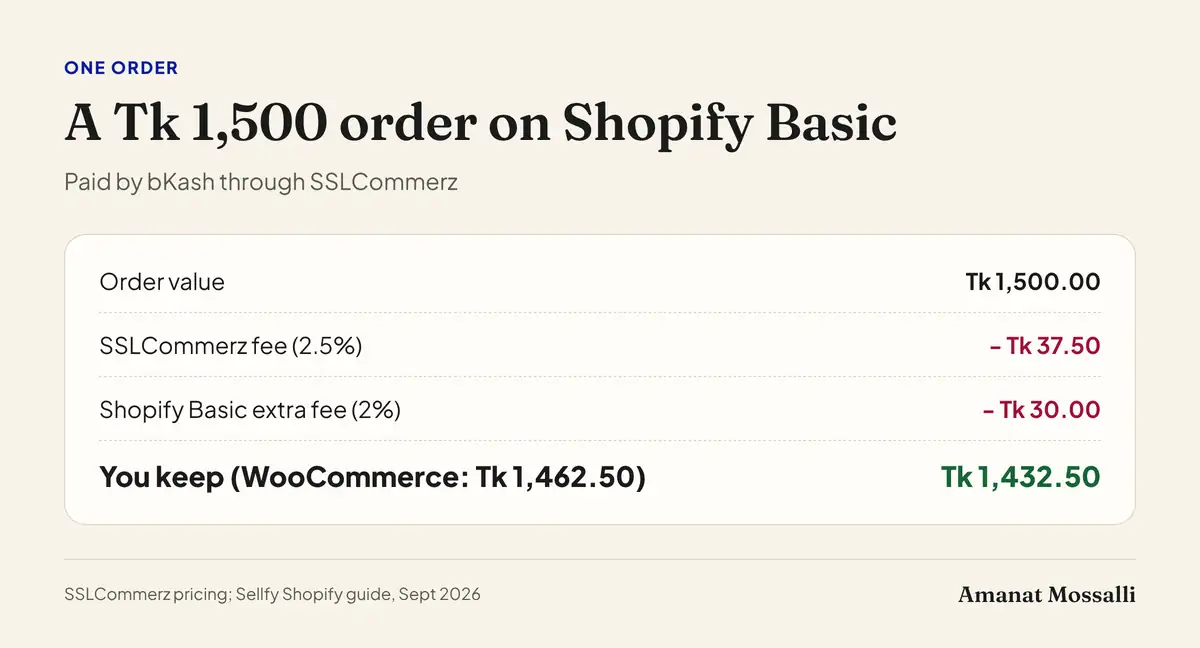
Take a Tk 1,500 order paid through SSLCommerz. The gateway’s 2.5% is Tk 37.50 on either platform. On Shopify Basic, the extra 2% adds Tk 30. You keep Tk 1,432.50 on Shopify and Tk 1,462.50 on WooCommerce.
- 1Apply for a merchant account with the gateway and get approved.
- 2Install the gateway app from the App Store.
- 3Enter your store ID or keys from the gateway.
- 4Run test orders with small amounts before going live.
- 5Remember the extra platform fee on each order paid this way.
Some shops add bKash as a “manual payment” method instead. Buyers send money and type a transaction ID. It works, but someone has to check every payment by hand. I wouldn’t run more than a few orders a day that way. My guide to bKash payment gateway integration covers the merchant side in detail.
Which Is Cheaper Over Three Years?
WooCommerce, for a local shop. There’s no monthly platform fee and no extra fee per sale. Shopify can cost less at the very start, when orders are few.
A rough three-year view for a small shop. The build, hosting and plugin lines are typical ranges, not quotes.
| Cost line | WooCommerce | Shopify Basic |
|---|---|---|
| Build and setup | Usually BDT 50,000 to 1,50,000 | Usually BDT 30,000 to 1,00,000 |
| Platform fee | None | USD 29 to 39 a month |
| Hosting | Usually BDT 5,000 to 30,000 a year | Included |
| Paid plugins or apps | Usually USD 100 to 300 a year | Usually USD 10 to 50 a month |
| Extra fee per sale | None | 2% with a local gateway |
| Gateway fee | SSLCommerz: Tk 25,500 once, then 2.5% | SSLCommerz: Tk 25,500 once, then 2.5% |
A worked example at Tk 3 lakh a month
Say your shop sells Tk 3,00,000 a month and you pay Shopify Basic yearly. I’ll use Tk 125 to the dollar, a round figure close to what card payments cost; your bank’s rate will differ.
- Plan: USD 29 x 36 months = USD 1,044, about Tk 1,30,500.
- Extra 2% fee: Tk 6,000 a month x 36 = Tk 2,16,000.
- Shopify-only total: about Tk 3,46,500 over three years, before apps.
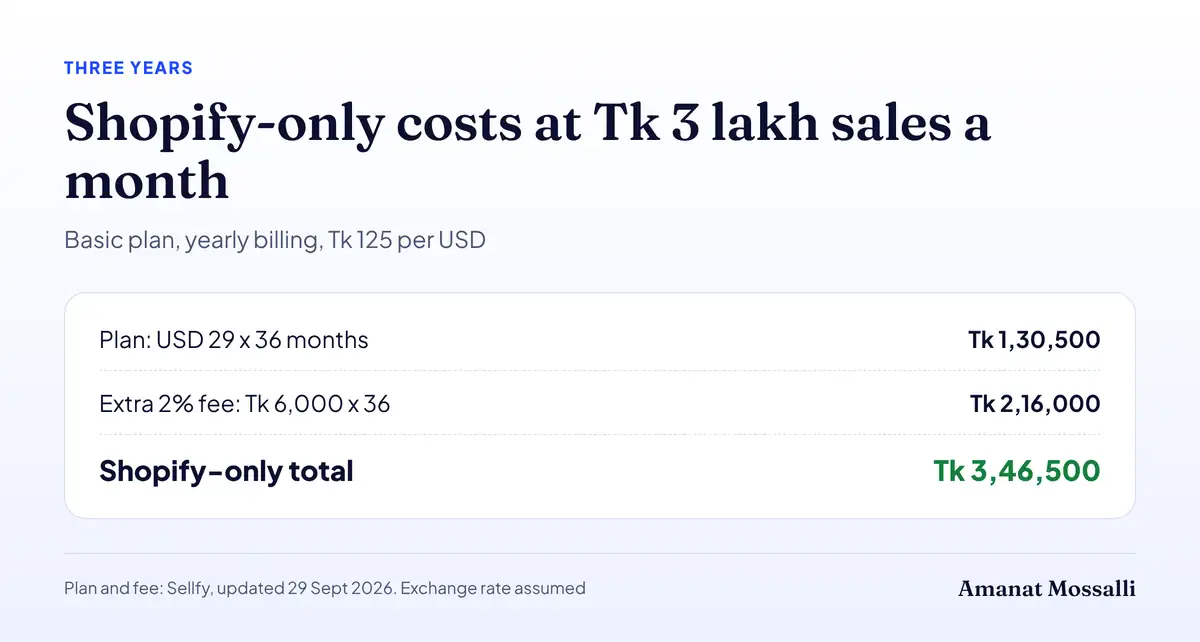
Against that, a WooCommerce shop pays for hosting and care. Even at the top of the typical hosting range, three years cost Tk 90,000. So at this sales level the gap is large, and it grows with every taka you sell.
One more sum for growing Shopify shops. Grow costs USD 50 a month more than Basic on yearly billing, but its fee is 1% lower. The two break even at USD 5,000 of sales a month, about Tk 6,25,000 at Tk 125. Above that, Grow is cheaper.

A 2% fee is Tk 1,000 at Tk 50,000 of sales a month. At Tk 20,00,000 a month it’s Tk 40,000, every single month.
For where local shops are heading, see my guide to the future of e-commerce in Bangladesh. For build prices, see my website development cost guide.
Which Loads Faster for Shoppers on Mobile Data?
Both can be fast. Shopify gets there with no effort. WooCommerce gets there only if it’s built and hosted well.
Speed matters because many buyers here shop on phones with mobile data. Google’s Core Web Vitals page says the main content should load within 2.5 seconds for a good experience.
- Shopify: hosting and a global CDN are built in. Heavy themes and too many apps still slow it down.
- WooCommerce: needs good hosting, caching, compressed images and a light theme. Done right, it loads fast.
- Custom code: can be the fastest of all, if the team knows what it’s doing.
What I see most often: a WooCommerce shop on cheap hosting with a page builder, 40 plugins and huge product photos. The fix is rarely a platform switch. It’s a lighter theme, fewer plugins and smaller images.
Which Ranks Better on Google Here?
WordPress gives you more SEO control. Shopify covers the basics well, but some parts are fixed. Its product, collection and page URLs always carry the /products/, /collections/ and /pages/ prefixes, as community experts confirm in the Shopify Community.
| SEO need | WooCommerce | Shopify |
|---|---|---|
| Custom URLs | Full control | Fixed /products/ and /collections/ |
| Blog for content | Strong, built in | Basic blog |
| Schema and meta | Via SEO plugins | Theme plus apps |
| Bangla content | Easy | Possible |
| Technical access | Full | Limited |
For local search, content wins. A ceiling fan and lighting shop that writes “fan price in Bangladesh” guides will usually beat a shop with only product pages. WordPress makes that kind of content easy.
A word on who’s advising you. I’m Amanat Mossalli Taju, a digital marketer in Dhaka, working on online stores for over seven years. About half my clients sell from the UK, USA, Australia, Canada and Europe. Some of them rank #1 on Google in those markets. So I’ve watched both platforms rank, and stall, from both sides. My guide on SEO for e-commerce in Bangladesh explains what to build first.
Cash on Delivery and Couriers on Each Platform
Both platforms support Cash on Delivery out of the box. The difference is courier links, order checks and how far you can customise the flow.
Most comparisons skip this. Yet COD is still how many buyers here pay, especially outside Dhaka, and fake orders and returns are a real cost.
- WooCommerce: the SteadFast API plugin, published under SteadFast Courier’s own WordPress.org account, shows 8,000+ active installs. It books parcels in bulk and, since version 1.1.0, checks a buyer’s courier history by phone number. A third-party Pathao integration sends orders to Pathao. You can also take a small bKash advance on COD orders.
- Shopify: COD is a built-in manual method. Local courier and SMS links depend on which apps exist for Bangladesh, and the choice is smaller.
- Custom code: anything is possible, but each feature is built and paid for separately.
A pattern I see: a Dhaka shop loses money on COD parcels that buyers refuse at the door. Asking for the delivery charge in advance by bKash often cuts those refusals. That rule is easy to set up on WooCommerce. The masala seller added it in her third month, along with the courier history check. Her refused parcels fell from about one in eight to about one in fifteen.
What Does Each Platform Take Every Month?
Shopify needs less technical care. WooCommerce needs updates, backups and a hosting check, which means an hour or two a month, or a small maintenance fee.
This is the hidden side of the choice. Shopify trades money for time. WooCommerce trades a little time for lower fees and more control.
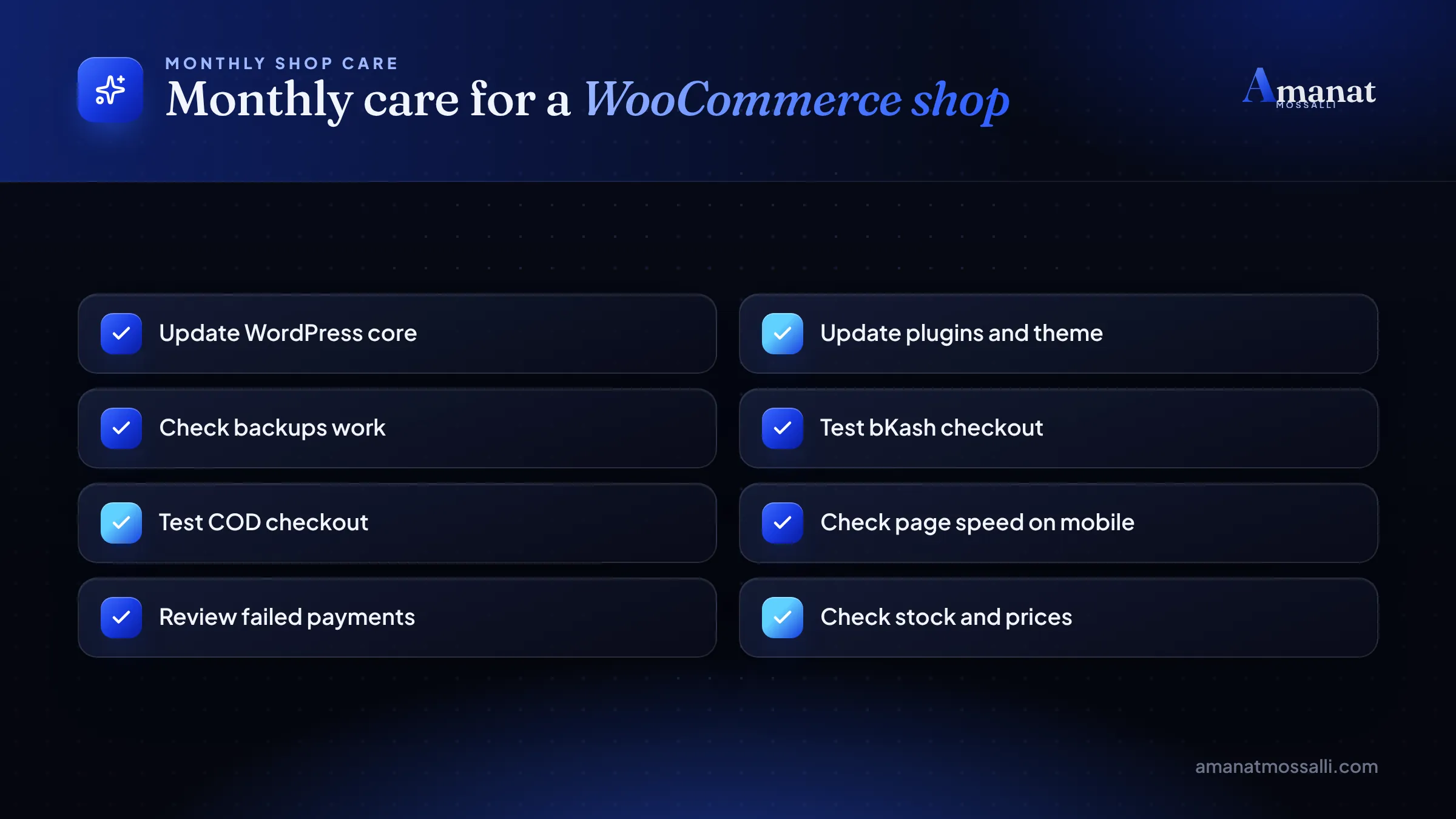
If nobody on your team wants this job, pay for a care plan. It costs less than one lost weekend of orders. The masala seller learned this in her second month. A plugin update clashed with her theme on a Friday, her busiest order day. Her checkout showed a blank page until Saturday afternoon.
Who Owns Your Shop?
On WordPress, you own the site, the files and the data. On Shopify, you own your content and customer data, but you rent the platform.
Renting isn’t always bad. You never worry about servers. But if the platform changes prices or rules, you accept them or move, and moving a big store is real work.
With WooCommerce you can switch hosting companies any time. You can also hire any WordPress developer, and Bangladesh has plenty.
Whatever you choose, keep these in your own name. The domain, the hosting or platform account, the payment gateway merchant account, Google Analytics and the Meta pixel. If a developer or agency leaves, the business keeps running.
Ask your developer for an admin login on day one. If they refuse, that tells you everything you need to know.
Are Local Store Builders Worth a Look?
They can be a quick, cheap start, especially for Facebook sellers. Search “store builder Bangladesh” and you’ll find several local platforms with bKash and courier links built in.
Before you pick one, ask four questions.
- 1Can I export my products, orders and customers if I leave?
- 2Can I use my own domain name?
- 3Which payment gateways are included, and at what fee?
- 4Can I edit page titles, URLs and content for SEO?
Weak answers? Treat it as a starter shop, and plan to move to WooCommerce once sales grow.
Common Mistakes When Choosing
The most common one is choosing by price alone, without checking payments and ownership. These are the others I run into.
- Ignoring the per-sale fee. That extra 2% looks small until sales grow.
- Planning around a closed plugin. Check a plugin’s WordPress.org page before you design checkout around it.
- No merchant account plan. Gateway approval takes time. Apply before launch, not after.
- Too many plugins or apps. Each one adds weight and cost.
- Cheap hosting for a busy shop. A slow checkout loses orders during Eid and 11.11.
- No tracking. Without GA4 and pixel events, you can’t tell which ads make money.
- Locked data. Pick a platform that lets you export everything.
FAQ: WordPress vs Shopify in Bangladesh
Is Shopify available in Bangladesh?
Can I accept bKash on Shopify?
Is WooCommerce free in Bangladesh?
Which is cheaper, WooCommerce or Shopify?
Which platform is better for SEO?
Should I build a custom e-commerce website?
Can I move from Shopify to WooCommerce later?
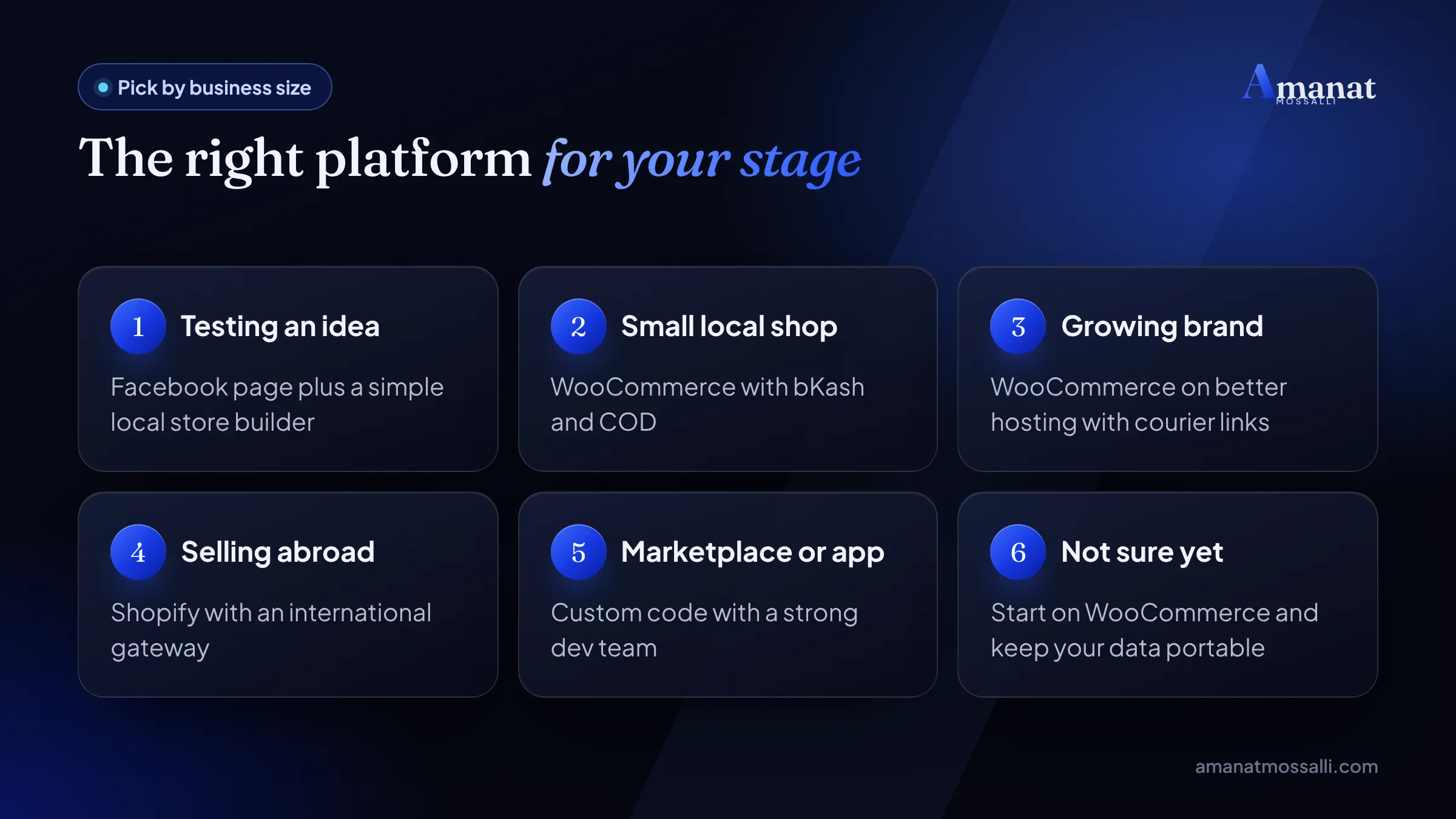
Which Platform Fits Your Stage?
Match your situation to a row. If two rows fit, the one about where your buyers live wins.
| If this is you | Pick | Why |
|---|---|---|
| Facebook seller testing a website | Local builder or WooCommerce | Cheap start, local payments |
| Local shop, buyers pay by bKash or COD | WooCommerce | No platform fee, courier plugins |
| Small team selling mainly abroad | Shopify | No server work, trusted checkout |
| Shopify shop above USD 5,000 a month | Shopify Grow, or move | Basic’s 2% fee overtakes the price gap |
| Marketplace or app-like features | Custom code | Only if no plugin can do it |
Still choosing what to sell? My list of online business ideas in Bangladesh may help.
The masala seller from Chawkbazar is still on WooCommerce. She pays a small monthly care fee now, after that Friday, and calls it the cheapest insurance she has. The Rangamati workshop is still on Shopify. Both were right, because each picked the platform that fit where its buyers live.

Amanat Mossalli Taju
Senior Digital Marketer & SEO Expert, Dhaka, BangladeshI have grown 235+ brands over more than seven years with SEO, Google and Meta Ads, server-side tracking, WordPress and AI automation. Half of my clients are in the UK, USA, Australia and Canada. Everything I write here comes from real client work.
Want this done for your business?
Book a free 15-minute call. I look at your site and ads before we talk, so you leave with clear next steps.