Server-Side Tracking: A Plain-English Guide for Marketers
What server-side tracking changes, where it falls short, what hosting costs in 2026 and whether your business needs it yet.

The first server-side setup I helped launch taught me a line I still repeat to clients. It cleans the pipe. It doesn’t add water.
Server side tracking means your website sends its tracking data to a server you control first. That server then passes it on to Google, Meta and the rest. You decide what each platform receives.
That one change gives you more control, lighter pages and cookies that browsers treat with more respect. It doesn’t create buyers. It doesn’t get around a visitor who said no to tracking. And it can make your numbers worse if one small rule is missed.
This guide covers how it works and what it can’t fix. It also covers the Meta deduplication rules that catch most people, and hosting costs in dollars and taka. Every price and rule below comes from an official page I opened on 12 November 2026.
What Is Server Side Tracking, Really?
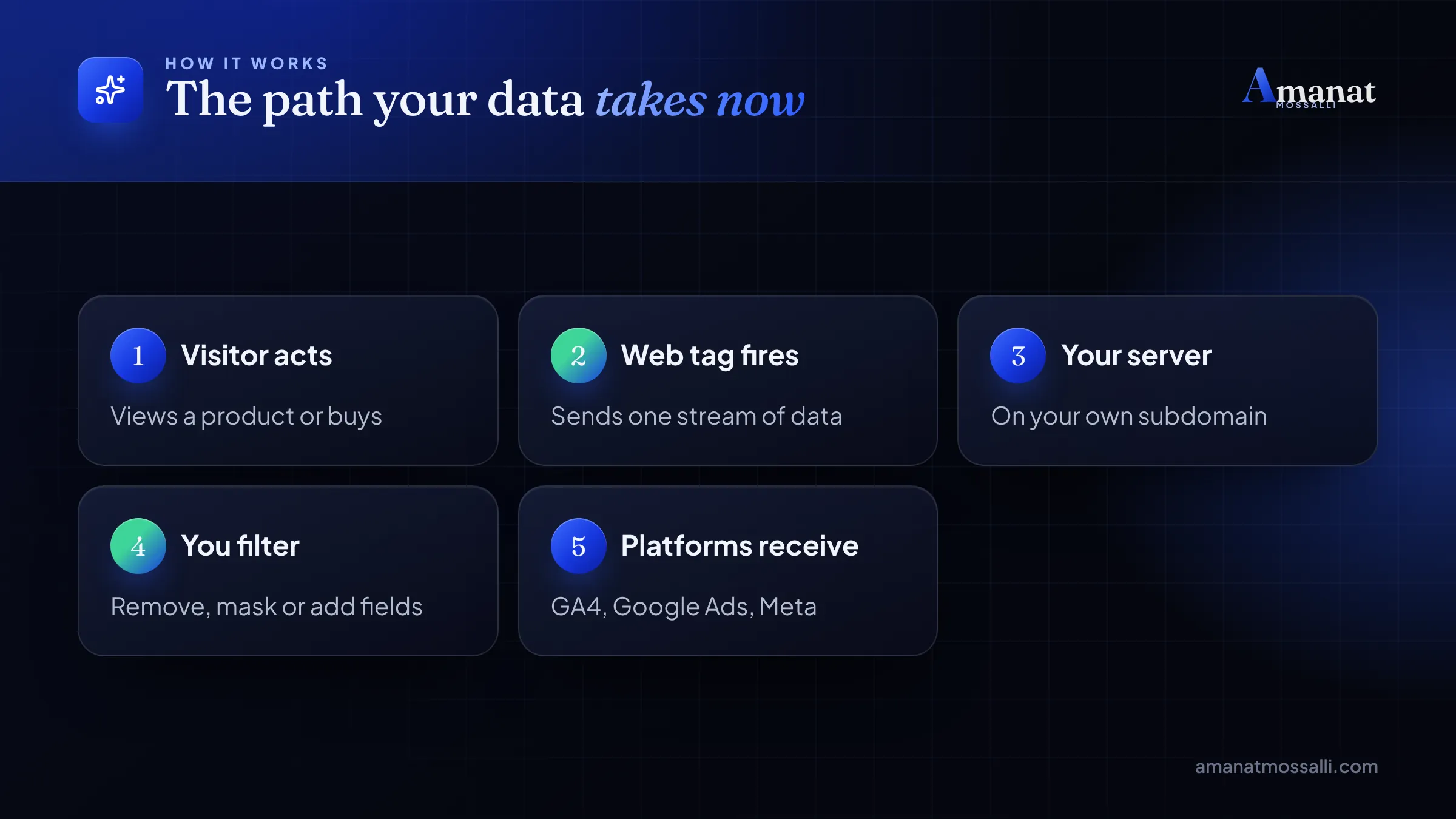
It’s a middle step. Normally your site loads tags from Google, Meta and others. Each tag sends data straight from the visitor’s browser to its owner. With server-side tagging, the browser sends one stream of data to your server. Your server decides what goes where.
In Google Tag Manager, that server is called a server container. People shorten it to server side GTM or sGTM. It usually lives on a subdomain of your site, like data.yourshop.com.
Three words you'll hear
- Client: the part of the server container that receives incoming data, such as the GA4 client.
- Tag: the part that sends data out to a platform, such as GA4, Google Ads or Meta.
- Container: the box holding your clients, tags, triggers and variables, running on a cloud server.
So the order is simple. A visitor acts, your web tag fires once, your server receives it, you filter or add fields, and each platform gets its copy.
Browser Tags vs Server Tags, Side by Side
The difference is who sends the data and from where. Here’s what changes in practice.
| Point | Client-side only | With a server container |
|---|---|---|
| Who sends data to vendors | The visitor’s browser | Your server. |
| Scripts loaded on the page | One per vendor, often many | Fewer, often one main tag. |
| What vendors can see | Visitor’s IP, browser details | What your server passes on. |
| Cookie type | Mostly set by JavaScript | Can be set by your server, HttpOnly. |
| Effect of ad blockers | Vendor domains often blocked | Your own subdomain is blocked less often. |
| Monthly cost | Free | Hosting fee, plus setup time. |
| Upkeep | Low | Moderate, someone must watch it. |
Notice the words “less often” for ad blockers. Some blockers and privacy browsers spot server setups too. Anyone promising 100% data recovery is selling, not explaining.
Server Side Tracking Benefits Worth Paying For
Google’s own server-side tagging fundamentals page names three: privacy controls, site performance and data quality. Here’s what each means for a marketer, plus a fourth I’d add.
Why the cookie part matters
Safari is strict. WebKit’s tracking prevention page says Safari deletes all cookies created in JavaScript after 7 days of no user interaction with the website. A customer who comes back on day 10 can look like a stranger.
Cookies set by your own server in an HTTP response aren’t hit by that rule in the same way. That’s the heart of first party data tracking. There’s a catch, though, covered in the limits below.
For a shop selling to buyers on cheap Android phones and patchy 4G, the speed gain can matter more than the cookies. Every script you drop is less for a slow phone to chew on.
A simple enrichment example
Say you sell cookware online. Your browser sends a purchase worth BDT 3,500. On the server, you look up the profit on that order, say BDT 900. You send BDT 900 as the conversion value to Google Ads instead.
Now bidding chases profitable orders, not just big baskets. Visitors and competitors never see your margins, because the lookup happens on your server.
This is one of the server side tracking benefits that rarely makes the sales pitch. I think it’s the most useful one for stores with mixed margins. Take a BDT 5,000 pressure cooker at 12% margin and a BDT 2,000 knife set at 40% margin. Once profit is the value, the cheaper item is worth more.
What Can't Server-Side Tagging Fix?
Server-side tagging improves data you’re allowed to collect. It doesn’t hand you data you aren’t. Keep these limits in mind before you budget for it.
- It’s not cookie less tracking. It still uses cookies. They’re just set by your own server.
- It doesn’t override consent. If a visitor declines, you should respect that on the server too.
- It won’t fix bad events. A purchase tag firing on the wrong page stays wrong, just faster.
- It doesn’t beat every blocker. Some tools block known tracking paths even on your own domain.
- Setup shortcuts can backfire. WebKit caps server-set cookies at 7 days when it spots third-party CNAME or IP cloaking.
That last point trips up a lot of setups. WebKit’s page covers this too. When it detects third-party CNAME or IP address cloaking, it “caps the expiry of any cookies set in the HTTP response to 7 days”. First-party cloaking gets no cap.
In plain words: if data.yourshop.com points to a server that clearly belongs to someone else, Safari can treat it as third-party. Hosts now offer ways around this, such as same-origin paths like yourshop.com/metrics. Ask yours how they handle it.
What changed in Safari 27.2
One recent fix is worth knowing. Apple’s Safari 27.2 release notes, released 26 October 2026, list a networking fix. Safari had been capping cookies from a page’s own response to seven days when the site’s hostname was CNAMEd to a different domain.
That bug hit ordinary sites on CDNs and hosted platforms, not only trackers. The fix covers cookies set by a top-level page load. The notes say nothing about tracking subdomains or the IP cloaking rule. So I treat a tagging subdomain exactly as before.
I’ll be straight with you. I don’t know how far browsers will push this next year. Nobody outside Apple and Google does. Build for the rules that exist now, and check them every few months.
Pixel Plus Server Events, Without Double Counting
This is where most Meta setups go wrong. Meta recommends running its pixel and the Conversions API side by side. That means the same purchase often reaches Meta twice, once from the browser and once from your server.
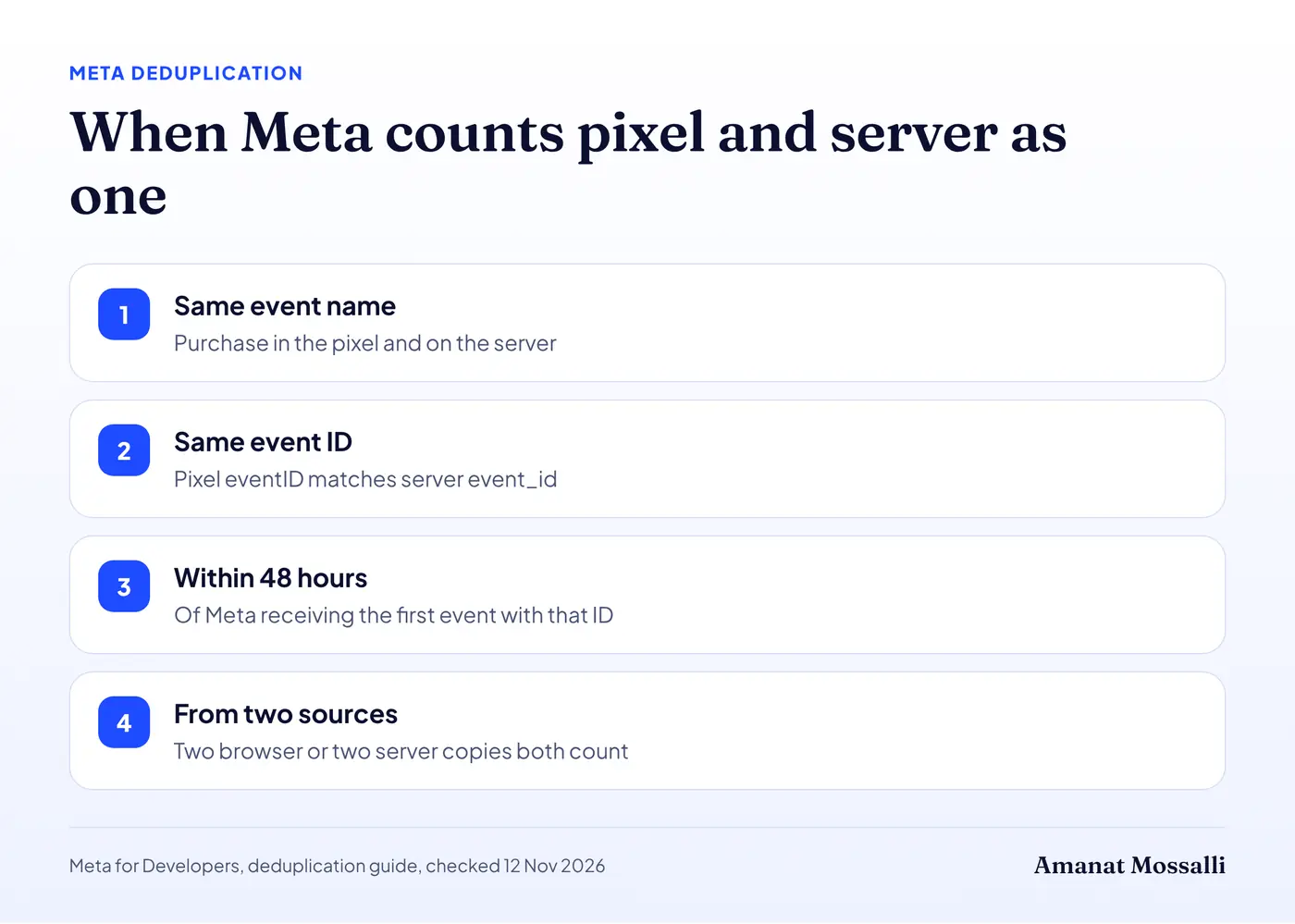
Meta’s deduplication guide (checked 12 November 2026) sets the rules. The pixel’s eventID must match the server’s event_id. The event names must match too, such as Purchase in both. Meta then keeps one copy, usually the first to arrive.
Two more rules matter. Matching only works within 48 hours of Meta receiving the first event with that ID. And Meta doesn’t deduplicate within one source. Two identical browser events both count, and so do two identical server events.
I check deduplication before anything else when I audit an account. I’ve managed more than $8M in Google and Meta ad spend, and doubled purchases are the error I meet most.
A sports supplement shop in Kashimpur sent me a screenshot one night in March, close to midnight. Ads Manager showed 412 purchases that month. WooCommerce showed 236 orders. The owner wanted to know which number to believe before he raised his budget.
A freelancer had set up server-side tagging for him. The server container worked fine. But the theme still loaded the old pixel, and the two copies carried different IDs. Meta saw two separate purchases almost every time.
We passed one order-based ID to both the pixel and the server tag, and kept the event name as Purchase in both. The next month, Meta’s count sat within about 6% of real orders. His reported cost per purchase rose from about Tk 290 to about Tk 480. That was the true number all along. He paused two ad sets that had only looked profitable, and stopped arguing with his bank balance.
For the full Meta side, my guide to the Facebook Conversion API walks through the server event fields. If you’re still on the basic pixel, start with setting up GA4 and the Facebook pixel first.
Stape vs Google Cloud and Other Hosting Options
You can host the server container yourself on Google Cloud, or pay a service to run it. For most small and mid-sized businesses, a hosted service is cheaper and simpler.
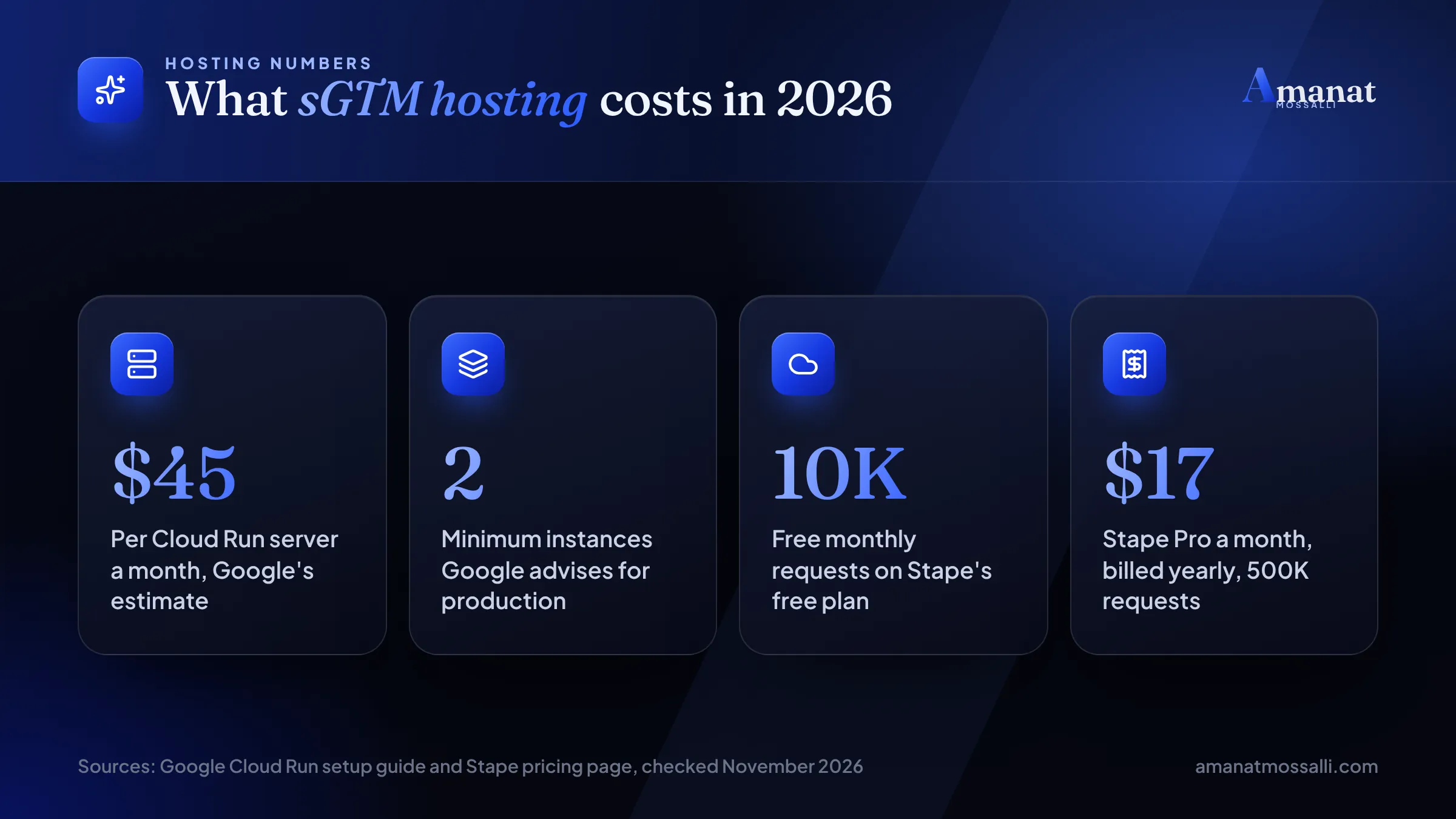
Google’s Cloud Run setup guide recommends at least 2 instances for production. It puts each server at about $45 a month, with 1 vCPU and 0.5GB memory. So a basic live setup starts near $90 a month before traffic grows.
The same guide expects auto-scaling between 2 and 10 servers, handling 35 to 350 requests per second. It also warns that request logging can add cost above about 1 million requests a month, and advises a billing alert. Those two settings save people real money.
| Option | Entry price (checked 12 Nov 2026) | Included | Good for |
|---|---|---|---|
| Google Cloud Run (self-managed) | About $45 per server a month, 2 or more advised | Scales with traffic | Teams with a developer and cloud billing. |
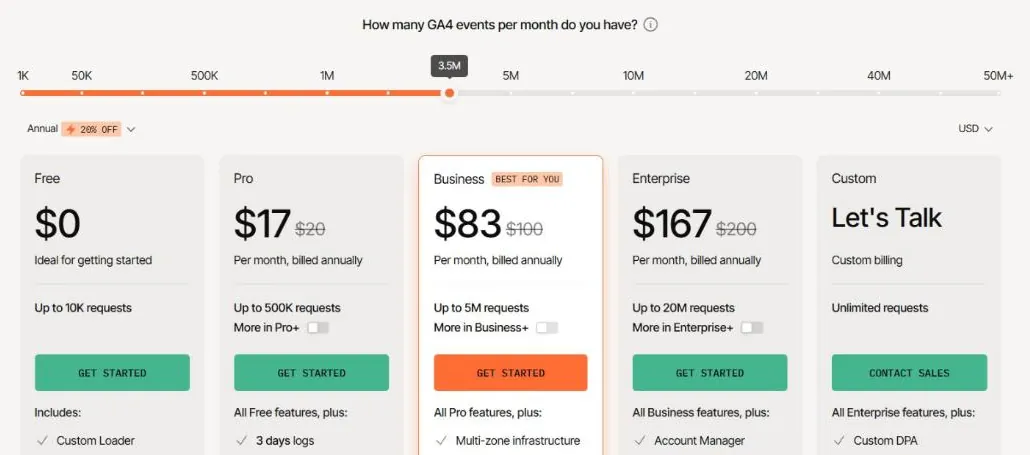
| Stape | Free; Pro $17 a month billed yearly ($20 monthly) | Free: 10K requests; Pro: 500K | Small shops and agencies. |
| Stape Business | $83 a month billed yearly ($100 monthly) | 5M requests | Busy stores. |
| Addingwell | Free; then €90 a month | Free: 100K requests; paid: 1M, then €2.30 per extra 100K | EU-focused brands. |
| TAGGRS | Free; Basic from 22 a month | Free: 10K requests; Basic: 750K | Smaller sites, EUR or USD billing. |
Prices come from Stape’s pricing page, Addingwell’s pricing page and TAGGRS’s price page, all opened on 12 November 2026. TAGGRS shows Basic at 22, 23, 25 or 26 a month, by currency and billing period. Check its page for your exact figure.
What that means in taka
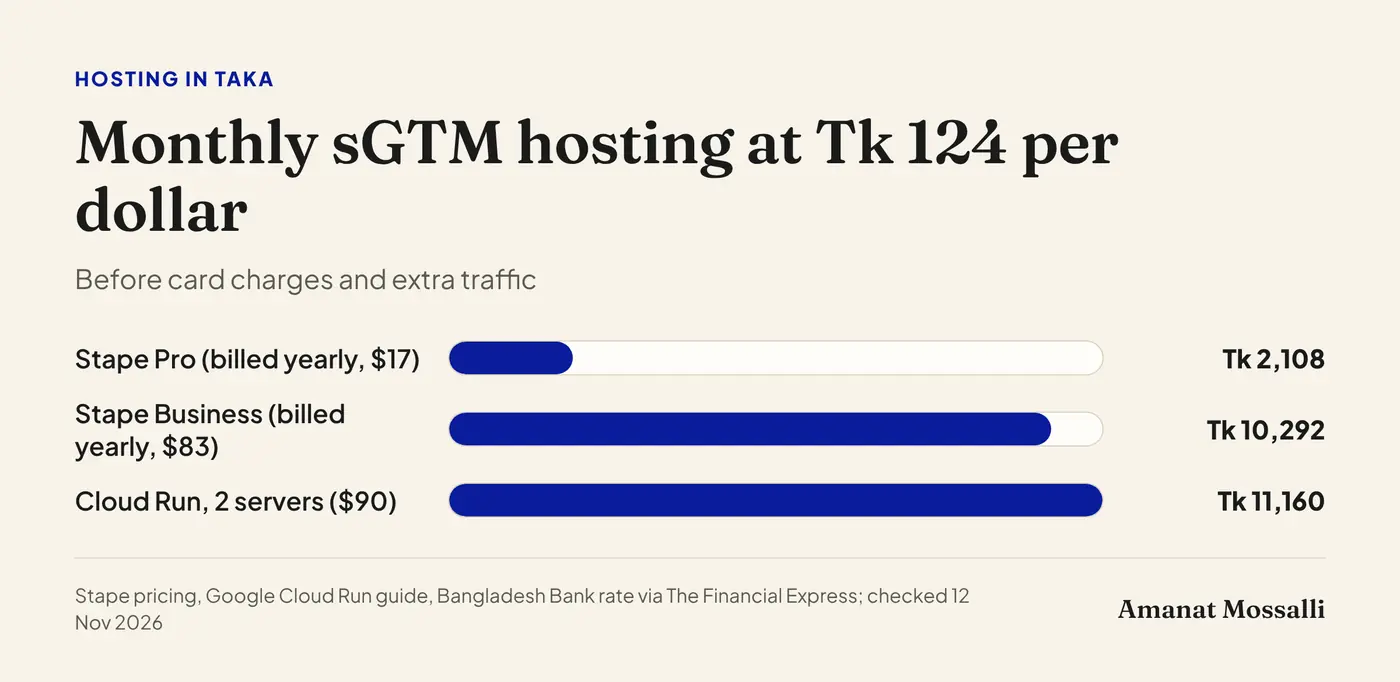
The Financial Express reported Bangladesh Bank’s rate at Tk 124.00 to the dollar at the end of October 2026. At that rate:
- Stape Pro at $17 billed yearly comes to about Tk 2,108 a month.
- Stape Business at $83 billed yearly comes to about Tk 10,292 a month.
- Cloud Run with two servers at $90 comes to about Tk 11,160 a month, before extra traffic.
Your bank or card may add its own foreign transaction charge on top. That’s why I usually suggest a hosted plan unless a client already runs on Google Cloud.
How to estimate your requests
Every event that hits your server is a request. Page views, add-to-carts, purchases, and scrolls if you track them.
Multiply your monthly sessions by the events in a typical session. A shop with 20,000 sessions and about 8 events each lands near 160,000 requests. That’s far past Stape’s free 10K but well inside Pro’s 500K. Leave room for sale seasons like Eid, when traffic can jump for a few weeks.
Five questions to ask any host
- 1Where are your servers, and can I pick a region close to my visitors?
- 2How do you keep my tracking subdomain first-party in Safari?
- 3What happens when I go over my request limit?
- 4Can I export my container and move to another host later?
- 5Do you show logs so I can see failed requests?
The fourth one matters most to me. Your container belongs to you in Google Tag Manager, so moving should be easy. If a host makes leaving hard, pick another.
On the third, Addingwell’s page is clear: extra requests are added to the invoice at the end of the cycle. Stape’s pricing page doesn’t spell out what happens past the limit, so ask before you sign up.
sGTM Setup in Eight Steps
Here’s the sGTM setup I follow, stripped down. Each step has more depth, but this order avoids most of the rework I see.
Which events to move first
Don’t move everything on day one. Start with the events that decide your ad spend, and leave the nice-to-haves for later.
- Purchase or lead. The event your bidding learns from. Move it first and test it hardest.
- Add to cart and begin checkout. Useful signals for shops, and easy to compare with the old setup.
- Page views. High volume, so they drive your request count and hosting bill.
- Scrolls and clicks. Often not worth the extra requests. Keep them in the browser or drop them.
A clinic taking bookings online might only need two events on the server: the booking form and the thank-you page view. That keeps the bill tiny and the setup easy to check. If you’d like help choosing, my tracking and analytics service starts with exactly this kind of event list. For Google’s side of the purchase event, see my guide to Google Ads conversion tracking.
Keep a copy of last month’s GA4 numbers before you switch. Comparing a week of server data with that baseline is the fastest way to spot a missing event.
Where Does Consent Mode Fit In?
Consent is still set in the browser. The server just carries the visitor’s choice forward and acts on it.
Google’s consent mode guide for server-side Tag Manager says you only need to set up consent mode in the web container. The Google tag then adds consent parameters to each request it sends to your server. The server container needs a GA4 client to receive them.
Google’s own tags in the server container read that and adjust. The guide lists how:
| Server tag | Consent signal it reads | When consent is denied |
|---|---|---|
| GA4 | analytics_storage | Basic mode: blocked. Advanced mode: sends cookieless measurements only. |
| Google Ads Conversions | ad_storage | No cookies read or written. Needs a Conversion Linker in the server container. |
| Google Ads Remarketing | ad_storage | Requests and cookies blocked. |
| Floodlight | ad_storage | Requests and cookies blocked. |
The guide says nothing about Meta, TikTok or other vendors. So check how each server template handles consent. Don’t assume it works the same, and add a consent check to the trigger yourself if the template has none.
Bangladeshi businesses selling only at home often skip a consent banner. If you take orders from the UK or Europe, their privacy rules follow those visitors. About half of my clients are in the UK, USA, Australia, Canada and Europe, so I set this up often. Even so, get proper legal advice for your markets, because I’m not a lawyer.
Google Tag Gateway: A Lighter First Step
If you only use Google tags, Google tag gateway for advertisers may be enough. It loads the Google tag from your own domain without a full server container.
Google’s gateway setup guide says it uses your own first-party infrastructure, such as a CDN or load balancer. Cloudflare, Akamai, Fastly and Google Cloud are listed as providers. You need an existing Google tag or Tag Manager container first.
| Need | Tag gateway | Full server-side GTM |
|---|---|---|
| Google tags from your own domain | Yes | Yes. |
| Send data to Meta, TikTok and others | No | Yes. |
| Edit or remove fields before sending | No | Yes. |
| Extra hosting bill | Usually none beyond your CDN | Yes, monthly. |
| Setup effort | Low, often a few clicks on Cloudflare | Moderate to high. |
Google’s guide doesn’t mention a fee, so your cost depends on your CDN plan. Already on Cloudflare? Try the gateway first. Move to full server-side GTM when you need Meta data control or field-level filtering.
Is It Worth It for Your Business Yet?
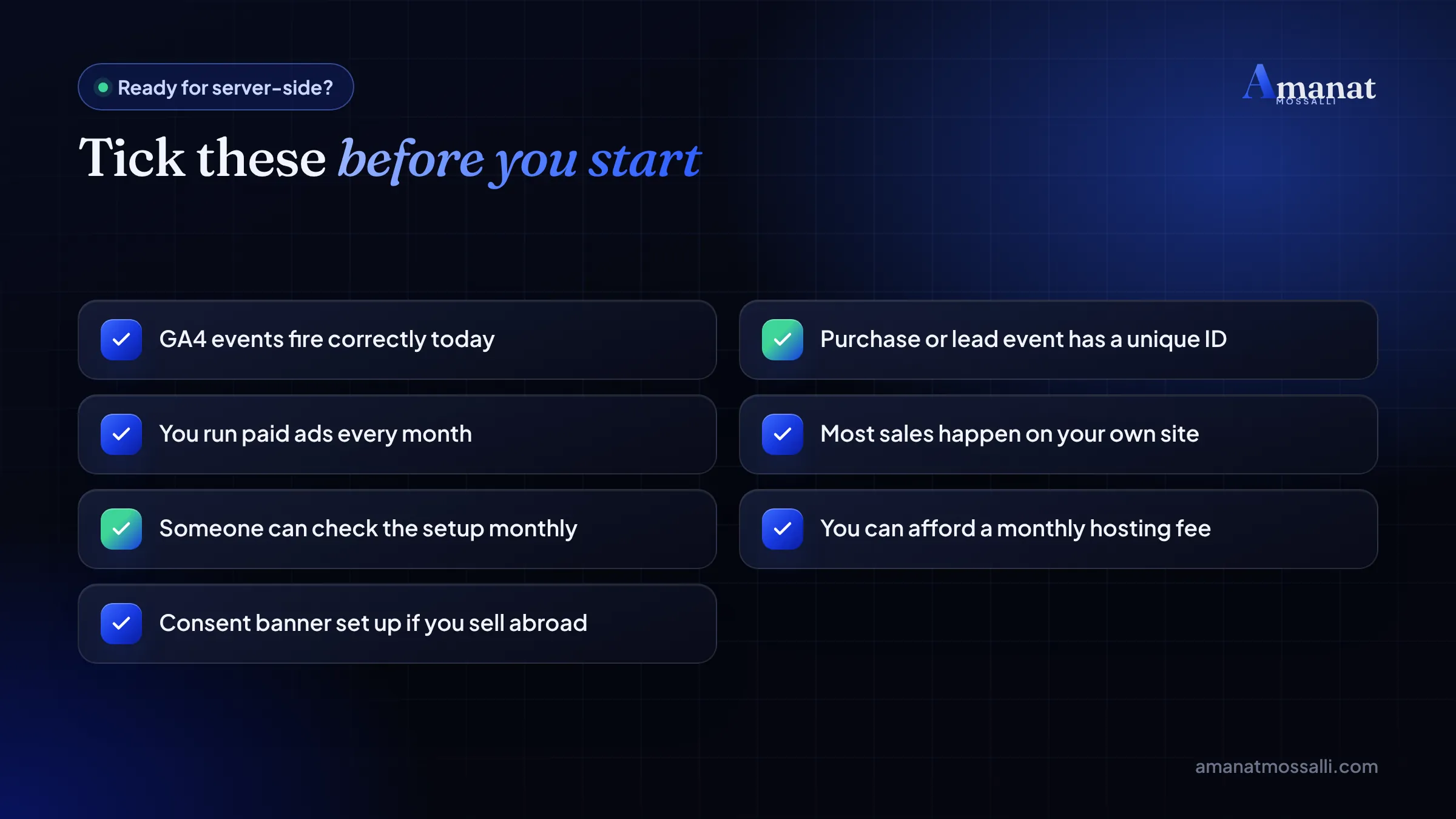
Server side tracking is worth it when you spend steadily on ads and sell through your own website. Not yet when most orders come through Messenger or a phone call.
Here’s the rough rule I use. It’s my judgment, not a published threshold.
| Your situation | My suggestion |
|---|---|
| F-commerce page, orders by inbox | Skip it. Fix lead tracking and order logs first. |
| New website, little ad spend | Get GA4 and basic conversions right. |
| Shopify or WooCommerce store, regular Meta and Google ads | Worth testing on a hosted plan. |
| Selling to UK, US or EU buyers | Worth it, mainly for consent and data control. |
| Large catalogue, several ad platforms | Strongly worth it, with someone watching it monthly. |
The first row is the one people argue with. Here’s why I hold to it.
A lungi maker in Madhabdi asked me last year for a quote on server-side tracking. He’d watched a video saying every serious brand needed it. I opened his numbers on a video call while his looms clattered in the background. His website had about 1,500 visits a month. Nearly all his orders came through Messenger and phone calls from his Facebook page.
A server container would have tracked a website that barely sold. I told him to keep his money. Instead we ran click-to-Messenger ads and added a simple Google Sheet where his staff logged each order with the ad it came from. Three months later he could see which two ads brought most orders. His cost per order fell from roughly Tk 260 to about Tk 200. No server needed.
A slow site is often the bigger leak. Run your homepage through my free SEO audit tool for a quick health check before you add any new tracking layer.
Before you spend on any of this, it’s worth reading the digital marketing mistakes I see Bangladeshi businesses make. Several are tracking problems in disguise. My breakdown of Facebook ads cost in Bangladesh shows why clean purchase data changes what you pay per sale.
Setup Mistakes That Waste the Hosting Fee
Most failed projects fail in the same few places. Check yours against this list.
- 1Keeping the old browser pixel and adding a server tag, without matching event IDs and event names.
- 2Using the host’s default URL instead of your own subdomain or same-origin path.
- 3Never testing in Safari or on an iPhone.
- 4Forgetting the Conversion Linker in the server container for Google Ads.
- 5Sending full emails or phone numbers to vendors without hashing or consent.
- 6Leaving request logging on for a busy Cloud Run server, with no billing alert.
- 7Setting it up once and never checking the hosting logs or request count again.
None of these are hard to fix. They’re just easy to miss when the setup feels finished.
A Seven-Day Test for Any Tracking Setup
Whether you already have server-side tagging or you’re about to pay for it, run this test. It needs no tools beyond what you already log into.
- 1Day 1: write down last week’s real orders or leads from your shop or CRM.
- 2Day 1: write down what GA4, Google Ads and Meta reported for the same week.
- 3Day 2: place one test order on an iPhone in Safari, and one on Android in Chrome.
- 4Day 2: check Meta’s Events Manager. Each test order should show once, marked as deduplicated.
- 5Day 7: compare the week again. Platform numbers within about 10% of real orders are healthy.
That 10% is my working rule, not a published standard. A gap far above it means something is counted twice or missed. A gap close to zero on Meta usually means deduplication is working.
If the numbers match, you may not need to spend another taka. If they don’t, you now know exactly where to look. That’s the whole point of server side tracking: reports you can put next to your bank statement without wincing.
Server Side Tracking: Quick Answers
What is server side tracking in simple words?
Is server-side tagging the same as server side GTM?
Does server-side tracking get around ad blockers?
How much does server-side tracking cost?
Is server-side tracking legal under GDPR?
Do I still need the Meta pixel with server-side tracking?
Is server-side tracking cookieless?

Amanat Mossalli Taju
Senior Digital Marketer & SEO Expert, Dhaka, BangladeshI have grown 235+ brands over more than seven years with SEO, Google and Meta Ads, server-side tracking, WordPress and AI automation. Half of my clients are in the UK, USA, Australia and Canada. Everything I write here comes from real client work.
Want this done for your business?
Book a free 15-minute call. I look at your site and ads before we talk, so you leave with clear next steps.