How to Set Up GA4 and Facebook Pixel on WordPress, Step by Step (2026)
A plain walkthrough for WordPress and WooCommerce: Tag Manager, GA4, Meta Pixel and Conversions API, with the WhatsApp, call and COD order events a Bangladeshi business actually needs.

Forty browser tabs and a plugin for everything. That’s what the internet hands you when you ask how to set up GA4 and Facebook Pixel. Ignore most of it.
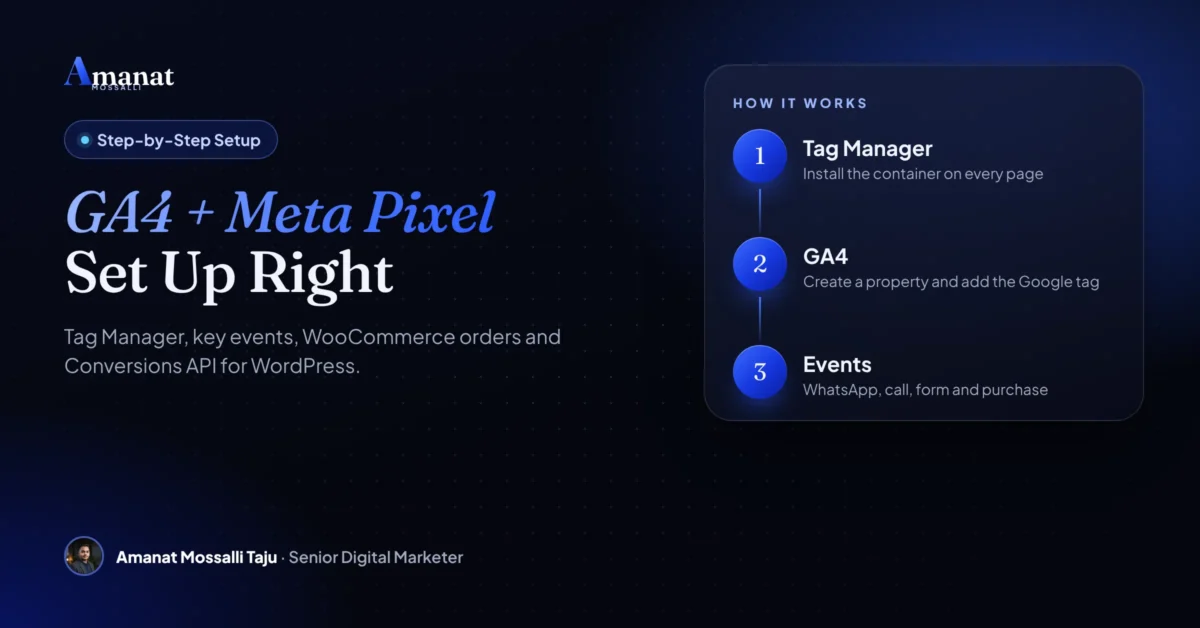
The clean order on WordPress is this. Install Google Tag Manager once. Add GA4 and your key events through it. Connect the Meta Pixel and Conversions API. Then test every event before you spend a taka on ads.
Everything below is tuned for how Bangladeshi businesses earn. That means WhatsApp clicks, phone calls, lead forms and WooCommerce orders, cash on delivery included. I reread every Google and Meta page I cite on 11 November 2026.
Before You Start: Four Logins and Two Hours
You need admin access to four things and about two hours. Gather the logins first so you don’t get stuck halfway through.
Use a business email you control, not a freelancer’s account. If someone else owns your tracking, your history leaves when they do.
I’m Amanat Mossalli Taju. I’ve led digital marketing for agencies in Bangladesh and abroad. Much of this guide comes from cleaning up tracking I inherited, not from building on a blank site.
Pick one installation method for each tool. Two GA4 plugins, or a pixel added by both a plugin and Tag Manager, will double your numbers.
The Right Order to Set Up Tracking
Container first, then analytics, then events, then the pixel and server tracking. Testing comes last. It is never optional.
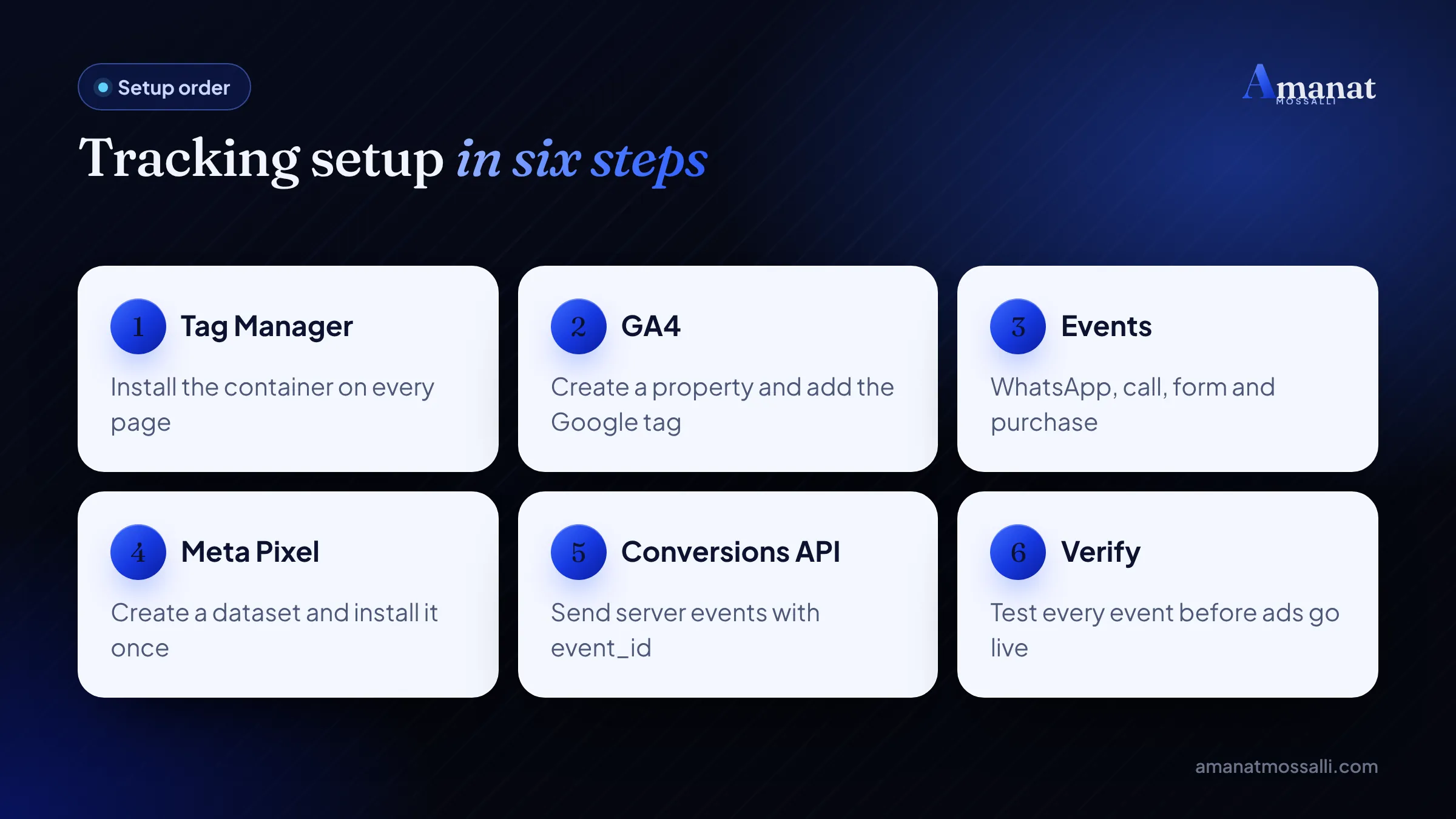
In a hurry? Do steps 1 to 4 today. Add Conversions API this week, before you scale any Meta campaign.
Plugin or Tag Manager?
Tag Manager for GA4 and custom events. A trusted plugin for WooCommerce order data and the Meta Pixel. That mix gives you control without writing code.
| Method | Good for | Watch out for |
|---|---|---|
| Google Tag Manager | GA4, WhatsApp and call clicks, form events | Needs testing in Preview after every change |
| Plugin only | Fast start for small sites | Less control, and some plugins add tags twice |
| Meta for WooCommerce | Pixel, catalog sync and shop events | Do not also add the pixel in GTM |
| Hard-coded in theme | Developers with a child theme | Breaks on theme updates if done wrong |
Whatever you choose, write it down. A one-page note saves hours the next time someone touches the site. I give you a template for that note at the end.
Most guides skip this choice. It’s why so many Bangladeshi sites end up with duplicate tags after two or three freelancers have passed through.
Step 1: Install Google Tag Manager on WordPress
Create a Tag Manager account and a Web container. Then add its two code snippets to every page. After that, new tags go inside Tag Manager instead of into your site.
- 1Go to tagmanager.google.com and create an account with your business name.
- 2Create a container, choose Web, and enter your domain.
- 3Copy the two snippets Google shows you. Your container ID starts with “GTM-“.
- 4Paste the first snippet as high as possible inside the
<head>, and the second right after the opening<body>tag.
That placement comes from Google’s Tag Manager setup guide. On WordPress, the easiest route is a header and footer code plugin, or a GTM plugin that only asks for your GTM- ID.
Don’t paste code into your theme’s header.php file. A theme update wipes it, and your tracking stops without a word of warning. I’ve found this on more inherited sites than I can count.
This Google Tag Manager setup is a one-time job. Every tag after this lives inside the container.
Three words you will meet all day
- Tag. A piece of code that sends data somewhere. The GA4 event tag is one.
- Trigger. The rule that decides when a tag fires. “A click on a wa.me link” is one.
- Variable. A value the tag or trigger reads. Click URL and order total are two.
That is most of Tag Manager. If a tag misbehaves, the fault is nearly always in its trigger.
Step 2: GA4 Through Tag Manager
Create a GA4 property and add a web data stream. Then load it on every page with a Google tag in Tag Manager. It takes about ten minutes.
- 1In Google Analytics, go to Admin and create a property. Set the time zone to Bangladesh and the currency to BDT.
- 2Add a Web data stream for your domain. Copy the Measurement ID, which starts with “G-“.
- 3Leave enhanced measurement on. It collects several events without extra work.
- 4In Tag Manager, add a new tag: Google Tag. Paste your G- ID and use the trigger Initialization – All Pages.
- 5Click Preview, open your site, and check that the Google tag fires. Then click Submit to publish.
What enhanced measurement gives you for free
Google’s enhanced measurement page lists seven options. It helps to know them, so you don’t rebuild what already exists.
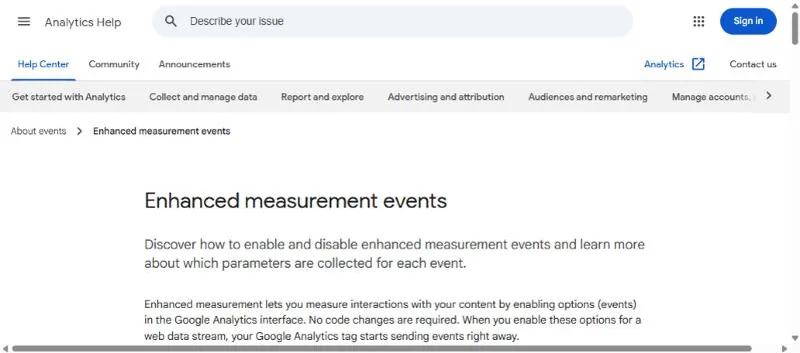
| Option | Event name | When it fires |
|---|---|---|
| Page views | page_view | Each page load. Always on |
| Scrolls | scroll | The first time a visitor reaches 90% of the page depth |
| Outbound clicks | click | A click on a link to another domain |
| Site search | view_search_results | A results page with a search parameter such as s or q |
| Video engagement | video_start, video_progress, video_complete | Embedded YouTube videos with JS API support |
| File downloads | file_download | A click on a link to a common file type |
| Form interactions | form_start, form_submit | First touch on a form, and form submission |
Two warnings from experience. The automatic form_submit event doesn’t know whether the form succeeded. And a generic “click” tells you nothing about WhatsApp. That’s why you build your own events in step 3.
Change one setting most people miss
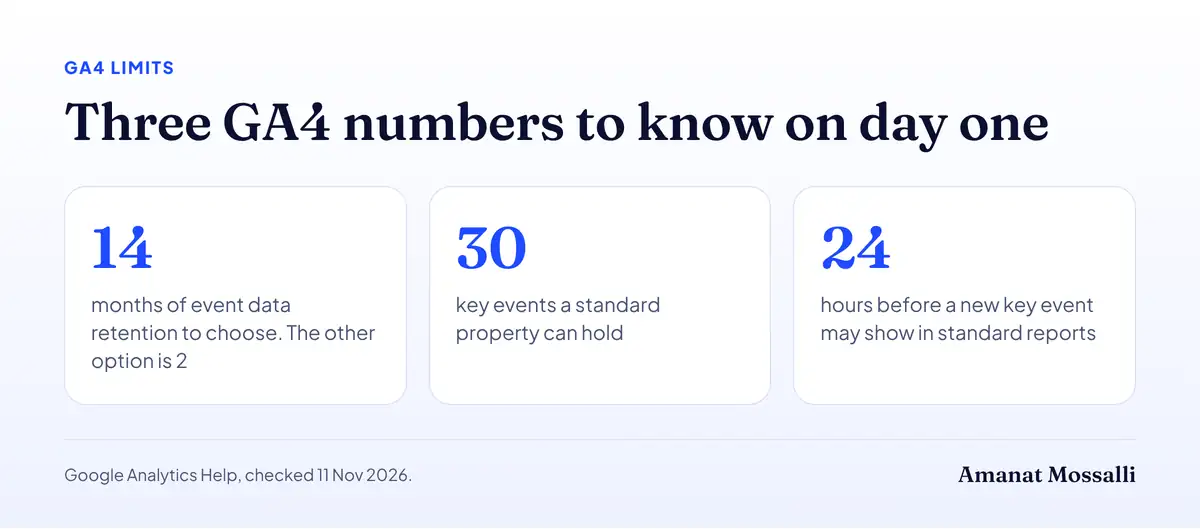
Open Admin, then Data retention. Google’s data retention page says a standard property can keep event data for 2 or 14 months. Choose 14.
The setting only affects explorations and funnel reports. Standard reports are not touched. Google also says an increase applies to data you’ve already collected and not yet deleted. So change it on day one, before two months of detail has gone.
New to analytics? GA4 for small business doesn’t need to be complicated. You need the right events and two or three reports, which come further down.
Step 3: Which GA4 Events Should a Bangladeshi Business Track?
The actions that lead to money. For most local businesses that’s WhatsApp clicks, call clicks, form submissions and orders.
Good event tracking in GA4 uses clear names. Google’s recommended events list includes names like generate_lead and purchase. Use those where they fit, and simple custom names for the rest.
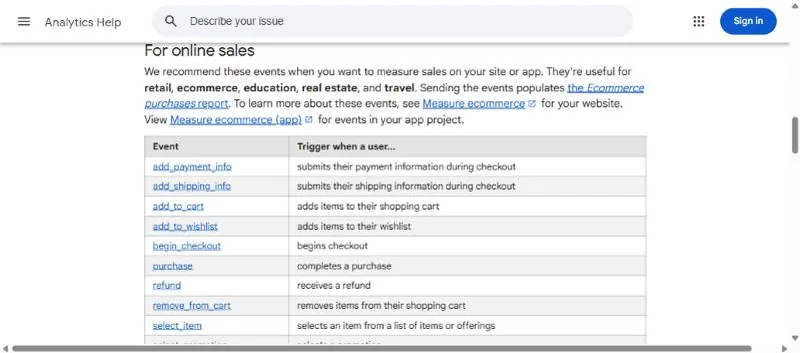
| Action | GTM trigger | GA4 event name | Meta event |
|---|---|---|---|
| WhatsApp button click | Click URL contains wa.me or api.whatsapp.com | whatsapp_click | Contact |
| Phone number click | Click URL starts with tel: | call_click | Contact |
| Lead form sent | Form success message or thank-you page | generate_lead | Lead |
| Messenger click | Click URL contains m.me | messenger_click | Contact |
| WooCommerce order | Purchase data on the order-received page | purchase | Purchase |
Why Contact for WhatsApp and calls? Meta’s pixel reference describes Contact as a person reaching your business by phone, SMS, email or chat. That is exactly what a WhatsApp tap is.
How to track a WhatsApp click in Tag Manager
Repeat the pattern for calls with Click URL starts with tel:. Plenty of WhatsApp buttons use api.whatsapp.com instead of wa.me, so add a second condition if yours does.
One honest limit. A click is not a conversation. The event tells you someone tapped the button, not that they sent a message. Treat it as a strong signal, and count real enquiries in WhatsApp itself.
Lead form tracking that does not lie
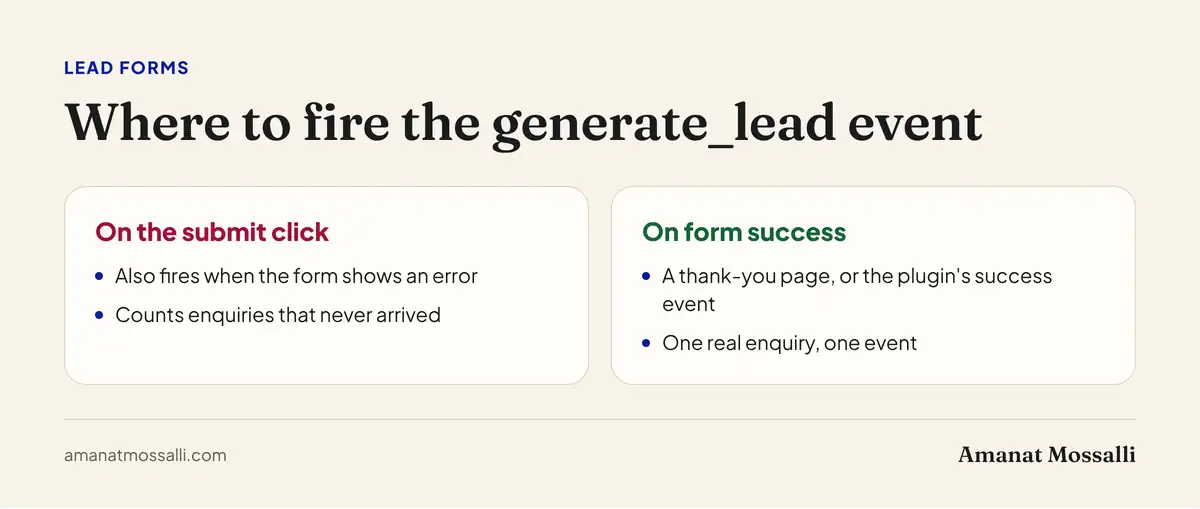
Fire on success, not on the submit click. A submit click also fires when the form throws an error. The best trigger is a thank-you page or the form plugin’s own success event.
I learned to check this early. An IELTS coaching centre in Farmgate hired me after its GA4 showed about 140 leads a month. The front desk had logged about 90 real enquiries. Nobody could explain the gap.
Their trigger fired on the submit button. Every time the form rejected a phone number with a missing digit, GA4 counted a lead. The student then tried again and was counted twice. We moved the trigger to the plugin’s success event.
The next month, GA4 and the front desk were within a handful of each other. Their real cost per lead turned out near Tk 260, not the Tk 170 they had been reporting. Less flattering, but now they could plan with it.
If you follow leads up by phone, GA4 has names for the later stages too. The same recommended list includes qualify_lead and close_convert_lead. Few small businesses need them on day one. It’s good to know the names exist before you invent your own.
Mark the events that matter as key events
In GA4, go to Admin, Events, and click the star next to each important event. Google’s help page says a standard property can hold up to 30 key events. The change only applies from that moment on.
The same page says standard reports can take up to 24 hours to show a new key event. Realtime shows it within minutes. So don’t panic at an empty report on day one.
Step 4: WooCommerce Purchase Tracking
Use a WooCommerce tracking plugin that pushes order data into the data layer. Then send it to GA4 as a purchase event. Don’t hand-code it unless you’re a developer.
The data layer is just a list the page keeps for Tag Manager to read. The plugin writes the order into it. Tag Manager picks it up and passes it on.
Google’s missing revenue help page lists what a purchase event needs. Check yours against it.
| Parameter | What to send | Common local mistake |
|---|---|---|
| transaction_id | The WooCommerce order ID | Left empty, so a page reload counts again |
| value | A plain number, such as 1850 | Sent as text with a ৳ or Tk symbol |
| currency | The three-letter code BDT | Left as USD from a theme demo |
| items | Each product with item_id or item_name | Missing, so product reports stay empty |
The transaction ID stops GA4 counting one order twice when a buyer reloads the thank-you page. The currency code matters more than it looks. A Tk 1,850 order sent as USD turns into a very exciting revenue report.
The doubled-purchase trap
A shoe seller with a small office in Badda called me one Saturday, very pleased. Ads Manager showed his best week ever, with a return on ad spend near 5. He wanted to triple the budget before Eid.
I asked him to open WooCommerce in another tab. The order list showed about half of what Ads Manager claimed. His theme had a built-in pixel option, switched on. A previous freelancer had also added a pixel plugin. Every purchase fired twice.
Then came the second surprise. About one in five of his real orders were cash on delivery parcels the courier later brought back. Counted on delivered orders, his return on ad spend was closer to 2. He went quiet for a while.
We removed the theme pixel and used order IDs as event IDs. He didn’t triple anything that month. He raised the budget by about a third, only on the two ads whose buyers kept their shoes. Two months later his delivered ROAS was around 2.8, and this time the number was real.
The cash on delivery problem
Many orders here are cash on delivery. The purchase event fires when the order is placed, not when it’s paid. Some of those orders get cancelled, refused at the door or sent back.
So read GA4 and Meta purchase numbers as orders placed. Each month, compare them with delivered orders from your courier or WooCommerce status. That gap is your real return rate. It’s usually bigger than owners expect.
GA4’s recommended list also has a refund event. Some WooCommerce tracking plugins send it when you mark an order refunded. Check whether yours does. If it doesn’t, a monthly spreadsheet comparison is honest enough.
Running an online store? My guide on why SEO matters for e-commerce in Bangladesh pairs well with this setup. Good tracking shows which free traffic sells too.
Step 5: Facebook Pixel on WordPress
Create a dataset in Meta Events Manager, then install it with one method: a plugin or Tag Manager. Meta now calls the pixel a dataset, but the Pixel ID works the same way.
- 1Open Meta Events Manager and click Connect data.
- 2Choose Web, name your dataset, and note the Pixel ID.
- 3Pick your install method. For WooCommerce, Meta’s own plugin, Meta for WooCommerce, connects the pixel and syncs your product catalog.
- 4For a non-shop site, add the pixel base code in Tag Manager as a Custom HTML tag on All Pages. A pixel plugin works too.
- 5Add standard events: Contact for WhatsApp and call clicks, Lead for forms, Purchase for orders with value and currency.
Meta’s pixel reference is strict about one thing. Purchase must carry both currency and value. Send BDT and the order total, or the event is of little use to the ad system.
A word on the Meta for WooCommerce plugin. Its plugin listing names Facebook as the author. The WordPress.org page showed 400,000+ active installations when I looked on 11 November 2026. It asks for WordPress 5.6 or higher and PHP 7.4 or higher.
The same page showed a rating of 2.1 out of 5 from 480 reviews. Several recent reviews complain of heavy server load during catalog sync. So test it on cheap shared hosting before you trust it. If your site slows down, a lighter pixel plugin is a fair choice. Just keep to one method.
A simple Meta Pixel setup on WordPress is enough to start ads. A browser pixel alone now misses a share of conversions, though. Hence step 6.
Step 6: Add the Conversions API
The Conversions API sends events from your server straight to Meta. It catches conversions the browser pixel misses because of ad blockers, browser limits and iPhone privacy settings.
Since iOS 14.5, Apple’s App Tracking Transparency lets iPhone users stop apps tracking them across other apps and websites. Server events fill some of that gap.
Three ways to add it
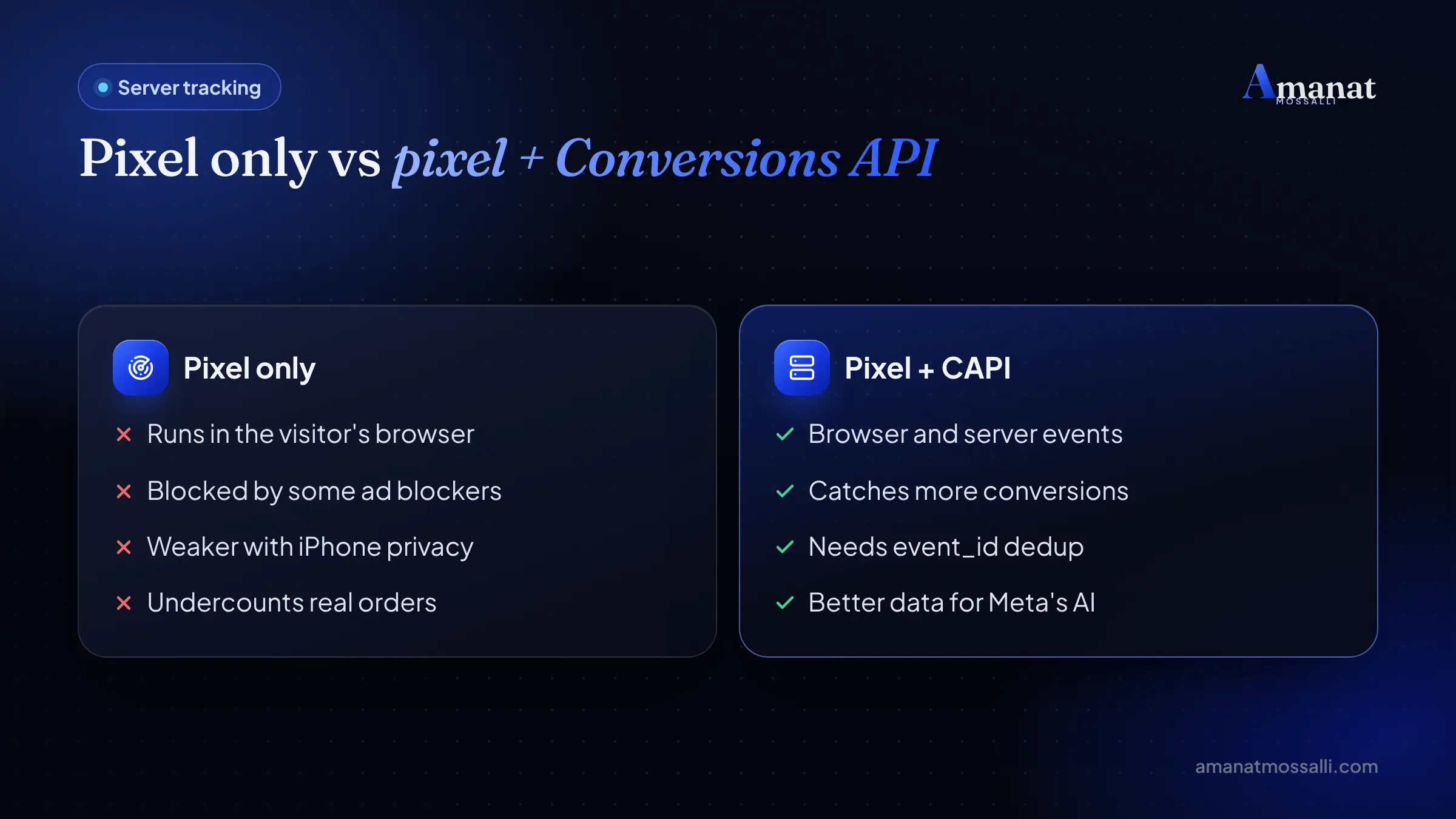
- Plugin: Meta for WooCommerce and several pixel plugins can send server events for you.
- Conversions API Gateway: Meta’s hosted option, set up from Events Manager on a cloud account.
- Server-side Tag Manager: the most control, but needs a developer and hosting.
For most small shops here, the plugin route is enough. I only move a client to a server container when ad spend is large enough to justify the hosting bill.
Deduplication: the step that prevents double counting
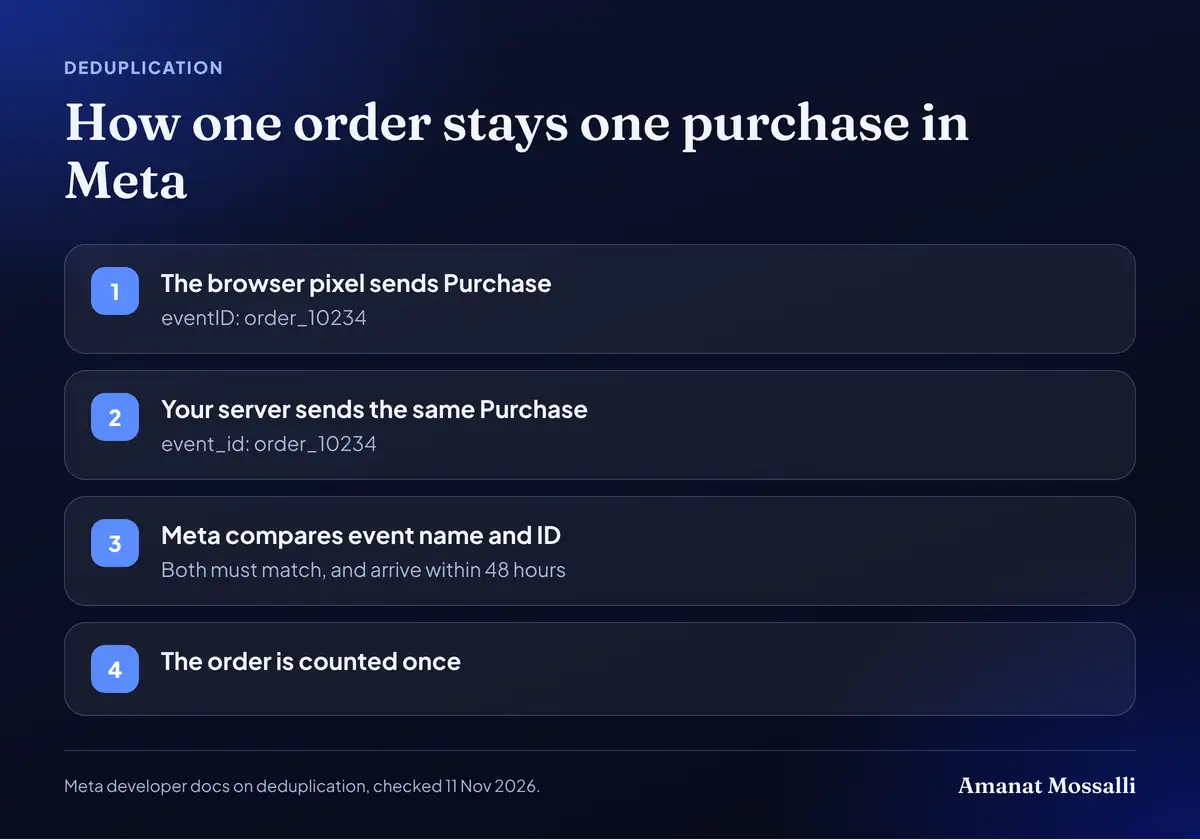
When the pixel and the server both send the same purchase, Meta must know it’s one order. Meta’s developer docs say the browser eventID must match the server event_id, and the event names must match. Meta deduplicates matching events that arrive within 48 hours.
On the browser side, the ID travels as the fourth argument of the pixel call. It looks like this: fbq('track', 'Purchase', {value: 1850, currency: 'BDT'}, {eventID: 'order_10234'}).
For a WooCommerce order, the order ID makes a good event_id. A good plugin does this for you. In Events Manager, the event overview shows whether deduplication is working.
Event match quality, in one minute
Events Manager gives each event a match quality score out of 10. Meta’s Conversions API best practices explain why it matters. Only matched events can be used for attribution and ad delivery.
The score rises when the server event carries customer details. Meta names email, phone, first and last name, and IP address as useful ones. They must be hashed before sending. Plugins and Meta’s own SDKs do the hashing for you.
For a cash on delivery shop, phone number is your best asset. Every order has one. Make sure the checkout phone field reaches the server event.
Tell customers what you collect. Add a plain line to your privacy policy saying order details are shared with ad platforms for measurement.
How Do You Know It Actually Works?
Test every event yourself before you spend on ads. Each platform gives you free tools for it.
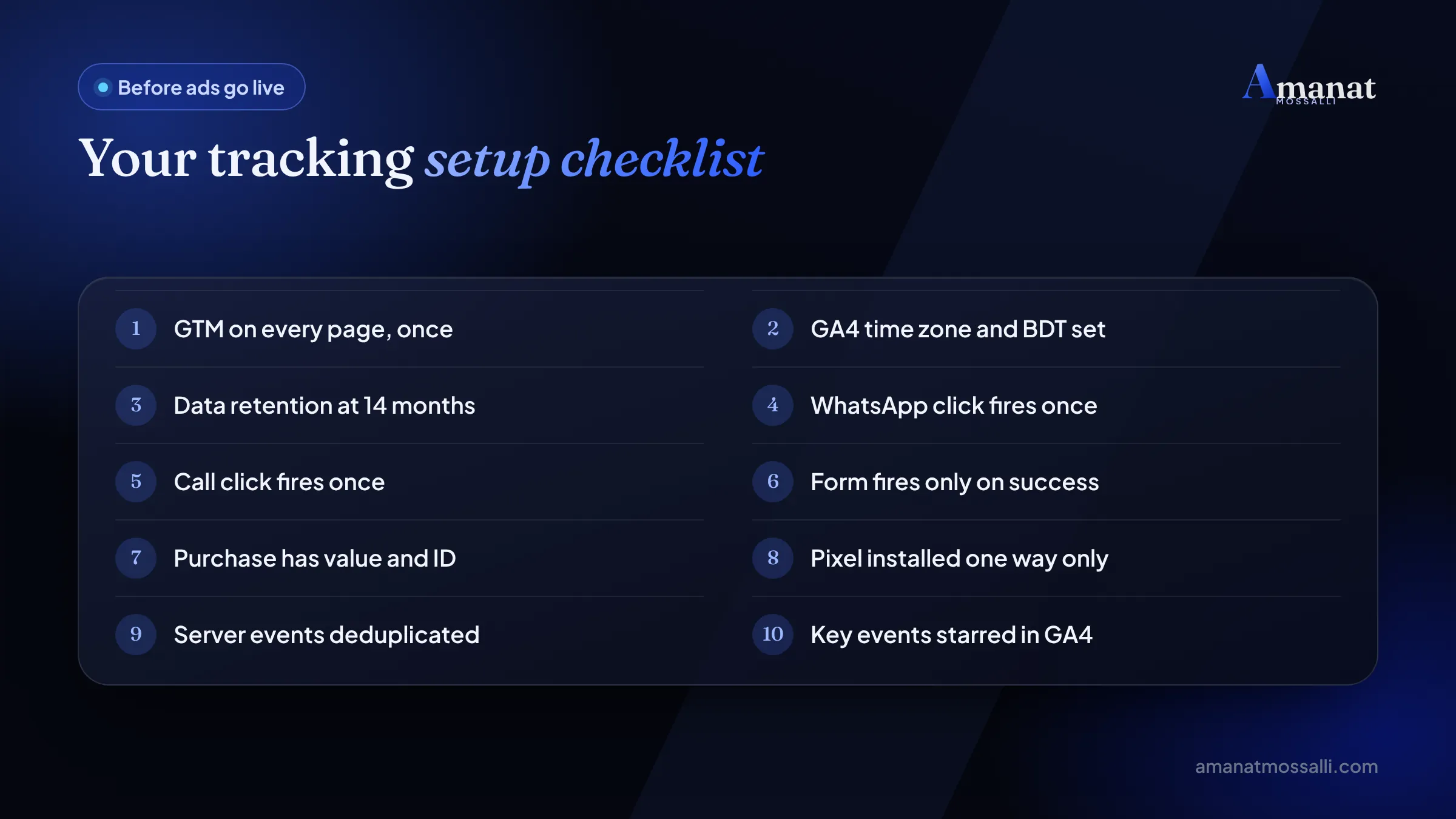
Place a real test order with cash on delivery, then cancel it. Check that GA4 and Meta each show one purchase with the right value. See two? Find the second install and remove it.
Meta’s best practices page adds a useful tip. Use your own real customer details for test orders. Unmatched test events may be discarded, and you’ll think the setup is broken when it isn’t.
Why GA4, Meta and WooCommerce Never Show the Same Number
They count different things. Once you know which, the gaps stop being scary and start being useful.
| What you see | Usual reason | Worry? |
|---|---|---|
| GA4 a little below WooCommerce | Ad blockers, or buyers closing the tab before the thank-you page | No. Small gaps are normal |
| GA4 far below WooCommerce | Purchase tag broken, or a payment gateway that never returns the buyer | Yes. Test a real order |
| Meta above WooCommerce | Pixel installed twice, or deduplication missing | Yes. Fix before scaling |
| Meta above GA4 for the same ads | Meta counts ad views and its own time window. GA4 uses a different attribution model | No. Different rules |
| All three above delivered orders | Cash on delivery returns and cancellations | Expected. Track the gap monthly |
Pick one source of truth for money. For a shop, that is delivered orders. Everything else is a signal for steering ads.
Tracking Mistakes I Find on Inherited Sites
Most broken tracking comes from the same few mistakes. Check for these on any site you take over.
- Two installs of the same tool, such as a theme option plus a plugin.
- Firing the lead event on button click instead of form success.
- No transaction_id on purchases, so page reloads count as new orders.
- Wrong currency, sending USD values for taka orders.
- Accounts owned by a freelancer instead of your business.
- Never testing after a theme or plugin update.
- Trusting placed orders as sales when many are cash on delivery.
Tracking also needs a site that loads properly. If your WordPress site is slow or stuffed with old plugins, my WordPress development service can clean it up first. For the server side in more depth, read my guide to the Facebook Conversion API.
What Should a Small Business Check in GA4 Each Week?
Three things: where visitors came from, which key events happened, and which pages led to them. Leave the rest alone until you need it.
- Traffic acquisition report: which channels bring visits and key events.
- Key events by source: did Facebook, Google or organic search bring the WhatsApp clicks?
- Landing pages: which pages turn visitors into leads, and which leak them.
Pair this with Search Console to see free search traffic. My guide on how to increase organic traffic in Bangladesh shows what to do with those numbers.
FAQ: Setting Up GA4 and the Facebook Pixel
Do I need Google Tag Manager to set up GA4?
Can I install the Facebook Pixel with Google Tag Manager?
Is the Conversions API necessary for small businesses?
How do I track WhatsApp clicks in GA4?
Why does GA4 show fewer orders than WooCommerce?
Why does Meta show more purchases than I received?
How long does tracking setup take?
Track First, Spend Second
That’s how to set up GA4 and Facebook Pixel in a way you can trust. It isn’t glamorous work. Every good ad decision rests on it anyway.
Before you close this tab, make the note I promised. One page, kept where your team can find it. Fill it in today, even if half the boxes say “not yet”.
| Item | Write down |
|---|---|
| GTM container ID | GTM-… and who has admin access |
| GA4 Measurement ID | G-… and the property owner email |
| Meta dataset (Pixel) ID | The ID, and which business portfolio owns it |
| Install method | For example: GA4 via GTM, pixel via one named plugin |
| Key events | whatsapp_click, call_click, generate_lead, purchase |
| Conversions API | On or off, which method, and what the event_id is |
| Last full test | Date, who did it, and the test order number |
Update the last row after every theme or plugin update. The day that row is older than your last update is the day your numbers stop deserving trust.

Amanat Mossalli Taju
Senior Digital Marketer & SEO Expert, Dhaka, BangladeshI have grown 235+ brands over more than seven years with SEO, Google and Meta Ads, server-side tracking, WordPress and AI automation. Half of my clients are in the UK, USA, Australia and Canada. Everything I write here comes from real client work.
Want this done for your business?
Book a free 15-minute call. I look at your site and ads before we talk, so you leave with clear next steps.